
🔍 Read the full analysis: 12 AI Productivity Apps That Could Make Work More Manageable on ThorstenMeyerAI.com

Get business pricing on tech for your team
- Business-only prices and quantity discounts
- Tax-exempt purchasing
- Multiple users, one account, clear invoices
TL;DR
A ThorstenMeyerAI.com roundup names 12 AI productivity products and resources, including Google Gemini AI Workspace, Conference Notes App and AI Writer Pro. The selection is a buyer’s guide, not an independent test proving that any tool saves time; the best fit depends on the task, setup and data-handling requirements.
ThorstenMeyerAI.com has published a roundup of 12 AI productivity apps and learning resources aimed at work such as drafting, meeting notes and workflow automation. The guide recommends Google Gemini AI Workspace as its broad, workflow-oriented pick, while presenting more focused options for people seeking help with a particular task; it does not establish that the products deliver measured productivity gains.
The roundup’s named examples include Conference Notes App for meeting capture, AI Writer Pro for drafting and SmartPrompt for improving instructions given to AI tools, alongside AI-powered note apps for meeting capture and related tasks. It also includes general-purpose assistants and resources such as a workflow automation directory and handbooks covering Gemini and Microsoft 365. The source does not provide enough product detail to verify specific features for every item in the 12-product selection.
The author says the ranking emphasizes whether a product supports a repeatable work task, offers practical direction and has a scope that matches its stated purpose. The guide distinguishes functioning software from books and directories: those resources may help people plan or learn, but users must apply the material themselves. The order is described as reflecting common work needs, not as a universal ranking.
For readers comparing options, the article advises testing a tool on a real task—such as an existing draft or meeting record—and judging the final result after checking and editing. It also recommends considering setup time, overlap with existing software, how information can be moved in and out, and the sensitivity of any material submitted; a guide to AI productivity apps can provide another set of options to compare.
The 12 picks
- 1
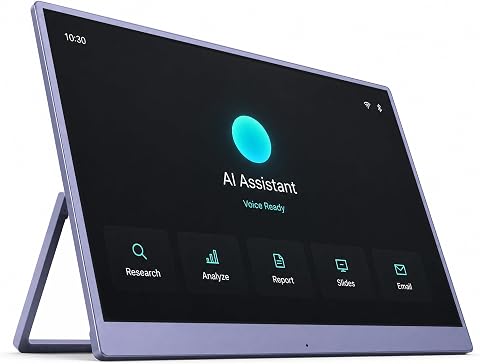 VAIMI AI Companion Hub with 15.6-Inch DisplayView on Amazon →
- 2
 The Complete Microsoft 365 and Copilot Handbook, Volume I: Core Apps and AI-E…View on Amazon →
- 3
 Aulax Smart AI Productivity, Writing, and Assistant AppView on Amazon →
- 4
 The Google Gemini AI Workspace: Build Smart AI Workflows, Automate Tasks, Cre…View on Amazon →
- 5
 The Complete Guide: The Ultimate Directory of 5,000+ Apps in 500+ Categories…View on Amazon →
- 6
 AI Writer Pro: Write SmartView on Amazon →
- 7
 SmartPrompt – AI Prompt Generator & EnhancerView on Amazon →
- 8
 AI NotebookView on Amazon →
- 9
 AIO AI ApexView on Amazon →
- 10
 GPT AI Chatbot: Chat, RPG Games, and AI AssistantView on Amazon →
- 11
 AI AssistantView on Amazon →
- 12
 Conference Notes AppView on Amazon →
Match Each Tool to a Work Task
The roundup’s practical point is that an AI assistant’s breadth does not guarantee a better fit. Someone who repeatedly prepares meeting records may prefer a narrowly focused tool, while a writer may get more value from drafting support. A broader system can support several routines, but may require more setup before it becomes useful.
That distinction matters because adopting another app can add work if users must copy information between services, maintain prompts or correct outputs. The source offers a way to frame the decision, but it does not report controlled testing, user outcomes or quantified time savings. Readers should treat the recommendations as editorial guidance rather than proof of performance.
Products Worth Considering

Jackery Explorer 1000 v2 Portable Power Station

LG UltraGear 27-inch 4K UHD IPS Gaming Monitor, Dual Mode 180Hz/360Hz, 1ms, G-SYNC Compatible

Samsung 32-Inch Odyssey G5 (G51F) QHD 180Hz Gaming Monitor
As an affiliate, we earn on qualifying purchases.
How the Roundup Ranks Its Picks
The guide says it gives more weight to products with a defined use case, including writing, meeting notes and workflow building, than to broadly named assistants whose roles are less clear from available product information. It also treats setup demands and overlap with software a reader already uses as tradeoffs.
Its selection spans different kinds of help: apps that may assist with a task and learning materials that explain how to build or select a process. That makes the 12 picks a mixed category rather than a direct comparison of interchangeable software. The source material does not identify a publication date or provide a full, independently verified feature list for every pick.
“The right choice depends on which work you want to improve.”
— ThorstenMeyerAI.com roundup
Product Results Need Independent Testing
The source material does not provide measured time savings, comparative test results, pricing, or detailed capabilities for all 12 picks. It also does not establish how each product handles submitted data or whether it integrates with a particular reader’s existing tools. Those points should be checked with the providers and, where relevant, an employer’s policies.
Descriptions of a product as a strong or focused choice are the roundup author’s judgments. They should not be read as verified claims that an app will improve output for every user. The article recommends a trial using a real task, while acknowledging that generated text and meeting records need human review.
Test a Tool on Your Own Work
The next step for readers is to identify one recurring task and compare a candidate tool against their current process. Use the same draft, meeting notes or workflow where possible, and assess whether the finished, checked output is worth the time spent setting up and using the app.
Before submitting work materials, review the provider’s data-handling information and any workplace rules. The roundup does not announce further testing or a follow-up date, so pricing, product capabilities and real-world results remain for readers to verify.
Key Questions
What is the roundup recommending?
It presents 12 AI productivity apps and learning resources for tasks including writing, meeting notes and workflow building. The source names Google Gemini AI Workspace, Conference Notes App, AI Writer Pro and SmartPrompt among its examples.
Which product does the guide rank as its broadest pick?
The roundup names Google Gemini AI Workspace as its strongest workflow-oriented choice, describing it as a way to connect AI assistance with practical routines. That is the author’s assessment, not an independently verified performance result.
Does the list prove these apps save time?
No. The provided source offers selection criteria and recommendations but reports no measured time savings or comparative test results. It advises readers to test an app on their own work and include review and correction time.
Are all 12 picks software apps?
No. The roundup includes books and a directory alongside software. Those resources can help readers learn or plan a workflow, but they do not perform the task automatically.
What should readers check before using an AI productivity tool?
Assess whether it fits a recurring task, how much setup it needs, whether it works with existing tools, and how easily information can be retrieved. For sensitive material, review data-handling terms and workplace rules before submitting it.
Source: ThorstenMeyerAI.com