Searching for the best smart locks keyless options in 2026? The Philips WiFi Keypad Deadbolt stands out as the best overall thanks to its reliable Wi-Fi connectivity and app control. For those prioritizing fingerprint access, the eufy Security Smart Lock C220 offers quick biometric entry, while the Wyze Auto-Lock Bolt v2 provides a budget-friendly alternative with solid features. Each model balances convenience, security, and ease of installation, but they also have tradeoffs—like higher price tags or limited compatibility. Keep reading to explore these options in detail and find the perfect match for your needs.

Get business pricing on tech for your team
- Business-only prices and quantity discounts
- Tax-exempt purchasing
- Multiple users, one account, clear invoices
Key Takeaways
- Top-tier models combine Wi-Fi connectivity with user-friendly app controls for seamless remote access.
- Biometric options like fingerprint readers significantly speed up entry but often come at a higher cost.
- Budget-friendly locks can still deliver reliable security but may lack advanced features like auto-lock or remote management.
- Installation complexity varies; some locks are DIY-friendly, while others may require professional setup.
- Design and finish options are diverse, so matching your home aesthetics is an important consideration.
| Philips WiFi Keypad Deadbolt with Handle, Built-in WiFi, App Remote Control |  | Best Overall for Ease of Use and Versatile Access | WiFi Connectivity: 2.4GHz WiFi, no hub needed | Auto-Lock: Yes, customizable 0-180 seconds | Battery Life: Up to 6 months | VIEW ON AMAZON | See Our Full Breakdown |
| Wyze Auto-Lock Bolt v2 Fingerprint Keyless Entry Smart Lock with Wi-Fi |  | Best for Fast Biometric Access and AI Recognition | Fingerprint Recognition Speed: 0.5 seconds | Battery Life: 8 months | Battery Type: 8 AA batteries | VIEW ON AMAZON | See Our Full Breakdown |
| eufy Security Smart Lock C220, Fingerprint Keyless Entry Door Lock |  | Best for Seamless Multi-Method Access & Ecosystem Integration | Unlock Methods: Fingerprint, app, keypad, physical key, voice control | Battery Life: 8 months | Battery Type: 8 AA batteries | VIEW ON AMAZON | See Our Full Breakdown |
| Veise VE06-L Smart Deadbolt Lock with 2 Lever Handle Set, Matte Black |  | Best for Durable, Weatherproof Multi-Access Control | Material: Zinc alloy | Weatherproof Rating: IP54 | Certification: BHMA/ANSI Grade 3 | VIEW ON AMAZON | See Our Full Breakdown |
| TEEHO TE001 Keyless Entry Deadbolt with Keypad for Front Door, Satin Nickel |  | Best for Budget-Friendly, Reliable Front Door Security | Material: Aluminum alloy | Weather Resistance: IP54 | Battery: 4 AA batteries (not included) | VIEW ON AMAZON | See Our Full Breakdown |
| Schlage Encode Smart WiFi Deadbolt Lock with Century Trim, Matte Black |  | Best Overall for Modern Smart Homes | Material: Matte Black finish | Connectivity: WiFi | Battery: 4 AA batteries (included) | VIEW ON AMAZON | See Our Full Breakdown |
| TEEHO TE001 Keyless Entry Deadbolt with Keypad for Front Door, Matte Black |  | Best for Budget-Friendly, Basic Keyless Entry | Access Codes: 20 | Temporary Code: Yes | Battery Life: up to 365 days | VIEW ON AMAZON | See Our Full Breakdown |
| Philips Wi-Fi Smart Deadbolt Lock, Keyless Entry Door Lock |  | Best for Versatile Access and Smart Integration | Connectivity: Wi-Fi 2.4GHz | Power: AA alkaline batteries | Supported Door Thickness: 1-3/8″ to 2″ | VIEW ON AMAZON | See Our Full Breakdown |
| Smart Door Handle Lock with Keypad and Fingerprint for Front Door |  | Best for Multifaceted Access Control and Property Management | Unlocking Methods: Fingerprint, Bluetooth app, passcodes, key fobs, mechanical keys, Alexa voice | Installation Time: 10 minutes | Handle Compatibility: Reversible for left and right-handed doors | VIEW ON AMAZON | See Our Full Breakdown |
| Keypad Smart Door Knob Lock, Yamiry Keyless Entry Digital Lock with Handle | 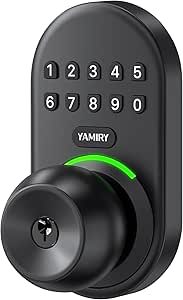 | Best for Easy, Outdoor-Ready Keyless Entry | Material: Aluminum alloy | Backlit keypad: Yes | Weather resistance: IP54 | VIEW ON AMAZON | See Our Full Breakdown |
| Veise VE017 Fingerprint Smart Door Lock with App Control, Matte Black |  | Best Overall for Versatile Security & Ease of DIY Installation | Material: All-zinc alloy, scratch-resistant | Battery Life: ≥12 months | Power: 4 AA batteries (not included) | VIEW ON AMAZON | See Our Full Breakdown |
| Veise VE017 Fingerprint Smart Door Lock with App Control, Satin Nickel |  | Best Value for Long Battery Life & Remote Management | Material: All-zinc alloy, all-metal | Battery Life: ≥12 months | Battery Type: 4 AA/LR6 alkaline batteries (not included) | VIEW ON AMAZON | See Our Full Breakdown |
| Smart Door Lock with Knob, Keyless Entry, Fingerprint, Passcode, NFC, Remote Control, Black |  | Best for Easy, No-Wiring Installation on Various Door Types | Material: Not specified | Compatibility: Wooden doors 1.18″-1.97″ thick | Unlock Methods: Fingerprint, keypad passcode, NFC, mechanical key, app control | VIEW ON AMAZON | See Our Full Breakdown |
| Desloc B200 Fingerprint Smart Door Lock, Keyless Entry Deadbolt |  | Best for Weather-Resistant, High-Performance Outdoor Use | Unlock Methods: Fingerprint, PIN code, app control, voice control (via G2 Gateway), physical keys | Fingerprint Recognition Speed: Less than 0.3 seconds | Battery Life: Up to 12 months | VIEW ON AMAZON | See Our Full Breakdown |
| Ulecoce Fingerprint Keypad Deadbolt with Knob Set, Keyless Entry Door Lock with App Control, Auto Lock & One-Touch Lock, 100+ User Codes, Easy Installation, Matte Black | 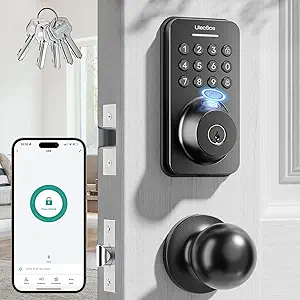 | Best for Large User Management & Auto Lock Convenience | Fingerprint Storage: 512 sets | User Codes: 100+ | Auto Lock Timing: 5-60 seconds | VIEW ON AMAZON | See Our Full Breakdown |
| smart locks keyless | Battery Life | Material |
|---|---|---|
| Philips WiFi Keypad Deadbolt w | Up to 6 months | — |
| Wyze Auto-Lock Bolt v2 Fingerp | 8 months | Tempered glass |
| eufy Security Smart Lock C220 | 8 months | — |
| Veise VE06-L Smart Deadbolt Lo | Over 10 years | Zinc alloy |
| TEEHO TE001 Keyless Entry Dead | Up to 365 days | Aluminum alloy |
| Schlage Encode Smart WiFi Dead | Up to 6 months | Matte Black finish |
| TEEHO TE001 Keyless Entry Dead | up to 365 days | — |
| Philips Wi-Fi Smart Deadbolt L | — | — |
| Smart Door Handle Lock with Ke | — | — |
| Keypad Smart Door Knob Lock | — | Aluminum alloy |
| Veise VE017 Fingerprint Smart | ≥12 months | All-zinc alloy, scratch-resistant |
| Veise VE017 Fingerprint Smart | ≥12 months | All-zinc alloy, all-metal |
| Smart Door Lock with Knob | — | Not specified |
| Desloc B200 Fingerprint Smart | Up to 12 months | — |
| Ulecoce Fingerprint Keypad Dea | — | Matte Black |
More Details on Our Top Picks
Philips WiFi Keypad Deadbolt with Handle, Built-in WiFi, App Remote Control
This Philips model stands out for its straightforward installation and broad access options, including PIN, fingerprint, and voice commands, making it a versatile choice for many households. Compared with the eufy C220, it offers faster biometric access and easier DIY setup, but requires manual activation of the auto-lock feature and batteries are sold separately. Its built-in WiFi enables remote control without additional hubs, providing convenience for users who prioritize quick setup and multiple entry modes. However, its primary design for right-opening doors and the need to purchase batteries separately are notable tradeoffs.
Pros:- Easy to install on most doors with DIY tools
- Supports multiple access methods including PIN, fingerprint, and voice
- Remote management via smartphone app
Cons:- Batteries are not included, adding extra purchase step
- Auto-lock feature must be manually enabled in the app
- Designed primarily for right-handed doors
Best for: Homeowners seeking a straightforward, multi-access keyless lock with remote capabilities who value ease of installation.
Not ideal for: Users with left-opening doors or those who want an all-in-one package with batteries included and no manual setup.
- WiFi Connectivity:2.4GHz WiFi, no hub needed
- Auto-Lock:Yes, customizable 0-180 seconds
- Battery Life:Up to 6 months
- Battery Type:Standard 1.5V alkaline batteries (not included)
- Fingerprint Speed:0.3 seconds
- Compatibility:Doors 1-3/8″ to 1-3/4″ thick
Our verdict“This lock suits users who want a flexible, easy-to-install keyless entry with a variety of access options.”
Wyze Auto-Lock Bolt v2 Fingerprint Keyless Entry Smart Lock with Wi-Fi
The Wyze Auto-Lock Bolt v2 excels in quick fingerprint unlocking and adaptive AI learning, making it ideal for busy households or those prioritizing speed. Unlike the Philips lock, it offers a biometric unlock in just 0.5 seconds, plus backup USB-C power, which adds to its reliability. While its IP53 water resistance is sufficient for most weather conditions, it does require Wi-Fi for remote features, and battery life can vary depending on usage intensity. Its tempered glass finish and AI recognition make it a strong contender for users who want speed and smart recognition but are fine with limited water resistance.
Pros:- Very fast fingerprint unlocking at 0.5 seconds
- AI learning improves recognition accuracy over time
- Includes backup USB-C power for emergency use
Cons:- Requires Wi-Fi for remote management, limiting offline use
- Battery life may fluctuate with heavy use
- Limited water resistance (IP53)
Best for: Families demanding fast biometric access and smart recognition features for daily convenience.
Not ideal for: Users in harsh weather environments needing higher water resistance or those without Wi-Fi access.
- Fingerprint Recognition Speed:0.5 seconds
- Battery Life:8 months
- Battery Type:8 AA batteries
- Connectivity:Wi-Fi
- IP Rating:IP53
- Material:Tempered glass
Our verdict“Ideal for those who prioritize speed and smart recognition over water resistance and offline functionality.”
eufy Security Smart Lock C220, Fingerprint Keyless Entry Door Lock
The eufy C220 offers a comprehensive suite of unlocking options, including fingerprint, app, keypad, physical key, and voice commands, making it suitable for households wanting versatile access methods. Its self-learning AI enhances fingerprint accuracy, outperforming simpler biometric systems like Wyze in long-term recognition. Compared to the Philips lock, it supports voice commands directly via Alexa or Google Assistant, but requires a standard deadbolt for installation and may need initial AI training. Its weather-resistant build and BHMA Grade 3 certification make it a solid choice for durability, though its longer installation time and dependency on compatible deadbolts are factors to consider.
Pros:- Multiple unlocking options including voice control
- Self-learning AI improves fingerprint accuracy
- Easy 15-minute installation with standard deadbolts
Cons:- Requires a compatible deadbolt, limiting universal fit
- Battery life can vary with usage patterns
- Initial AI setup may take time
Best for: Tech-savvy homeowners who want extensive unlocking options and ecosystem integration for enhanced security.
Not ideal for: Renters or owners with non-standard deadbolts or those seeking quick, plug-and-play solutions.
- Unlock Methods:Fingerprint, app, keypad, physical key, voice control
- Battery Life:8 months
- Battery Type:8 AA batteries
- Wi-Fi:Built-in, no bridge needed
- Certification:BHMA Grade 3
- Waterproof Rating:IP53
Our verdict“Best suited for users wanting a multi-method, smart home-compatible lock with AI-enhanced recognition.”
Veise VE06-L Smart Deadbolt Lock with 2 Lever Handle Set, Matte Black
The Veise VE06-L combines a sturdy zinc alloy build with multiple unlocking options, including app, codes, IC cards, and voice commands, making it ideal for both residential and rental properties. Its IP54 rating provides better weather resistance than some competitors like Wyze, and the long battery life over ten years reduces maintenance. Compared to the eufy C220, it offers more flexible remote management via app and web portal but requires a separate G2 gateway for voice control, adding complexity. Its ease of installation and encrypted data storage make it a reliable choice for users needing durable, versatile access solutions.
Pros:- Multiple unlocking methods including app, codes, and voice
- Weatherproof with IP54 rating and durable zinc alloy
- Extended battery life over 10 years
Cons:- Requires a separate G2 gateway for voice control
- Some features need app or web setup
- Limited warranty of 1 year (extendable to 2)
Best for: Property managers or homeowners needing weatherproof, multi-access control with long-term battery life.
Not ideal for: Users seeking a plug-and-play solution without additional gateways or those with very specific deadbolt compatibility needs.
- Material:Zinc alloy
- Weatherproof Rating:IP54
- Certification:BHMA/ANSI Grade 3
- Battery Life:Over 10 years
- Door Compatibility:1-3/8″–2″ thickness
- Hole Diameter:1-1/2″ or 2-1/8″
Our verdict“Ideal for those needing a durable, multi-method smart lock with long battery life and flexible remote management options.”
TEEHO TE001 Keyless Entry Deadbolt with Keypad for Front Door, Satin Nickel
The TEEHO TE001 delivers straightforward keyless entry with a keypad supporting up to 20 access codes, including temporary ones for guests. Its simple installation on standard 54mm holes makes it accessible for most DIY users. Compared with premium models like the eufy C220 or Veise VE06-L, it forgoes advanced AI or app management but excels in providing reliable, basic security with auto-lock features. Its long battery life up to a year and low-cost batteries make it appealing for budget-conscious buyers, though it lacks Wi-Fi for remote control and needs reset procedures for initial setup or troubleshooting.
Pros:- Supports up to 20 access codes, including temporary ones
- Automatic and one-touch auto-lock
- Easy to install with standard door holes
Cons:- Requires 4 AA batteries (not included)
- No Wi-Fi or app control for remote access
- Reset needed for first use or troubleshooting
Best for: Homeowners seeking a simple, cost-effective keypad lock with long battery life for front entry.
Not ideal for: Tech enthusiasts wanting remote management or users with non-standard door hole sizes or needing advanced features.
- Material:Aluminum alloy
- Weather Resistance:IP54
- Battery:4 AA batteries (not included)
- Battery Life:Up to 365 days
- Door Hole Size Compatibility:2-1/8″ (54mm)
Our verdict“Best for budget-conscious users who want a reliable keypad lock without remote features.”
Schlage Encode Smart WiFi Deadbolt Lock with Century Trim, Matte Black
The Schlage Encode stands out for its seamless WiFi integration, allowing remote access without extra hubs, unlike the Philips Wi-Fi Deadbolt which requires a separate app setup. Its compatibility with Alexa and Google Home offers hands-free convenience, making it ideal for busy households wanting effortless control. However, its reliance on WiFi means battery life can suffer with frequent remote use, and the touchscreen’s fingerprint-prone surface can be an annoyance. Compared to the less versatile TEEHO TE001, this lock provides more advanced smart features and security ratings. The tradeoff is that it’s slightly more expensive and needs regular battery checks for heavy use.
Pros:- Remote access and control via WiFi and mobile app
- Works with Alexa and Google Home for voice commands
- Easy to install without hardwiring
- Secure, encrypted connection with alarm features
Cons:- Battery life may require frequent replacement with heavy use
- Requires WiFi for remote features, no offline mode
- Touchscreen may be fingerprint-prone
Best for: Homeowners seeking a reliable, feature-rich smart lock with integrated WiFi for remote control and voice assistant compatibility.
Not ideal for: Renters or users with unreliable WiFi connections who prefer offline operation or longer battery life without frequent replacements.
- Material:Matte Black finish
- Connectivity:WiFi
- Battery:4 AA batteries (included)
- Battery Life:Up to 6 months
- Backset:2-3/8 in or 2-3/4 in
- Door Thickness:1-3/8 in to 1-3/4 in
- Alarm:Built-in customizable alarm
- Security Rating:BHMA highest residential
Our verdict“This lock suits tech-savvy homeowners who prioritize convenience and remote management but are prepared for regular battery upkeep.”
TEEHO TE001 Keyless Entry Deadbolt with Keypad for Front Door, Matte Black
The TEEHO TE001 offers straightforward keyless entry with a durable keypad, making it suitable for those who want simple, reliable security without extra smart features. Its long battery life of up to a year outperforms many WiFi-based locks like the Philips Wi-Fi Deadbolt, which might drain batteries faster with constant connectivity. While not supporting remote control or voice commands, it excels in weather resistance and easy installation—perfect for users who prefer a low-maintenance, dependable lock. The main drawback is that resetting the lock can be cumbersome initially, and it doesn’t support smart home integrations. Compared to the more advanced Philips model, it lacks remote management, but its simplicity ensures fewer failure points.
Pros:- Supports 20 user access codes and temporary guest codes
- Automatic locking enhances security
- Weather-resistant and durable construction
- Easy to install with standard tools
Cons:- Requires 4 AA batteries (not included)
- Not compatible with 38mm door holes
- Resetting may be necessary for initial setup
Best for: Homeowners seeking a durable, straightforward keypad lock with long battery life and weather resistance for outdoor use.
Not ideal for: Tech enthusiasts or smart home users wanting remote access, voice control, or integration with other smart systems.
- Access Codes:20
- Temporary Code:Yes
- Battery Life:up to 365 days
- Battery Type:4 AA batteries (not included)
- Weather Resistance:IP54
- Door Compatibility:2-1/8″ (54mm) door holes
Our verdict“This lock is ideal for budget-conscious users who prioritize durability, ease of use, and long battery life over remote control features.”
Philips Wi-Fi Smart Deadbolt Lock, Keyless Entry Door Lock
The Philips Wi-Fi Smart Deadbolt stands out for its flexible entry options, including app control, passcodes, fingerprint, voice commands, and physical key, surpassing simpler locks like the Yamiry keypad lock that only offers keypad and backup key. Its built-in WiFi allows remote management, real-time notifications, and auto-lock features, making it a well-rounded choice for busy households. However, it’s limited to 2.4GHz WiFi, which can cause connectivity issues in some environments, and it requires AA batteries that need frequent replacement if used heavily. Unlike the Schlage Encode, it doesn’t specify a high security rating but provides a broad range of access methods, appealing to families with varied needs.
Pros:- Multiple unlocking options including app, passcode, fingerprint, voice, and physical key
- Remote control with real-time notifications
- Auto-lock feature for added security
- Easy DIY installation on most doors
Cons:- Supports only 2.4GHz WiFi networks
- Requires AA batteries (not included)
- No door sensor for automatic status updates
Best for: Families or individuals who want versatile unlocking options and remote control with real-time alerts for added security.
Not ideal for: Users with limited WiFi or those seeking a high-security lock with a BHMA rating, as this model emphasizes convenience over strict security standards.
- Connectivity:Wi-Fi 2.4GHz
- Power:AA alkaline batteries
- Supported Door Thickness:1-3/8″ to 2″
- Remote Range:65 ft
Our verdict“This pick is best for households looking for flexible access methods and remote control features, accepting some limitations in network compatibility.”
Smart Door Handle Lock with Keypad and Fingerprint for Front Door
The Smart Door Handle Lock offers an impressive array of unlocking options—fingerprint, app, passcodes, key fobs, mechanical key, and Alexa voice—making it highly adaptable. Compared to standalone keypad locks like Yamiry, this model provides biometric access, which is faster and more secure, especially for families with children or tenants. Its quick 10-minute installation on most standard doors is a major plus for DIYers. The requirement of a separate WiFi gateway for Alexa integration can be a hassle, and its dependency on Bluetooth and app connectivity might cause occasional delays. Nonetheless, its versatile access options make it ideal for property managers or tech-savvy homeowners managing multiple users.
Pros:- Multiple unlocking methods including fingerprint, app, passcodes, and key fobs
- Quick and easy installation
- Remote access management via mobile app
- Reversible handle for both left and right-handed doors
Cons:- Requires separate WiFi gateway for Alexa voice control
- Potential app and Bluetooth dependency issues
- No info on battery life or backup options
Best for: Property managers, landlords, or busy families needing multiple access methods and remote management capabilities.
Not ideal for: Users seeking a simple, standalone keypad lock without the need for additional gateways or who prioritize battery longevity over multiple unlocking options.
- Unlocking Methods:Fingerprint, Bluetooth app, passcodes, key fobs, mechanical keys, Alexa voice
- Installation Time:10 minutes
- Handle Compatibility:Reversible for left and right-handed doors
- Connectivity:Bluetooth, WiFi (requires gateway)
Our verdict“This lock excels for users wanting a flexible, biometric-enabled security system with remote management, provided they’re willing to handle additional setup steps.”
Keypad Smart Door Knob Lock, Yamiry Keyless Entry Digital Lock with Handle
The Yamiry Keypad Smart Lock offers a straightforward approach to keyless entry, with a durable aluminum alloy build and backlit keypad making it suitable for outdoor use. Its support for up to 20 user codes and temporary access makes it flexible for families, rentals, or short-term visitors. Installation is quick and tool-free, ideal for DIY users. Compared to the more complex WiFi locks, it focuses on basic electronic keypad functionality with physical key backup, which simplifies troubleshooting. However, its reliance on batteries could mean more frequent replacements, and it lacks remote management, limiting control to local access only. This lock is best when simplicity and weather resistance are priorities.
Pros:- Secure and durable aluminum alloy construction
- Supports multiple user codes and temporary access
- Easy installation in under 15 minutes
- Weather resistant (IP54)
Cons:- Requires batteries that may need frequent replacement
- Limited to keypad and physical key backup
- No remote access or integration features
Best for: Homeowners or landlords needing a rugged, easy-to-install keypad lock for outdoor doors without smart home integration.
Not ideal for: Tech enthusiasts seeking remote access or voice control, as this lock lacks WiFi or Bluetooth connectivity.
- Material:Aluminum alloy
- Backlit keypad:Yes
- Weather resistance:IP54
- User codes:20
- Auto-lock timer:5 to 99 seconds
- Includes:Face Plate, Back Plate, Hardware, User Guide, Adjustable Latchbolt, 2 Keys
Our verdict“This lock is best suited for outdoor use where simplicity, durability, and basic keyless entry are needed without smart features.”
Veise VE017 Fingerprint Smart Door Lock with App Control, Matte Black
This model stands out for its advanced AI fingerprint recognition, providing quick and reliable access compared to less sophisticated biometric locks. Its multiple unlocking methods—app, fingerprint, keypad, and mechanical key—offer flexibility that suits diverse household needs. Unlike some locks requiring complex wiring, its DIY installation in just 15 minutes makes it accessible for most users. However, remote access depends on buying the separate G1 Gateway, which adds cost and complexity. Its local encrypted storage prioritizes security, but battery life of around 12 months may mean frequent replacements depending on usage. Overall, this lock makes the most sense for those seeking a high-tech, flexible solution with straightforward installation, accepting the need for extra accessories for remote features.
Pros:- Advanced AI fingerprint recognition for quick, reliable access
- Multiple unlocking options including app, keypad, fingerprint, and mechanical key
- Local encrypted storage enhances security
Cons:- Requires separate purchase of G1 Gateway for remote access
- Batteries are not included and may need frequent replacement
Best for: Homeowners or small business owners who want a secure, feature-rich lock with DIY installation.
Not ideal for: Users who require built-in Wi-Fi or prefer integrated remote access without additional purchases.
- Material:All-zinc alloy, scratch-resistant
- Battery Life:≥12 months
- Power:4 AA batteries (not included)
- Connectivity:Wi-Fi via Veise G1 Gateway (sold separately)
- Waterproof Rating:IP55
- Security Standards:BHMA/ANSI
Our verdict“This lock is ideal for tech-savvy users who want flexible, secure access with straightforward installation, willing to manage extra accessories for remote features.”
Veise VE017 Fingerprint Smart Door Lock with App Control, Satin Nickel
Compared with the matte black version, this satin nickel model offers similar biometric and multi-entry features but emphasizes long-term usability with over 12 months of battery life. Its all-metal construction enhances durability, making it suitable for multi-tenant settings or high-traffic homes. Remote management and activity logs are accessible via Wi-Fi, but this again depends on the G1 Gateway, which is an extra purchase. The user-friendly DIY installation in about 15 minutes makes it appealing for those who prefer hassle-free setup. Its compatibility with Alexa and Google Voice provides convenient voice control, but the need for additional accessories like the Gateway may be a hurdle for some. This pick makes the most sense for those prioritizing long battery life and remote oversight at a good price point.
Pros:- All-metal construction for durability
- Over 12 months of battery life reduces maintenance
- Remote user management and activity logs
Cons:- Requires G1 Gateway for remote and voice control
- Batteries not included, need replacement approximately annually
Best for: Residents or property managers seeking a secure, durable lock with long-lasting batteries and remote access capabilities.
Not ideal for: Those who want an all-in-one Wi-Fi lock without extra purchases or are not comfortable with DIY installation.
- Material:All-zinc alloy, all-metal
- Battery Life:≥12 months
- Battery Type:4 AA/LR6 alkaline batteries (not included)
- Waterproof Rating:IP55
- Security Standards:BHMA/ANSI
- Connectivity:Wi-Fi via G1 Gateway
Our verdict“This lock is well-suited for users who value longevity and remote management without frequent battery changes, accepting the extra cost of a gateway.”
Smart Door Lock with Knob, Keyless Entry, Fingerprint, Passcode, NFC, Remote Control, Black
This lock excels in ease of installation, especially for users who want a quick, wire-free setup without sacrificing multiple access methods. Its biometric fingerprint unlock in just 0.5 seconds offers a fast, high-tech experience, superior to many keypad-only locks. It supports app control, passcodes, NFC cards, and mechanical keys, making it versatile for busy households or rental properties. However, initial setup requires registering an administrator fingerprint, and it does not support charging the batteries via USB, which could be inconvenient if batteries die unexpectedly. Material details are limited, but its straightforward installation makes it ideal for standard doors. This lock makes the most sense for users who prioritize simplicity and speed over extensive smart home integration.
Pros:- Fast fingerprint unlocking in 0.5 seconds
- Multiple access options including app, passcode, NFC, and mechanical key
- Easy, wiring-free installation
Cons:- Initial setup requires registering an administrator fingerprint
- Cannot charge batteries via USB in emergency
Best for: Homeowners seeking an easy, wire-free upgrade that offers multiple unlocking options and quick setup.
Not ideal for: Tech enthusiasts wanting advanced remote management or integration with broader smart home systems.
- Material:Not specified
- Compatibility:Wooden doors 1.18″-1.97″ thick
- Unlock Methods:Fingerprint, keypad passcode, NFC, mechanical key, app control
- Auto-Lock:Yes
- Power Source:Internal batteries, USB emergency port
Our verdict“This lock suits users who want a simple, fast, and versatile keyless solution without complex wiring or extensive smart features.”
Desloc B200 Fingerprint Smart Door Lock, Keyless Entry Deadbolt
Compared with other locks like the Veise VE017, the Desloc B200 emphasizes durability with IP54 weather resistance and a wide temperature range, making it ideal for outdoor settings. Its AI-powered fingerprint recognition under 0.3 seconds ensures swift access, even in harsh conditions. The lock offers multiple access methods, including PIN, app, physical keys, and voice commands via Alexa or Google Assistant, but voice control requires the G2 Gateway, adding extra cost. Its long battery life—up to 12 months—and backup options enhance convenience for outdoor use. Installation is straightforward for most US doors, but the need for a gateway for voice features could deter some. This lock makes the most sense for users who need reliable, weatherproof access in outdoor or exposed environments.
Pros:- Fast, reliable fingerprint recognition in under 0.3 seconds
- Weather-resistant with IP54 rating
- Multiple access methods including app, voice, and physical keys
Cons:- G2 Gateway required for voice control
- Batteries not included and may need frequent replacements
Best for: Homeowners or property managers requiring a weather-resistant, outdoor-capable smart deadbolt with fast biometric access.
Not ideal for: Indoor-only users or those who don’t want to manage additional gateways for voice control.
- Unlock Methods:Fingerprint, PIN code, app control, voice control (via G2 Gateway), physical keys
- Fingerprint Recognition Speed:Less than 0.3 seconds
- Battery Life:Up to 12 months
- Water Resistance:IP54
- Standards:BHMA Grade 3
Our verdict“This lock is designed for users needing a durable, outdoor-ready lock with quick biometric access, accepting extra costs for voice control gateways.”
Ulecoce Fingerprint Keypad Deadbolt with Knob Set, Keyless Entry Door Lock with App Control, Auto Lock & One-Touch Lock, 100+ User Codes, Easy Installation, Matte Black
Compared to the other models, this Ulecoce lock offers a robust user code capacity with over 100 codes and a quick fingerprint recognition system, ideal for multi-user households or rentals. Its auto-lock feature and one-touch locking enhance security without user intervention. Installation is straightforward with just a screwdriver, making it accessible for most DIYers. The app control adds remote management, but voice control requires a gateway, similar to others on this list. Battery life isn’t specified, which could be a concern for heavy use. Its extensive user options and auto-lock make it particularly suitable for busy households or short-term rentals that need flexible access control. However, reliance on additional gateways for voice commands could be a downside for some.
Pros:- Supports over 100 user codes for flexible access
- Fast fingerprint recognition and auto-lock feature
- Easy installation with screwdriver
Cons:- Requires gateway for voice control
- Battery life details not provided
Best for: Property managers or large households needing extensive user code capacity and auto-lock features.
Not ideal for: Users seeking a fully integrated smart home system with built-in Wi-Fi and voice control without extra hardware.
- Fingerprint Storage:512 sets
- User Codes:100+
- Auto Lock Timing:5-60 seconds
- Material:Matte Black
- Compatibility:Alexa, Google Assistant (with gateway)
- Installation:Screwdriver required
Our verdict“This lock is best for users needing extensive user management and automatic locking, accepting the extra step of gateway setup for full smart features.”

How We Picked
To determine the best smart locks keyless, I focused on several key factors: connectivity options (Wi-Fi or Bluetooth), ease of installation, security features, user management capabilities, and overall build quality. I prioritized models that offer reliable remote control via smartphone apps, as this enhances convenience for most users. Durability and the quality of materials also played a significant role, ensuring the locks could withstand daily use. The ranking reflects a balance between advanced features and value, emphasizing options suitable for different budgets and technical comfort levels. Models that excelled in multiple categories earned higher positions, while those with notable drawbacks fell lower in the list.Factors to Consider When Choosing Smart Locks Keyless
Choosing the right keyless smart lock involves understanding your specific needs and weighing the features that matter most. Beyond basic security, factors like connectivity type, installation process, and user management can significantly impact your experience. Being aware of these considerations helps avoid common pitfalls such as overly complex setup or limited app support, which can lead to frustration or compromised security. A well-selected lock should blend convenience, durability, and ease of use, matching your home’s style and your security priorities.Connectivity Options
Deciding between Wi-Fi and Bluetooth is crucial. Wi-Fi-enabled locks allow remote control and real-time alerts, ideal for frequent remote access or smart home integration. Bluetooth locks are simpler and often cheaper but require proximity for unlocking, which can limit convenience. Consider your primary use case: if remote access is essential, prioritize Wi-Fi models; for basic keyless entry, Bluetooth might suffice.
Ease of Installation
Some locks are designed for DIY installation, featuring straightforward instructions and adaptable mounting hardware. Others might require professional help, especially if your door configuration is complex. A DIY-friendly lock saves money and time, but if you’re uncomfortable with tools or electrical connections, investing in professional installation might be worth the extra cost for peace of mind.
Security Features
Look beyond the lock mechanism itself—consider encryption standards, alarm systems, and tamper alerts. Biometric options like fingerprint readers provide quick access but can be more vulnerable if not properly secured. Keypad locks reduce the risk of lost keys but can be vulnerable to code guessing. Think about your specific security concerns and the environment in which the lock will be used to choose wisely.
User Management & Access Control
Multiple user codes, temporary access, and remote permissions add flexibility, especially for households or rentals. Some locks allow you to set different access levels for family members or guests, which is a valuable feature but often increases complexity. Avoid models with limited user options if you plan to share access frequently or need detailed control over permissions.
Design & Finish Options
From sleek modern finishes to traditional looks, the aesthetic of your lock should complement your home’s style. Material quality varies, affecting durability against weather and wear. Consider whether you want a lock that blends seamlessly or stands out as a design feature. Keep in mind that more premium finishes may come at a higher price but offer longer-lasting aesthetics.
Frequently Asked Questions
Can I upgrade my existing traditional lock to a keyless smart lock?
Yes, many smart locks are designed to replace existing deadbolts or handle sets, making upgrades straightforward. However, compatibility depends on your door’s dimensions, pre-existing hardware, and wiring. It’s important to verify your door measurements and whether the new lock fits your existing setup to avoid surprises during installation. Some models include adapters or supplementary hardware to ease the upgrade process.
How secure are keyless smart locks against hacking or tampering?
Most reputable smart locks use advanced encryption and security protocols to prevent hacking. However, no system is entirely invulnerable—weak passwords, outdated firmware, or poor Wi-Fi security can pose risks. Regular updates, strong unique codes, and secure Wi-Fi networks help protect your lock. Choosing models with tamper alerts and physical key backup can also add layers of security, ensuring peace of mind even if digital defenses are compromised.
Do smart locks require an ongoing subscription or service fee?
Most smart locks do not require ongoing fees for basic features like remote locking or unlocking. However, some models with advanced features—such as extended access management, activity logs, or integration with broader smart home systems—may charge subscription fees. Always check the manufacturer’s terms before purchasing if ongoing costs are a concern, and consider whether the added features justify the expense for your needs.
What happens if the Wi-Fi or app connection fails?
If the lock relies on Wi-Fi or app control, connection failures could temporarily prevent remote access. Many locks still offer traditional key access as a backup, ensuring security isn’t compromised. Some models also feature local control options, like keypad or biometric entry, which can be used when connectivity is down. Planning for potential outages ensures you’re not locked out during critical moments.
Are keyless smart locks suitable for outdoor use?
Yes, most keyless smart locks are designed to withstand outdoor conditions, but it’s essential to verify their weather resistance ratings. Look for locks with high IP ratings indicating resistance to water, dust, and temperature fluctuations. Proper installation and regular maintenance can prolong their lifespan. Choosing a model specifically rated for outdoor use minimizes the risk of malfunction due to weather exposure.
Conclusion
For most homeowners seeking all-around performance, the Philips WiFi Keypad Deadbolt offers a balanced mix of connectivity, ease of use, and durability, making it the best overall choice. Budget-conscious buyers will find the Wyze Auto-Lock Bolt v2 provides solid keyless convenience without a hefty price tag. Those looking for premium features and sleek design should consider high-end options like the Schlage Encode, especially if you prioritize advanced security and integration. New users or less tech-savvy individuals might prefer locks with straightforward installation and simple controls, like the TEEHO TE001. Ultimately, your decision should align with your security needs, budget, and how much you value remote access or biometric entry.