
Searching for the best portable monitor for business travel means balancing size, weight, and functionality. The Anyuse Portable Monitor stands out for its ultra-slim design and versatility, making it ideal for on-the-go productivity. The ASUS ZenScreen offers excellent eye care features and a reliable build, perfect for frequent travelers. Meanwhile, the VisionOwl Portable Monitor provides a larger display with built-in speakers for multimedia needs. The main tradeoffs include choosing between maximum portability versus screen size and additional features, with some models sacrificing weight for extra functionality. Keep reading for a detailed breakdown of these options to find your perfect travel companion.

Get business pricing on tech for your team
- Business-only prices and quantity discounts
- Tax-exempt purchasing
- Multiple users, one account, clear invoices
Key Takeaways
- The top-ranked monitors balance portability with screen size, prioritizing lightweight design without sacrificing usability.
- Features like built-in stands, VESA mounts, and speakers significantly enhance productivity and multimedia experiences while traveling.
- Higher refresh rates and HDR support are rare in travel monitors but offer advantages for gaming or media tasks, often at a premium price.
- Most models with extensive connectivity options (USB-C, HDMI) provide seamless compatibility with laptops, phones, and gaming consoles.
- Tradeoffs frequently involve weight versus features; the lightest models tend to have fewer ports or smaller screens.




More Details on Our Top Picks
Anyuse Portable Monitor 15.6 Inch 1080P USB-C HDMI Ultra-Slim Travel Monitor with Kickstand, for Laptop, PC, Mac Phone, PS, Xbox, Switch IPS Ultra-Thin Zero Frame Gaming
This option stands out for its impressive combination of high-quality visuals, portability, and wide device compatibility, making it the most adaptable choice for business travelers who also value entertainment. Unlike the ViewSonic VA1653, which offers a slightly more traditional portable design, the Anyuse monitor provides HDR and Low Blue Light features, reducing eye strain during long work sessions or gaming. The dual Type-C ports and HDMI support enable seamless connection to a broad range of devices without driver hassles, but the ultra-slim profile and light weight come with tradeoffs in build rigidity—it’s less sturdy than some bulkier options. This monitor makes the most sense for users needing a flexible second screen who prioritize visual quality and multi-device compatibility over ruggedness or a built-in stand.
- 1920*1080P resolution with HDR and Low Blue Light
- Ultra-lightweight at 1.37 lbs
- Dual full-featured Type-C ports and HDMI
- Multiple display modes including extension and copy
Verdict: This monitor suits frequent travelers who want a premium, highly compatible portable display that balances work and play, accepting some fragility for portability and quality.Pros:- High-resolution HDR display with Low Blue Light
- Extremely light and thin for easy packing
- Multiple device inputs including dual USB-C and HDMI
- Flexible display modes for productivity and entertainment
Cons:- Fragile build quality due to ultra-slim design
- Limited stand or ergonomic features
- Requires devices supporting Thunderbolt 3.0/4.0 or USB 3.1 with DP ALT-MODE
Best for: Travelers needing a lightweight, versatile second screen compatible with gaming consoles and laptops
Not ideal for: Rugged environments or users who prioritize a built-in stand and sturdy chassis for rough handling
- Display Size:15.6 inches
- Resolution:1920x1080p
- Display Technology:IPS
- Refresh Rate:60 Hz
- Weight:1.37 lbs
- Connectivity:2 USB-C, 1 mini HDMI
Bottom line: This pick is best for tech-savvy travelers who need a portable, high-quality display with broad device support and minimal bulk.
cocopar Portable Monitor 15.6 Inch 1080P FHD 60Hz 85% sRGB Travel Monitor with Speaker HDMI USB-C Second Screen for Laptop MacBook Surface PC Xbox PS4/5, VESA Mountable, with Cover Stand
This model makes the most sense for budget-conscious professionals who need a reliable second screen without sacrificing resolution or color accuracy. Compared with the InnoView, which offers a similar size and resolution, the cocopar emphasizes VESA mounting and a magnetic cover for added flexibility and protection, but its 60Hz refresh rate is less suited for gaming or fast-moving video. The USB-C and HDMI support ensure plug-and-play compatibility with most laptops and gaming consoles, though its build quality is somewhat less premium than the ViewSonic VA1653. It provides a balanced mix of affordability and productivity features, though it may lack some advanced eye care or HDR options found in pricier models.
- 1080P resolution with 85% sRGB
- VESA mountable with protective cover
- Multiple device compatibility via USB-C and HDMI
- Lightweight at 1.5 lbs
Verdict: This monitor is ideal for users seeking a budget-friendly, portable secondary screen that handles everyday tasks and casual entertainment well.Pros:- Affordable price point
- VESA mount compatibility with protective cover
- Good color accuracy with 85% sRGB
- Lightweight and portable for travel
Cons:- Limited to 60Hz refresh rate
- Build quality feels basic
- No HDR or advanced eye care features
Best for: Professionals needing a second display for remote work and light multimedia on a budget
Not ideal for: Gaming enthusiasts or users requiring high-refresh-rate displays for smooth motion or fast video editing
- Display Size:15.6 inches
- Resolution:1920x1080p
- Color Gamut:85% sRGB
- Refresh Rate:60 Hz
- Weight:1.5 lbs
- Mounting:VESA compatible
Bottom line: Best for budget-conscious professionals who need a dependable secondary display for everyday work and light media use while traveling.
ViewSonic VA1653 16 Inch 1080p Portable Monitor, IPS Display with Eye Care for Easy Second Screen Productivity, Built-in Stand, USB-C, Mini HDMI, and Protective Case
This pick is tailored for professionals who prioritize durability, extended warranty, and straightforward setup. The ViewSonic VA1653 offers a slightly larger 16-inch screen with a crisp 1080p IPS display, making it ideal for extended work sessions with less eye strain thanks to its Eye Care technology. Compared to the Ingnok, which features height adjustment and a built-in stand, the ViewSonic’s included protective case doubles as a stand, providing more flexibility in different environments. While it might lack the ultra-light weight of some competitors, its 3-year warranty and industry-standard connectivity make it a dependable choice for demanding business travel. The main tradeoff is its slightly bulkier profile, which might be less convenient for ultralight packing.
- 16-inch IPS display with anti-glare coating
- Built-in stand with protective case
- Supports multiple connectivity options including USB-C and mini HDMI
- Extended 3-year warranty
Verdict: This monitor is best suited for business travelers who want a balance of size, comfort, and warranty support for regular use in varied environments.Pros:- Larger 16-inch display with IPS technology
- Built-in stand and protective case for versatile positioning
- Extended 3-year warranty for peace of mind
- Supports multiple devices via USB-C and mini HDMI
Cons:- Slightly heavier and larger for ultra-portability
- Bulkier profile may limit packing options
- Lacks advanced eye care features
Best for: Remote professionals seeking a larger, reliable secondary display with durable build quality
Not ideal for: Travelers prioritizing ultra-lightweight gear or those needing rugged, compact setups for harsh environments
- Display Size:16 inches
- Resolution:1920x1080p
- Display Technology:IPS
- Refresh Rate:60 Hz
- Weight:Approximately 2.4 lbs
- Connectivity:USB-C, mini HDMI
Bottom line: Ideal for professionals needing a dependable, larger portable monitor with good warranty coverage for frequent business trips.
Ingnok Portable Monitor, Ultra Slim 15.6 Inch FHD IPS Laptop Screen Extender with Adjustable Stand, USB C Compatible, Ideal for Travel and Office
This monitor makes the most sense for users who want a slim and lightweight secondary screen with adjustable viewing angles and straightforward USB-C connectivity. Compared to the cocopar or ViewSonic models, the Ingnok emphasizes height adjustability and a sturdy stand, making it more adaptable for different work environments. Its 0.48-inch thickness and 1.44 lbs weight make it one of the most portable options, suitable for those who often switch from travel to office. While its 60Hz refresh rate is standard for productivity tasks, it’s less ideal for fast-paced gaming or high-frame-rate content. The inclusion of an adjustable stand enhances ergonomics but adds slightly to its profile. The main tradeoff is that it lacks VESA mounting and advanced eye care features, which might matter for prolonged use.
- 15.6-inch FHD IPS display with anti-glare coating
- Adjustable stand for ergonomic positioning
- Super slim and lightweight for travel
- Full USB-C support for power and video
Verdict: Best suited for mobile professionals who need a compact, adjustable second screen with excellent portability and simple connectivity.Pros:- Super slim and light design
- Adjustable stand for ergonomic use
- Full USB-C support for daisy chaining and power
- Vivid IPS display with anti-glare coating
Cons:- No VESA mounting options
- Limited to 60Hz refresh rate
- Basic build quality without rugged features
Best for: Travelers and remote workers seeking an ultra-slim, adjustable secondary display for everyday productivity
Not ideal for: Heavy multitaskers or those requiring VESA compatibility for mounting or more rugged use
- Display Size:15.6 inches
- Resolution:1920x1080p
- Display Technology:IPS
- Refresh Rate:60 Hz
- Weight:1.44 lbs
- Connectivity:USB-C
Bottom line: Perfect for on-the-move professionals who want a lightweight, flexible second screen with adjustable positioning for daily use.
ARZOPA 16.1” 144Hz Portable Gaming Monitor, 106% sRGB 1080P FHD Kickstand Portable Monitor with HDR, Ultra Slim, Eye Care, External Second Screen for Laptop, PC, PS5, Mac, Xbox
This monitor is tailored for gamers and multimedia users who need a high refresh rate and vibrant color accuracy. Its 144Hz refresh rate ensures smooth motion, ideal for gaming, video editing, or fast-paced presentations, but it may be overkill for purely business tasks. Compared to the InnoView, which offers a more standard 60Hz refresh rate, the ARZOPA provides a superior experience for motion clarity, though it lacks adaptive sync technologies like FreeSync or G-SYNC, which could cause tearing in some scenarios. Its built-in kickstand and ultra-slim profile make it portable, but the focus on gaming features makes it less suitable for prolonged office work with detailed color accuracy. The HDR support adds to its appeal for multimedia, but the absence of adjustable height or VESA mounting limits ergonomic options.
- 144Hz fast refresh rate for smooth motion
- 1080P FHD with 106% sRGB for vibrant colors
- Built-in kickstand for flexible positioning
- Supports multiple connections including USB-C and HDMI
Verdict: This monitor is best for gamers or multimedia enthusiasts who want high performance in a portable form factor, accepting some ergonomic compromises for speed and visuals.Pros:- 144Hz refresh rate for ultra-smooth visuals
- Vivid 1080P IPS display with 106% sRGB
- Lightweight with built-in kickstand
- Supports multiple connection types
Cons:- No adaptive sync technology
- Limited ergonomic adjustment options
- Primarily designed for gaming, less for prolonged office work
Best for: Gaming and multimedia users who need high refresh rates and vibrant colors on the go
Not ideal for: Business travelers needing a secondary display primarily for productivity with ergonomic features
- Display Size:16.1 inches
- Resolution:1920x1080p
- Refresh Rate:144 Hz
- Display Technology:IPS
- Color Gamut:106% sRGB
- Connectivity:USB-C, HDMI
Bottom line: Ideal for users who prioritize high refresh rate and color vibrancy for gaming or multimedia in a portable format, with less emphasis on ergonomic flexibility.
VisionOwl Portable Monitor for Laptop, IPS USB-C HDMI Travel Second Monitor for MacBook Pro Air, PC, PS5, Xbox, Portable Second Screen, Built-in Kickstand, Speakers, VESA Mountable, 18.5 Inch
This 18.5-inch monitor stands out for combining a large, high-quality display with impressive connectivity options, making it highly adaptable for both work and entertainment during travel. Its 100Hz refresh rate and 1080p resolution provide smooth visuals, surpassing many competitors like the FLYTOCCA model, which has a smaller size and lower refresh rate. The built-in stand and VESA mount offer flexible placement, but the larger size and weight (under 3 pounds) slightly reduce portability compared to ultra-light options. The sturdy metal construction promises durability, though the size might be less ideal for very tight travel cases. Overall, this model is perfect for those who need a reliable, multi-use second screen without sacrificing image quality or connectivity, but travelers seeking the smallest footprint may prefer lighter options.
Pros:- Large 18.5-inch FHD IPS display for immersive viewing
- High 100Hz refresh rate reduces lag during gaming
- Multiple connectivity options including HDMI and USB-C
- VESA mountable for flexible setup
Cons:- Relatively heavier (around 2.6 pounds) for ultra-portable use
- Larger size may not fit in small travel cases
- No touchscreen functionality
Best for: Travelers who prioritize a large, high-performance display for multitasking or gaming on the go
Not ideal for: Minimalists needing the lightest, most compact monitor for ultra-portable travel
- Display Size:18.5 inches
- Resolution:1920 x 1080
- Refresh Rate:100Hz
- Connectivity:HDMI, USB-C, Thunderbolt
- Weight:2.6 pounds
- VESA Mountable:Yes
Bottom line: Ideal for professionals and gamers who want a sizable, versatile portable monitor without sacrificing performance.
FLYTOCCA Portable Monitor, 16 Inch FHD 1200P, Horizontal/Vertical Monitor, Plug & Play, Built-in Speakers & Headphone Jack, Travel Monitor for Laptop with Premium Smart Cover
This 16-inch monitor offers a crisp 1200P resolution in a lightweight, ultra-slim package, making it perfect for those who need a straightforward second screen without complexity. Its 360° rotating stand and included smart cover make transitioning between landscape and portrait modes seamless, unlike the ASUS ZenScreen, which requires manual setup. The plug-and-play nature simplifies connectivity, but the lack of touchscreen capability and occasional flickering issues when underpowered are drawbacks. The monitor’s compact size (around 1.5 pounds) excels in portability, although some users might find the 60Hz refresh rate less suitable for fast-paced gaming compared to the VisionOwl’s 100Hz. Overall, this model is a strong choice for casual users seeking a versatile, easy-to-carry monitor at a lower price point.
Pros:- Lightweight and ultra-slim design for easy portability
- Rotatable stand for flexible orientation
- Built-in speakers and headphone jack for multimedia use
- Easy plug-and-play connectivity
Cons:- 60Hz refresh rate may not satisfy fast-paced gaming
- Occasional flickering if underpowered
- No touchscreen functionality
Best for: Travelers seeking an affordable, portable monitor for light work and entertainment
Not ideal for: Power users or gamers needing ultra-smooth visuals or touchscreen features
- Display Size:16 inches
- Resolution:1920 x 1200
- Refresh Rate:60Hz
- Connectivity:HDMI, USB-C
- Weight:1.5 pounds
- Rotation:360°
Bottom line: Great for casual users wanting a portable, easy-to-use second screen without high-end features.
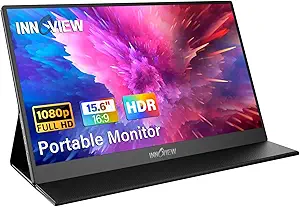
InnoView Portable Monitor, 15.6 Inch FHD 1080P HDMI USB C Second External Monitor for Laptop, Desktop, MacBook, Phones, Tablet, PS5/4, Xbox, Switch, Built-in Speaker with Protective Case
The InnoView 15.6-inch monitor excels at offering a compact, high-quality display with broad device compatibility, making it ideal for a variety of users from travelers to gamers. Its IPS panel with HDR technology delivers vivid images and accurate colors, surpassing smaller or lower-quality screens like the cocopar model. The built-in stand and protective case enhance portability and convenience, but the 18W power consumption requires external power sources for optimal brightness, which may be less convenient on the move. Its 178° viewing angles and eye-care features like flicker-free technology make it a comfortable choice for long usage. However, it lacks a high refresh rate, limiting its gaming performance compared to models like the VisionOwl. Overall, this is a reliable, versatile option for those who value color accuracy and broad compatibility.
Pros:- Vivid HDR display with accurate colors
- Broad device compatibility via HDMI and USB-C
- Built-in speakers and protective case
- 178° viewing angles and flicker-free technology
Cons:- Requires external power for maximum brightness
- No high refresh rate for fast-paced gaming
- Limited touchscreen options
Best for: Travelers and professionals needing a reliable, portable display with excellent color and device compatibility
Not ideal for: Hardcore gamers or users seeking ultra-fast refresh rates for competitive gaming
- Display Size:15.6 inches
- Resolution:1920 x 1080
- HDR:Yes
- Viewing Angle:178°
- Power Consumption:18W
- Built-in Speakers:Yes
Bottom line: Perfect for users prioritizing color fidelity and device versatility in a portable monitor.
MNN Portable Monitor 15.6inch FHD 1080P USB C HDMI Gaming Ultra-Slim IPS Display w/Smart Cover & Speakers, HDR Plug&Play, External Monitor for Laptop PC Phone Mac (15.6” 1080P)
The MNN 15.6-inch portable monitor offers a sleek, lightweight design with HDR support, making it well-suited for immersive gaming and multimedia. Its 178° IPS display delivers vibrant, accurate colors, comparable to the InnoView, but with a focus on gaming features like HDR and multiple display modes. The dual full-featured Type-C ports simplify connections, and the included smart cover doubles as a stand, enhancing portability. However, the 60Hz refresh rate limits smoothness in fast-paced games, and power requirements can cause flickering if not connected to a proper power source. Its eye-care features and HDR make it ideal for prolonged entertainment or casual gaming, but it may not satisfy competitive gamers seeking ultra-high refresh rates.
Pros:- HDR support with vibrant colors
- Slim and lightweight for travel
- Dual Type-C ports for simple connectivity
- Smart cover doubles as stand
Cons:- Limited 60Hz refresh rate
- Power flickering issues if not properly powered
- No touchscreen functionality
Best for: Travelers and gamers looking for a portable, stylish display for casual gaming and media consumption
Not ideal for: Hardcore gamers or professionals requiring ultra-smooth visuals for competitive play
- Display Size:15.6 inches
- Resolution:1920 x 1080
- HDR:Yes
- Refresh Rate:60Hz
- Connectivity:HDMI, USB-C
- Weight:2.2 pounds
Bottom line: Great for casual gaming and entertainment during travel, with a sleek form factor and HDR features.
KYY Portable Monitor 15.6inch 1080P FHD USB-C, HDMI Computer Display HDR IPS Gaming Monitor w/Premium Smart Cover & Screen Protector, Speakers, for Laptop PC MAC Phone PS4 Xbox Switch
This KYY 15.6-inch portable monitor stands out for its impressive combination of full HD resolution, HDR support, and wide viewing angles, making it suitable for both professional work and multimedia. Compared with the ViewSonic VA1653, it offers a slightly larger display with better color rendering and HDR, which can be a game-changer for those needing vibrant visuals on the go. Its ultra-slim profile (0.3 inches) and light weight (1.7 lbs) make it highly portable, while the dual USB-C ports and HDMI ensure broad device compatibility. The included smart cover doubles as a stand, adding convenience. However, its 60Hz refresh rate may not satisfy serious gamers or fast-paced video editors, and the power consumption (12W) might require a reliable power source in certain scenarios. This monitor is ideal for mobile professionals who need a versatile, portable second screen without sacrificing display quality.
Pros:- Excellent 1080p IPS display with HDR support
- Ultra-slim and lightweight design for effortless portability
- Broad compatibility via USB-C and HDMI ports
- Includes a durable smart cover that doubles as a stand
Cons:- Limited to 60Hz refresh rate, not suitable for fast-paced gaming
- Power consumption may require additional portable power options
Best for: business travelers who prioritize high-quality visuals and device compatibility in a portable form.
Not ideal for: gamers or video editors requiring higher refresh rates and specialized color accuracy.
- Display Size:15.6 inches
- Resolution:1920 x 1080 (FHD)
- Viewing Angles:178 degrees
- Refresh Rate:60Hz
- Brightness:300 cd/m²
- Ports:2 x USB-C, 1 x HDMI, 3.5mm audio
- Weight:1.7 pounds
- Thickness:0.35 inches
- Warranty:12 months
Bottom line: This monitor works best for mobile professionals seeking a reliable, high-quality portable display for work and multimedia on the go.
How We Picked
The products in this roundup were selected based on a combination of performance, portability, build quality, and versatility. Priority was given to lightweight designs under 2.5 pounds, with screen sizes ranging from 15.6 to 18.5 inches for a balance of portability and usability. Connectivity options like USB-C and HDMI were essential, ensuring compatibility with a variety of devices. Durability and ease of setup also played roles, along with user-friendly features such as built-in stands or VESA mounting. The ranking reflects how well each monitor balances these factors for business travelers, emphasizing value, reliability, and convenience.Factors to Consider When Choosing Best Portable Monitor For Business Travel
Choosing the right portable monitor for business travel involves evaluating several key factors. Size and weight are paramount to avoid adding bulk to your luggage. Connectivity options determine whether it will seamlessly work with your devices, while display quality impacts your productivity and media experience. Additional features like built-in stands, VESA compatibility, and speaker quality can make a significant difference in usability. Considering your typical travel setup and priorities helps in selecting a monitor that enhances rather than complicates your workflow.Size and Weight
For frequent travelers, the size and weight of a portable monitor directly influence convenience. Monitors under 2.5 pounds and with screen sizes around 15.6 inches tend to be the sweet spot—compact enough to carry easily, yet large enough for effective work. Larger screens improve productivity but add weight and bulk, which can become burdensome during transit. Evaluate your luggage space and mobility needs before settling on a size, aiming for a balance that minimizes fatigue without sacrificing too much screen real estate.
Connectivity Options
Look for monitors with versatile connectivity like USB-C, HDMI, and sometimes DisplayPort. USB-C is especially valuable because it can transmit power and video through a single cable, reducing clutter. Compatibility with your laptop, phone, or gaming console ensures smooth setup without extra adapters. Be cautious of models with limited ports, which may necessitate dongles or adapters, adding complexity and potential points of failure during travel.
Display Quality and Features
High resolution (at least 1080p) and good color accuracy are essential for productivity, ensuring sharp text and clear visuals. Features like anti-glare surfaces, blue light filters, and flicker-free technology reduce eye strain during long work sessions. HDR support and high refresh rates, while less common, can enhance media consumption or gaming. Weigh these features against price, as premium options often include advanced display tech that benefits multimedia but may not be necessary for basic tasks.
Build and Additional Features
Durability matters, especially if you frequently travel. Look for monitors with sturdy cases, VESA mounting options, and built-in stands or kickstands for flexible setup. Built-in speakers improve multimedia experience but can vary in quality; consider external audio if critical. Smart covers or cases that double as stands add convenience, but ensure they don’t increase weight or size excessively. Also, check for protective features like screen protectors or rugged construction for added longevity in transit.
Price and Value
While premium models offer extra features like HDR or higher refresh rates, many travelers find that mid-range monitors meet their needs without overspending. Focus on core features like size, weight, and connectivity, which most influence portability and usability. Beware of models that are cheap but flimsy, or overly expensive for only marginal improvements. Balancing cost against durability and features helps in choosing a monitor that provides the best value for your specific travel needs.
Frequently Asked Questions
Will a portable monitor work with all my devices during travel?
Most portable monitors support standard connectivity options like USB-C and HDMI, making them compatible with a broad range of devices including laptops, smartphones, and gaming consoles. However, compatibility depends on your device’s ports and supported protocols. For instance, some monitors require USB-C with DisplayPort Alt Mode, so check your device specifications first. Using adapters can extend compatibility, but ensure they are high quality to avoid connection issues during travel.
Is a higher refresh rate necessary for a travel monitor used primarily for work?
For typical business tasks—such as document editing, web browsing, and presentations—a 60Hz refresh rate is sufficient. Higher refresh rates (120Hz or more) are more relevant for gaming or media editing, which are less common on travel monitors. Investing in a higher refresh rate may increase cost and power consumption without providing tangible benefits for productivity. Focus instead on display clarity, connectivity, and portability for work-focused use.
How important is build quality for a portable monitor on the go?
Build quality is vital because a travel monitor endures frequent packing, unpacking, and transport. Sturdy cases, impact-resistant screens, and reliable stands help prevent damage. Cheaper models might crack or malfunction more easily, leading to inconvenience or replacement costs. Select a monitor with durable construction and protective features to ensure longevity and consistent performance during your business trips.
Should I prioritize screen size over weight for travel?
Choosing between screen size and weight depends on your specific needs. A slightly larger monitor enhances productivity by providing more screen real estate but tends to be heavier and less portable. If you travel frequently and need light luggage, a smaller, lighter model might be better even if it offers less space for multitasking. Consider your typical travel conditions and work requirements to find the best balance for your workflow.
Are there monitors with built-in batteries suitable for travel?
While some portable monitors include built-in batteries, they are relatively rare and often add to the weight and cost. Most models rely on power from connected devices, like laptops or USB power banks, which can be more convenient and lighter. If working in places without reliable power sources, a monitor with a good battery life or compatibility with portable power banks becomes more appealing. Always check battery capacity and compatibility before purchasing for travel use.
Conclusion
For frequent travelers seeking an all-around reliable option, the ASUS ZenScreen offers excellent balance with its portability, eye care features, and solid connectivity—ideal for business professionals. If budget is a priority, the InnoView Portable Monitor provides a good mix of size and performance at a lower price point. Those who need a larger screen with multimedia capabilities should consider the VisionOwl Portable Monitor, especially if media consumption or presentations are part of your routine. For users new to portable monitors, models with simple plug-and-play setup and sturdy cases will ease the learning curve. Ultimately, your choice should reflect your travel frequency, device compatibility, and specific work or media needs.Columbus Day / Indigenous Peoples' Day Picks
long weekend sales
As an affiliate, we earn on qualifying purchases.