
Finding the best mechanical keyboard for developers involves balancing performance, comfort, and customization. The ideal keyboard should support long coding sessions without fatigue, offer reliable keypresses, and fit your workflow. The Keychron K10 Pro stands out as the overall top choice for its versatility and hot-swappable switches, while the Logitech MX Mechanical offers a quiet, refined experience for those prioritizing noise reduction. The main tradeoffs typically involve choosing between tactile feedback and noise levels, wired versus wireless connectivity, and build quality versus price. Continue reading for a detailed breakdown of the best options for different needs and preferences.
Key Takeaways
- Top-performing models combine reliable build quality with versatile connectivity options, often leaning toward wireless for convenience.
- Switch type (tactile, linear, quiet) significantly impacts typing feel and noise, influencing suitability for shared workspaces.
- Hot-swappable switches are a key feature for developers who want to customize or upgrade their keyboard without soldering.
- Full-size layouts are preferred for productivity, but compact designs like 75% or TKL versions appeal to space-conscious users.
- Pricing varies widely, with the best value often found in mid-range models that balance features and affordability.


More Details on Our Top Picks
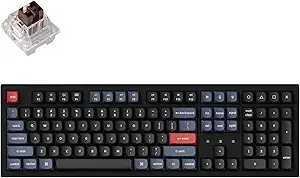
Keychron K10 Pro Wireless Custom Mechanical Keyboard, Full-Size QMK/VIA Programmable Bluetooth/Wired White Backlight with Hot-swappable Keychron Super Brown Switch Compatible with Mac Windows Linux
The Keychron K10 Pro stands out for its full-size layout combined with wireless flexibility, making it ideal for developers who need a reliable, multi-device setup. Its support for hot-swappable switches and QMK/VIA programmability allows for tailored key mappings and macro commands, surpassing more basic options like the Logitech G413 SE, which lacks customization. The large 4000 mAh battery and Bluetooth 5.1 ensure seamless multitasking and extended use, but this size and weight could be a drawback for those seeking portability. The addition of sound-absorbing foam and steel plate enhances typing comfort and reduces noise, crucial for long coding sessions. However, its wired mode only supports remapping, which might be limiting for some users. Overall, this pick makes the most sense for developers who want a durable, customizable, full-sized keyboard with wireless capabilities.
Pros:- Full-size layout with dedicated macro keys
- Hot-swappable MX switches for custom feel
- Supports wireless and wired modes with large battery
Cons:- Size and weight reduce portability
- Remapping only available in wired mode
Best for: Developers who prioritize customization, multi-device connectivity, and a full-size layout for their workstation.
Not ideal for: Travelers or those with limited desk space who prefer a more compact or lightweight keyboard.
- Layout:Full-size 104 keys
- Connectivity:Wireless Bluetooth 5.1, wired USB Type-C
- Switch Support:Hot-swappable MX mechanical switches
- Battery:4000 mAh, up to 100 hours
- Backlight:White dual-shot PBT keycaps
- Compatibility:Mac, Windows, Linux
Bottom line: Best suited for developers seeking a feature-rich, customizable full-size keyboard with wireless flexibility.
Keychron K10 HE Hall Effect Keyboard, Gateron Double-Rail Magnetic Nebula Switch, Full-Size Tri-Mode Wireless Keyboard with Rapid Trigger, Adjustable Actuation, RGB, Aluminum + Wooden Frame
This Keychron K10 HE introduces magnetic Hall Effect switches, which provide ultra-responsiveness and durability, making it a compelling choice for developers who want cutting-edge tech. Compared to the Keychron K10 Pro, which uses tactile MX switches, the Hall Effect switches offer a unique, smooth feel with less wear over long-term use, ideal for heavy typing. The tri-mode connectivity (Bluetooth, 2.4 GHz, wired) and customizable actuation provide flexible workflow options. The wood and aluminum frame add a premium aesthetic, but the larger size and weight could be less ideal for those who move their workspace frequently. The magnetic switches also support adjustable actuation points, perfect for fine-tuning responsiveness but can be more complex to maintain. This keyboard makes the most sense for developers eager to explore advanced switch technology for a long-lasting, high-precision typing experience.
Pros:- Magnetic Hall Effect switches with adjustable actuation
- Tri-mode connectivity for multi-device use
- Premium wood and aluminum frame design
Cons:- Heavier and larger than typical keyboards
- Complexity in switch maintenance
Best for: Tech-savvy developers who want to experiment with magnetic switch technology and enjoy high customization.
Not ideal for: Users seeking a lightweight or highly portable keyboard for frequent travel.
- Switch Type:Hall Effect magnetic switches
- Connectivity:Bluetooth 5.2, 2.4 GHz, wired Type-C
- Layout:Full-size 104 keys
- Frame Material:Aluminum + wood
- Adjustable Actuation:Yes
- Backlight:RGB
Bottom line: Ideal for developers looking for durable, high-precision switches and extensive customization options.
RK ROYAL KLUDGE R98 Pro Wired Mechanical Keyboard, 96% Creamy Gaming Keyboard RGB Backlit with Number Pad and Volume Knob, Gasket Mount, MDA Profile PBT Keycaps, Hot Swappable Pre-lubed Linear Switch
The RK R98 Pro offers a compact 96% layout with a dedicated number pad, perfect for developers who need a full set of keys in a smaller footprint. Its gasket mount design and pre-lubed linear switches provide a smooth, soft typing experience, ideal for long coding sessions. Compared with the Keychron K10 models, which are more modular, the R98 Pro’s integrated design and volume knob add a unique, space-saving touch without sacrificing functionality. The RGB backlighting with numerous modes enhances visual appeal, but the wired-only connectivity could be limiting for those who prefer wireless setups. Its MDA profile keycaps fit fingers well, improving comfort, yet the fixed layout makes customization more complex than the hot-swappable Keychron options. Best suited for developers wanting a full-featured but space-efficient keyboard with a focus on smooth typing.
Pros:- Compact 96% layout with numpad
- Gasket mount and pre-lubed linear switches for smooth typing
- RGB backlit with multiple modes
Cons:- Wired connection only
- Less modular compared to hot-swappable models
Best for: Developers who need a compact keyboard with a full layout, including a numpad, for multitasking and data entry.
Not ideal for: Mobile users or those who prioritize wireless flexibility over a wired connection.
- Layout:96% with numpad
- Switch Model:Pre-lubed linear switches
- Connectivity:Wired USB-C
- Frame Design:Gasket mount
- Backlight:RGB
- Keycaps:MDA profile PBT
Bottom line: Best for developers needing a space-efficient, full-featured layout with smooth switches and RGB flair.
Logitech G413 SE Full-Size Mechanical Gaming Keyboard – Backlit Keyboard with Tactile Mechanical Switches, Anti-Ghosting, Compatible with Windows, macOS – Black Aluminum
The Logitech G413 SE provides a solid, reliable mechanical experience with tactile switches, making it a great choice for developers on a budget who still want durability. Its aluminum top case offers premium feel and minimal flex, comparable to pricier options like the Logitech MX Mechanical, but at a more affordable price point. The anti-ghosting 6-key rollover ensures accurate inputs during intense work sessions or quick coding edits. While it lacks the customization options of hot-swappable switches or programmable macros, it compensates with consistent build quality and straightforward operation, ideal for those who prefer a no-fuss, durable keyboard. The backlit keys add visibility in low light, but the lighting is single-color, limiting aesthetic customization. Overall, this keyboard is perfect for developers needing dependable performance at a reasonable price.
Pros:- Robust aluminum top case minimizes flex
- Tactile mechanical switches for reliable feedback
- Anti-ghosting with 6-key rollover
Cons:- No switch customization or programmability
- Lack of multi-device wireless connectivity
Best for: Budget-conscious developers who need a durable, full-size keyboard with tactile feedback.
Not ideal for: Enthusiasts seeking extensive customization or wireless functionality.
- Switch Type:Tactile mechanical switches
- Connectivity:USB wired
- Build Material:Aluminum top case
- Anti-Ghosting:6-Key rollover
- Backlight:Single-color
- Keys:Full-size 104 keys
Bottom line: Ideal for budget-minded developers who want a durable, tactile keyboard without complex features.
Logitech MX Mechanical Wireless Illuminated Performance Keyboard, Tactile Quiet Switches, Backlit Keys, Bluetooth, USB-C, macOS, Windows, Linux, iOS, Android, Metal, Graphite
The Logitech MX Mechanical offers a premium, versatile experience with tactile quiet switches and smart illumination, making it ideal for developers working across multiple operating systems. Its low-profile, backlit keys provide comfortable typing with less noise, suitable for late-night coding or shared workspaces. Compared to the Keychron K10 Pro, the MX Mechanical emphasizes ergonomic design and multi-OS compatibility, supporting up to 3 devices via Bluetooth and Logi Bolt receiver, with seamless switchability. Its durable metal frame and adjustable backlighting enhance both aesthetics and usability, but the higher price reflects its premium build and features. The rechargeable battery lasts up to 15 days on a full charge, making it suitable for intensive work sessions. This makes it the best choice for developers seeking a high-quality, multi-platform keyboard that balances performance and comfort.
Pros:- Supports up to 3 devices with Bluetooth and Logi Bolt
- Quiet tactile switches reduce noise during long sessions
- Sleek low-profile design with smart backlit keys
Cons:- Higher price point compared to basic models
- Battery life could be better with heavy backlight use
Best for: Developers who need a premium, multi-device, quiet typing experience across various operating systems.
Not ideal for: Budget-conscious users or those preferring wired-only setups.
- Switch Type:Tactile Quiet
- Connectivity:Bluetooth, USB-C
- Multi-Device:Up to 3 devices
- Battery Life:Up to 15 days
- Frame Material:Metal
- Backlight:Adjustable
Bottom line: Best for developers wanting a premium, multi-platform keyboard with quiet, comfortable switches.
RK ROYAL KLUDGE S98 Mechanical Keyboard w/Smart Display & Knob, Top Mount 96% Wireless Mechanical Keyboard BT/2.4G/USB-C, Hot Swappable, Software Support, Creamy Sounding, 98 Keys
This keyboard stands out for its innovative smart display and customizable knob, making it ideal for developers who want quick access to system info or custom controls. Compared to more traditional boards like the Keychron K3, the RK S98 offers a larger 98-key layout with wireless versatility, but its complex features come with a steeper learning curve. The hot-swappable switches and dual-layer sound dampening contribute to a creamy, satisfying sound and tactile feedback, perfect for long coding sessions. However, the extensive software support may be a drawback for users who prefer plug-and-play simplicity. The wireless options (BT 5.0, 2.4G, USB-C wired) provide flexibility, and the premium sound absorption makes typing less fatiguing. The large display and multifunction knob streamline workflows, especially for multitasking developers.
bestFor: Developers who want customizable controls and innovative features for multitasking.
notIdealFor: Users seeking a straightforward, no-fuss keyboard for pure typing or gaming.
pros: Innovative smart display and knob, wireless flexibility, hot-swappable switches, premium sound dampening.
cons: Complex setup, potentially bulky, software reliance.
verdict: Perfect for developers eager to integrate a high-tech, customizable keyboard into their workflow.
specs:- Connectivity: Bluetooth 5.0, 2.4G, USB-C wired
- Keys: 98
- Sound Dampening: Sound-absorbing foams and silicone layer
- Display: Smart customizable display
- Switch Compatibility: Hot-swappable for 3/5-pin switches
- Size: 16.14″ L x 5.51″ W x 1.65″ H
Pros:- Unique smart display with custom options
- Wireless connectivity with multiple modes
- Hot-swappable switches for easy customization
- Superior sound dampening for a creamy typing experience
Cons:- Setup can be complex and time-consuming
- Bulky design may take up desk space
- Heavy reliance on software for full feature access
Best for: Developers who prioritize customization, multitasking, and innovative features.
Not ideal for: Users who prefer simple, plug-and-play keyboards without added complexity.
- Connectivity:BT 5.0, 2.4G, USB-C
- Keys:98
- Sound Dampening:Sound-absorbing foams, silicone dampening
- Display:Smart customizable screen
- Switch Compatibility:Hot-swappable 3/5-pin
- Dimensions:16.14″ x 5.51″ x 1.65″
Bottom line: A versatile, feature-rich keyboard best suited for developers who want innovation and customization over simplicity.
Redragon Mechanical Gaming Keyboard Wired, 11 Programmable Backlit Modes, Hot-Swappable Red Switch, Anti-Ghosting, Double-Shot PBT Keycaps, Light Up Keyboard for PC Mac
This wired keyboard offers excellent value with its programmable backlit modes, durable double-shot PBT keycaps, and hot-swappable red switches, making it a reliable choice for developers who also game or do heavy typing. Unlike the more compact Keychron K3, the Redragon K671 provides a full-size layout with dedicated macro keys and extensive backlighting control, but it’s bulkier and less portable. The hot-swappable red switches deliver smooth, low-force keystrokes that are ideal for long coding sessions and fast typing. Its anti-ghosting ensures reliable input during complex commands, a plus for development work. The durable build and simple wired connection make it straightforward to set up and maintain. On the downside, the heavier weight and larger footprint may not suit tight desk setups.
bestFor: Developers seeking a sturdy, feature-rich wired keyboard with programmability.
notIdealFor: Users who require wireless functionality or a minimal footprint.
pros: Programmable backlit modes, hot-swappable switches, durable PBT keycaps, anti-ghosting.
cons: Bulky size, wired only, heavier weight.
verdict: An excellent, durable wired option for development and gaming enthusiasts who need customization and longevity.
specs:- Connectivity: Wired USB
- Keys: 104
- Switch Type: Red linear, hot-swappable
- Backlit Modes: 11 programmable effects
- Keycaps: Double-shot PBT
- Size: 17.13″ x 4.88″ x 1.59″
Pros:- Multiple programmable backlit modes
- Hot-swappable linear switches
- Durable double-shot PBT keycaps
- Anti-ghosting for reliable inputs
Cons:- Bulky and heavy for small desks
- Wired connection limits portability
- Larger footprint may interfere with workspace
Best for: Developers who want a wired, durable keyboard with extensive programmability and reliable performance.
Not ideal for: Users looking for a wireless or ultra-compact setup.
- Connectivity:Wired USB
- Keys:104
- Switch Type:Hot-swappable Red linear
- Backlit Modes:11 customizable effects
- Material:Double-shot PBT keycaps
- Dimensions:17.13″ x 4.88″ x 1.59″
Bottom line: A rugged, feature-packed wired keyboard suitable for developers needing durability and customization.
Redragon K556 RGB LED Backlit Wired Mechanical Gaming Keyboard, 104 Keys Hot-Swap Mechanical Keyboard w/Aluminum Base, Upgraded Socket and Noise Absorbing Foams, Soft Tactile Brown Switch
This keyboard combines a robust aluminum base with noise-absorbing foam for a quieter, more comfortable typing experience, perfect for developers who spend hours coding. Compared to the more compact Keychron K3, the Redragon K556 offers a full-size layout with enhanced durability and premium tactile brown switches that provide satisfying feedback without excessive noise. Its RGB backlighting with multiple modes adds aesthetic appeal without sacrificing performance. The hot-swappable sockets allow easy switch customization, making it versatile for different preferences. While it’s a wired keyboard, its sturdy construction and sound dampening make it suitable for shared workspaces or late-night coding without disturbing others. The large footprint might be a drawback for tight setups.
bestFor: Developers who want a durable, quiet, full-size keyboard with premium build quality.
notIdealFor: Those seeking wireless or ultra-compact options.
pros: Aluminum base with noise dampening, tactile brown switches, RGB lighting with modes, hot-swappable socket.
cons: Bulky size, wired only, larger footprint.
verdict: An excellent, durable, quiet keyboard for developers prioritizing tactile feedback and stability.
specs:- Connectivity: Wired USB
- Keys: 104
- Switch Type: Brown tactile, hot-swappable
- Backlight: RGB with multiple modes
- Material: Aluminum base, noise-absorbing foam
- Size: 17.13″ x 4.88″ x 1.59″
Pros:- Durable aluminum base with noise damping
- Tactile brown switches for satisfying feedback
- Multiple RGB modes for aesthetic customization
- Hot-swappable sockets for switch flexibility
Cons:- Large and bulky for small workspaces
- Wired-only connection limits mobility
- Size may interfere in tight setups
Best for: Developers seeking a quiet, durable, full-size keyboard with tactile feedback and customization options.
Not ideal for: Users needing wireless freedom or minimal desk space footprint.
- Connectivity:Wired USB
- Keys:104
- Switch Type:Brown tactile, hot-swappable
- Backlight:RGB modes
- Material:Aluminum base
- Dimensions:17.13″ x 4.88″ x 1.59″
Bottom line: A solid, quiet, tactile keyboard ideal for developers who value durability and customization in a full-size wired package.
Logitech MX Mechanical Wireless Illuminated Performance Keyboard, Clicky Switches, Backlit Keys, Bluetooth, USB-C, macOS, Windows, Linux, iOS, Android, Metal
This full-size wireless keyboard offers satisfying clicky switches, smart backlit keys, and cross-platform compatibility, making it an excellent choice for developers who switch devices frequently. Unlike the compact Keychron K3, the MX Mechanical provides a larger form factor with a premium metal construction, ideal for those who prefer a full-sized, ergonomic setup. Its Bluetooth and USB-C connectivity ensure seamless multi-device pairing, similar to the Keychron but with a more refined build quality. The clicky switches give a gratifying tactile response, while the smart illumination adjusts automatically, reducing eye strain. The rechargeable battery lasts up to 15 days with backlighting or 10 months with lights off. While more expensive, its premium feel and cross-platform compatibility make it a top-tier option.
bestFor: Developers who need a premium, wireless, cross-platform keyboard for a professional workflow.
notIdealFor: Users seeking a compact or wired-only keyboard.
pros: Premium metal build, satisfying clicky switches, auto-adjusting backlit keys, multi-device Bluetooth pairing.
cons: Higher price point, larger size, heavier weight.
verdict: An ideal wireless, premium-grade keyboard for developers working across multiple devices and platforms.
specs:- Connectivity: Bluetooth, USB-C
- Keys: 104
- Switch Type: Clicky mechanical switches
- Backlit Keys: Yes, auto-adjusting
- Material: Metal construction
- Battery Life: Up to 15 days with backlight, 10 months with lights off
Pros:- Premium metal and solid build
- Satisfying clicky switches
- Smart backlit keys that adjust automatically
- Multi-device Bluetooth connectivity
Cons:- Higher cost compared to other options
- Larger, less portable footprint
- Heavier than compact keyboards
Best for: Developers who want a high-quality, wireless, cross-platform keyboard with satisfying clicky switches.
Not ideal for: Users needing a budget-friendly or wired-only setup.
- Connectivity:Bluetooth, USB-C
- Keys:104
- Switch Type:Clicky
- Backlit Keys:Yes, auto-adjusting
- Material:Metal
- Battery Life:Up to 15 days (lights on), 10 months (lights off)
Bottom line: A premium, wireless keyboard perfect for developers who demand durability, cross-platform compatibility, and satisfying feedback.
Keychron C2 Full Size Wired Mechanical Keyboard Compatible with Mac, Keychron Brown Switch, 104 Keys ABS Retro Color Keycaps Gaming Keyboard for Windows
The Keychron C2 stands out as the most versatile full-size wired keyboard tailored for developers who need a reliable, straightforward layout. Compared to the Keychron K2 75%, it offers a full 104-key setup, making it ideal for users who prefer dedicated function and number pads. Its retro-inspired color scheme and tactile Keychron Brown switches deliver a satisfying typing experience without the distraction of RGB lighting, which might not suit those seeking flashy aesthetics. While the C2 provides solid build quality and Mac/Windows compatibility, it’s not water-resistant and lacks backlighting, which could be drawbacks for heavy-duty or low-light use. This keyboard makes the most sense for developers who prioritize a classic design and full layout over flashy features or RGB lighting.
Pros:- Durable, tactile Keychron Brown switches with a long lifespan of 50 million keystrokes
- Full-sized layout with dedicated number pad and multimedia keys for productivity
- Compatible with Mac and Windows with included extra keycaps
Cons:- Lacks backlit or RGB illumination, limiting use in dim environments
- Not water-resistant, so spills could cause damage
- ABS keycaps may wear faster over prolonged heavy use
Best for: Developers who prefer a full-size, no-frills, durable wired keyboard with a tactile feel and classic look.
Not ideal for: Gamers or users who need RGB lighting or ultra-compact setups, as the retro style and lack of backlight may feel outdated or insufficient.
- Switch Type:Keychron Brown Tactile
- Keys:104
- Connectivity:Wired USB-C
- Material:ABS plastic keycaps
- Compatibility:MacOS, Windows
- Water Resistance:Not water resistant
- Weight:1.5 kg
Bottom line: This full-size keyboard is ideal for developers seeking reliability, classic style, and a tactile response without extra lighting features.
Logitech Alto Keys K98M Wireless Mechanical Clicky Keyboard, Customizable Keyboard with Vibration Absorbing Gasket, Backlit Keys, Bluetooth, USB-C Charging, for PC, Mac, Laptops – Graphite
The Logitech Alto Keys K98M makes a compelling case for developers who prioritize wireless flexibility and a tactile, clicky typing experience. Its gasket mount design and UniCushion technology absorb vibrations, resulting in smoother keystrokes comparable to a mechanical typewriter, outclassing the tactile feel of the Keychron K2’s Gateron switches. The backlit keys and customizable Action Keys via Logi Options+ add to its productivity appeal, although the lack of RGB lighting might be a miss for those who enjoy vibrant aesthetics. The compact 98-key layout with a numpad balances desktop space and functionality, making it suitable for multi-device workflows. Its 12-month battery life and Bluetooth 5.1 connectivity provide convenience for mobile or multi-device users, but the absence of water resistance and higher price point are potential downsides. This keyboard is perfect for developers who want a wireless, highly tactile, and customizable keyboard without RGB distractions.
Pros:- Vibration-absorbing gasket mount for smooth, quiet, and satisfying keystrokes
- Wireless connectivity with up to 12 months of battery life and Bluetooth 5.1
- Customizable Action Keys for increased productivity
Cons:- No RGB lighting, limiting visual customization
- Water resistance not specified, so spills could be problematic
- Higher price compared to some wired alternatives
Best for: Developers seeking a wireless, tactile, and highly customizable keyboard for multi-device use and minimal workspace clutter.
Not ideal for: Users who need RGB lighting or spill-proof features, or those on a tight budget, as the price is higher and it lacks some durability features.
- Switch Type:Logi Bolt Gateron Super Mechanical Brown
- Keys:98″ + ” with Numpad
- Connectivity:Bluetooth 5.1, USB-C wired
- Battery Life:Up to 12 months
- Backlighting:Single color LED
- Compatibility:PC, Mac
- Weight:1.1 kg
Bottom line: This wireless, tactile, and customizable keyboard excels for developers who value mobility and a satisfying clicky feel without RGB lighting.
Keychron K2 75% Layout Bluetooth Wireless Mechanical Keyboard Super Switch/White LED Backlit/USB C/Anti Ghosting/N-Key Rollover, 84 Keys Gaming Keyboard for Mac Windows-Version 2
The Keychron K2 offers a highly portable, space-efficient solution for developers who need a full-featured wireless keyboard that fits in tighter spaces. Its 75% layout retains essential arrow and shortcut keys while minimizing size, making it more versatile than the Keychron C2 for users with limited desk space. The Gateron Super Mechanical Brown switches provide a tactile response that’s satisfying for long coding sessions, and the white LED backlight ensures visibility in dim environments. Its dual mode connectivity—Bluetooth 5.1 and wired USB-C—supports multi-device workflows, similar to the Logitech MX Mechanical. The large 4000mAh battery lasts up to 72 hours of continuous use, ideal for on-the-go developers. However, it lacks RGB lighting and water resistance, which could be drawbacks for some. This is an excellent choice for developers who want a compact, wireless keyboard with reliable tactile feedback.
Pros:- Compact 75% layout with essential arrow and shortcut keys
- Wireless Bluetooth 5.1 with wired USB-C support for multi-device use
- Long-lasting 4000mAh battery, up to 72 hours of use
Cons:- No RGB backlighting, limiting aesthetic options
- Lacks water resistance, so spills may damage the keyboard
- No dedicated macro or programmable keys
Best for: Developers who need a compact, wireless keyboard with essential keys and tactile switches, suitable for tight desks or portable setups.
Not ideal for: Those who prefer RGB lighting or spill-resistant features, or require a full 104-key layout for extensive data entry.
- Switch Type:Gateron Super Mechanical Brown
- Keys:84
- Connectivity:Bluetooth 5.1, USB-C wired
- Backlighting:White LED
- Battery Life:Up to 72 hours
- Compatibility:Mac, Windows
- Water Resistance:Not water resistant
Bottom line: This space-saving, wireless keyboard is perfect for developers who want mobility, tactile feedback, and a compact footprint without RGB flair.

How We Picked
The products in this roundup were selected based on their relevance to developers’ needs: typing comfort, reliability, and customization options. We prioritized models with solid build quality, reliable key switches, and features like programmability or wireless connectivity. Performance aspects such as switch type, key rollover, and latency were carefully considered. Price-to-value ratio was a key factor, ensuring that each recommended keyboard offers features that justify its cost. Ranks reflect a combination of user flexibility, durability, and suitability for long coding sessions, with higher scores going to models that excel across these criteria.Factors to Consider When Choosing Best Mechanical Keyboard For Developers
Choosing the best mechanical keyboard for development depends on several core factors beyond just brand or appearance. Understanding these can help you avoid common pitfalls and select a keyboard that truly enhances your workflow and comfort. Here are the key considerations:Switch Type and Feel
Switches significantly influence how a keyboard feels during extended typing. Tactile switches provide feedback that many developers prefer for accuracy, while linear switches are smoother and quieter. Quiet switches are better for shared spaces or late-night work. Consider your preference for feedback and noise when selecting switches, as this impacts comfort and productivity over long hours.
Connectivity Options
Wireless keyboards offer freedom of movement and reduce desk clutter, but may introduce latency or connectivity issues in some setups. Wired options tend to be more reliable, especially for gaming or real-time coding. Developers should weigh the convenience of Bluetooth or USB-C against the stability that wired connections provide, especially if consistent performance is critical.
Layout and Size
Full-size keyboards include a number pad, which can boost productivity with data entry, but take up more space. Compact layouts like 75% or tenkeyless (TKL) save desk real estate and foster a cleaner workspace. Think about your workflow—if you frequently use a numpad, a full-size makes sense; otherwise, a smaller form factor might be more comfortable.
Build Quality and Materials
Durability is vital, especially for daily use. Metal frames, PBT keycaps, and solid mounting styles extend the lifespan and feel of a keyboard. Cheaper plastic models may save money initially but can feel flimsy and wear out more quickly. Investing in a sturdily built keyboard pays off in comfort and longevity.
Customization and Features
Programmable keys, hot-swappable switches, and adjustable backlighting can enhance your development experience. However, these features often come at a cost. Developers should consider how much they will utilize customization—if you enjoy tailoring your setup, prioritizing these options is worthwhile. For straightforward use, simpler models may suffice.
Frequently Asked Questions
Is a mechanical keyboard worth it for programming?
Many developers find mechanical keyboards worth the investment because they offer superior tactile feedback, durability, and customization options. Longer typing sessions become more comfortable, and the reliable keypresses reduce errors. While they tend to cost more than membrane keyboards, the overall comfort and efficiency gains often justify the expense, especially for those who type extensively every day.
Should I prioritize a quiet switch for coding?
Quiet switches can be highly beneficial if you work in shared spaces or late at night, where noise might disturb others. They typically produce less sound but may offer less tactile feedback compared to clicky options. If you value a quieter environment and still want good typing feel, switches like Gateron Silent or Cherry MX Red are good options, though some tradeoff in feedback is inevitable.
Is wireless or wired better for a developer’s keyboard?
Wireless keyboards provide greater flexibility and reduce desk clutter, which many developers find appealing. However, wired models tend to have lower latency and are more reliable during intensive tasks. If your workflow involves frequent movement or if you dislike dealing with potential connectivity issues, a wired keyboard might be the better choice. For most casual or home office setups, modern wireless options are sufficiently stable and convenient.
How important is switch customization for developers?
Switch customization allows developers to tailor their keyboard’s feel to their preferences, which can reduce fatigue and increase accuracy. Hot-swappable switches make it easy to experiment without soldering, making this feature valuable for those who want a highly personalized typing experience. If you prefer a specific switch type or plan to upgrade over time, prioritizing hot-swappable models makes sense.
Should I buy a full-size or a compact keyboard?
The choice depends on your workspace and workflow. Full-size models provide a numpad, which can speed up data entry and calculations. Compact layouts like 75% or TKL save space and can promote better ergonomics by reducing reach. Consider how often you use a numpad and whether desk space is limited—your decision should align with your daily tasks and comfort preferences.
Conclusion
For most developers, the Keychron K10 Pro offers a balanced mix of features, build quality, and customization, making it the best overall choice. Those prioritizing quiet operation and refined style should consider the Logitech MX Mechanical. If budget is a concern, models like the Redragon K556 deliver excellent value without sacrificing essential features. For newcomers, a simpler, more affordable model like the Keychron K3 provides an approachable entry point. Finally, power users who want maximum personalization will find hot-swappable, programmable models like the RK Royal KLudge S98 worth the extra investment.