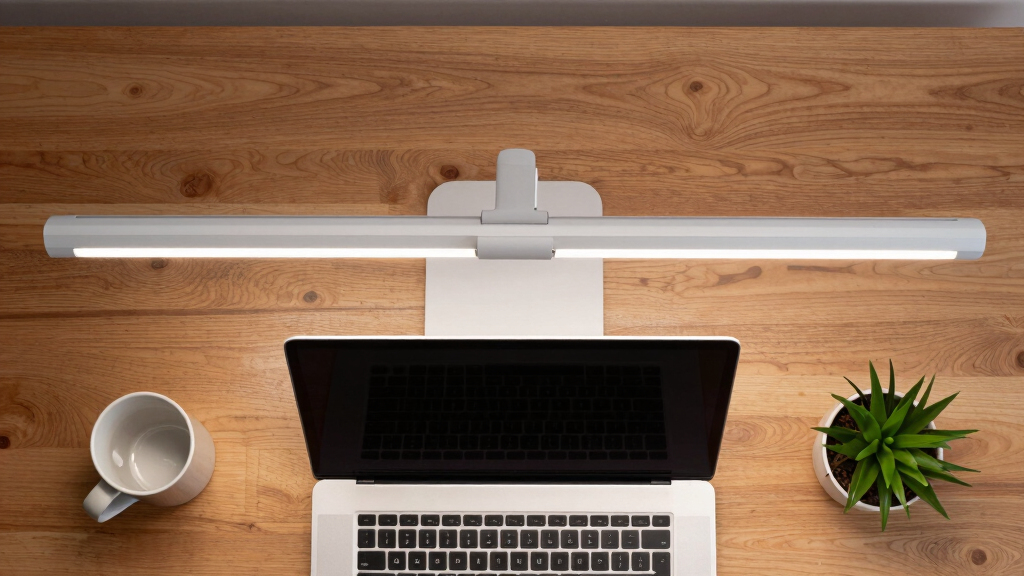
Finding the best monitor light bar for desk productivity is about balancing eye comfort, workspace illumination, and ease of use. The BenQ ScreenBar Halo is our top pick for its adjustable brightness and color temperature, making it ideal for long work sessions. The Quntis Monitor Light Bar PRO+ offers auto-dimming and remote control, perfect for users who want convenience. Meanwhile, the ONWAY Curved Monitor Light Bar provides auto-dimming and camera compatibility, suited for versatile home offices. Each option comes with tradeoffs, such as price, compatibility, or feature complexity. Keep reading for a detailed breakdown to find your ideal desk light.
Key Takeaways
- Top monitor light bars combine auto-dimming features with adjustable brightness and color temperature for optimal eye comfort.
- Compatibility with different monitor types (curved vs. flat) and monitor sizes is a key factor influencing choice.
- Remote controls and touch interfaces enhance ease of use, especially for multi-monitor setups.
- More advanced models often include RGB backlights or motion sensors, but these can add to cost or complexity.
- Choosing a light bar with glare reduction and flicker-free LEDs significantly improves long-term eye health.






More Details on Our Top Picks
Quntis Monitor Light Bar Pro White, Eye-Care No Glare USB Computer Lamp, Stepless Dimming & Auto-Dimming Brightness, Dual Control, Modern Aesthetic Space Saving Desk Accessories Office Gaming Reading
This pick stands out for its sleek, minimalist aesthetic that blends seamlessly into modern workspaces, making it ideal for those prioritizing a tidy, stylish desk. Compared with the BenQ ScreenBar Halo 2, it offers more intuitive dual control via touch and remote, which enhances ease of use during long sessions. Its asymmetric optical design reduces glare on screens, which is critical for extended computer use, although it may lack some of the advanced ambient backlighting features found in premium options. The auto-dimming sensor and timer help maintain eye comfort effortlessly, making it suitable for students, professionals, and gamers who want a reliable, long-lasting solution. The space-saving clamp fits most monitor styles without damaging screens, and the durable build ensures stable performance over years. The main tradeoff is that this light bar doesn’t include RGB backlighting or extensive color modes, which might matter to creative users. This monitor light bar makes the most sense for users seeking a balanced blend of design, ease of use, and eye care.
Pros:- Minimalist modern design that integrates well with various setups
- Dual control via touch and remote for convenience
- Auto-dimming sensor maintains consistent, eye-friendly lighting
- Secure clamp fits most monitor types without damage
Cons:- Lacks RGB backlighting or color modes for aesthetic customization
- Limited to basic white and warm light options
Best for: Desk users who want a stylish, all-around reliable light that prioritizes glare reduction and long-term comfort.
Not ideal for: Gamers or creative professionals needing extensive RGB lighting or color customization.
- Light Source Type:LED
- Power Source:USB
- Wattage:5 watts
- Color Temperature:3000K-6500K
- Mounting Type:Clamp
- Control Method:Dual (touch & remote)
- Dimensions:16.1 inches (41 cm)
- Material:Aluminum
- Warranty:Amazon 30-day return
Bottom line: Ideal for those seeking a durable, stylish monitor light with excellent glare control and long-lasting comfort.
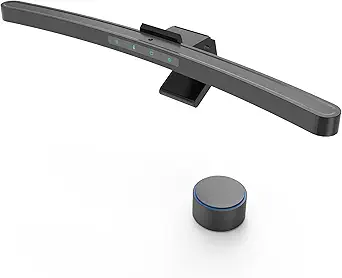
BenQ ScreenBar Halo 2 LED Monitor Light Bar – Wireless Controller, Backlight, Motion Sensor, Adjustable Brightness/Color Temperature, Eye-Care, No Screen Glare, Fits Curved Monitor, Monitor Accessory
This model is tailored for professionals who need precise color accuracy and ambient backlighting, making it ideal for designers, photographers, and those with curved monitors. Compared to the Quntis Pro White, the Halo 2 offers a sophisticated wireless dial for fine-tuned adjustments and a wide CRI > 95, ensuring true color reproduction essential for creative work. Its integrated ambient backlight reduces stark contrast and eases eye strain even in dim environments, surpassing the basic auto-dimming of the Quntis. The smart features, like automatic lighting adjustments and last-used setting memory, provide a seamless experience for long work or editing sessions. However, this premium comes with a higher price point and a slightly bulkier design, which might not suit minimalist setups. The Halo 2’s advanced backlighting and color fidelity make it the best choice for professionals who demand high precision and comfort. It’s perfect for users who prioritize color accuracy and ambient environment enhancement over basic lighting features.
Pros:- Exceptional CRI > 95 for accurate color rendering
- Wide ambient backlighting reduces contrast and eye fatigue
- Wireless controller with precise adjustment and display
- Automatic dimming with ambient sensors for consistent lighting
Cons:- Higher price point than most monitor lights
- Bulkier design may not suit minimalist desks
Best for: Creative professionals, photographers, and designers working on color-sensitive tasks.
Not ideal for: Casual users or gamers who primarily need basic glare reduction without advanced color features.
- Light Source Type:LED
- Power Source:USB
- Color Temperature Range:2700K-6500K
- CRI:> 95
- Control Method:Wireless dial
- Adjustability:Auto-dimming, manual brightness & color
- Dimensions:19.7 inches (50 cm) wide
- Material:Polished Aluminum
- Warranty:1 year
Bottom line: Best suited for users needing accurate color work with sophisticated ambient lighting and fine control.
ONWAY Curved Monitor Light Bar with Wireless Remote,Monitor Auto-Dimming and Camera Base,Applicable to All Screens. No Screen Glare,for Home Office
This product shines for its tailored design for curved screens, especially 1000R to 3000R curvature, making it ideal for users with large or irregular monitors. Compared with the Quntis Pro White and BenQ Halo 2, the ONWAY offers a unique curved optical asymmetrical design that prevents glare and reflections, which is a common issue with standard light bars on curved monitors. Its wireless remote and auto-dimming sensor make adjustments effortless, ideal for long hours of work or gaming. The camera base design offers space-saving benefits for content creators and streamers. The main tradeoff is that it lacks RGB or extensive color modes, focusing instead on glare-free, tailored lighting. This makes it perfect for users who need a custom fit for curved screens and value glare reduction over aesthetic lighting effects. It’s a top choice for curved monitor owners seeking stability, convenience, and eye comfort.
Pros:- Specially designed to match curved monitor shapes
- Wireless remote control with multiple modes
- Auto-dimming sensor for consistent lighting
- Camera base for space-saving setup
Cons:- No RGB or color customization options
- Limited to curved monitor compatibility
Best for: Owners of large or irregular curved monitors who need tailored, glare-free lighting.
Not ideal for: Users with flat, small monitors or those wanting RGB lighting effects.
- Light Source Type:LED
- Power Source:Corded
- Control Method:Wireless remote
- Color Temperature Range:3000K-6500K
- Dimensions:16.5 inches (42 cm)
- Material:Plastic & Metal
- Mounting Type:Clamp
- Warranty:1 year
- Special Feature:Camera base
Bottom line: Perfect for users with large or curved monitors needing tailored, glare-free illumination.
Quntis Curved Monitor Light Bar 15 RGB Backlight for 34″+ Screens, Computer Bar Lights Fold Dual Light with Color Temperature Brightness Stepless Dimming, No Glare Desk Lamp for Home Office Gaming
This model excels for gamers and creative users who want extensive RGB backlighting and ultra-wide coverage, especially on 34+ inch screens. Compared with the standard Pro White and Halo 2, it offers 15 RGB modes and stepless dimming, allowing immersive customization for gaming, streaming, or content creation. Its foldable dual-light design provides flexible angles to eliminate shadows and maximize lighting coverage across large or ultra-wide monitors, making it ideal for multitasking or detailed creative work. The asymmetrical optical design ensures no glare on screens, similar to other high-end options, but with the added appeal of vibrant RGB effects, which are absent in the premium color-accurate Halo 2. The tradeoff is that this light might be overkill for typical office use and less suited for those prioritizing color fidelity over aesthetics. This is best for users seeking vibrant, customizable lighting to enhance their gaming or creative environment.
Pros:- 15 RGB backlight modes for immersive effects
- Foldable dual-light design for flexible coverage
- Stepless brightness and color temperature adjustment
- No glare optical design
Cons:- Overly vibrant for typical office tasks
- Less focus on color fidelity, not ideal for professional editing
Best for: Gamers, streamers, or creative professionals needing extensive RGB lighting and wide coverage.
Not ideal for: Users who require high color accuracy or minimalistic, professional lighting.
- Light Source Type:LED
- Power Source:USB
- Color Modes:15 RGB modes
- Dimming:Stepless
- Dimensions:26 inches (66 cm)
- Material:Aluminum & Plastic
- Control Method:Remote
- Special Features:Foldable dual lights
- Warranty:30 days
Bottom line: Best suited for gamers or content creators wanting customizable RGB lighting and wide coverage.
Quntis Monitor Light Bar PRO+ with Remote Control, Fit for Curved/Flat Monitor, Eye-Care USB Computer Lamp Dimmable Screen Light Bar with Auto-Dimming, No Glare Home Office Gaming Desk Lamp
This model offers excellent flexibility, fitting both curved and flat monitors from 0.12″ to 2.36″ thick, making it highly adaptable for various setups. Compared with the ONWAY and Halo 2, it emphasizes a stable, weighted clip and double adjustment covers, allowing for precise positioning and a good fit on irregular screens. Its auto-dimming sensor and remote control provide steady, eye-friendly illumination, suitable for long work, gaming, or creative projects. The asymmetrical optical design eliminates glare, similar to premium options, but it may lack some of the RGB effects or ambient backlighting found in other models. The main tradeoff is that it’s less feature-rich in terms of aesthetic customization, focusing instead on stability and compatibility. This is a strong choice for users who need a reliable, versatile light that works across different monitor types and shapes.
Pros:- Fits a wide range of monitor types and thicknesses
- Stable, weighted clip prevents shaking
- Auto-dimming sensor for consistent lighting
- Remote control with multiple modes
Cons:- Limited aesthetic customization options
- No RGB or colorful backlighting features
Best for: Users with multiple or irregular monitors seeking a stable, adaptable lighting solution.
Not ideal for: Those primarily interested in RGB effects or ambient backlighting for mood setting.
- Light Source Type:LED
- Power Source:USB
- Control Method:Remote
- Adjustability:Auto-dimming, stepless brightness & color
- Monitor Compatibility:0.12-2.36 inches thick
- Dimensions:20.1 inches (51 cm)
- Material:Aluminum
- Warranty:1 year
- Special Feature:Stable clip & double adjustment
Bottom line: Great for versatile, stable lighting suitable for various monitor shapes and sizes.
Quntis Monitor Light Bar with Remote, Eye-Care No Glare, Space Saving Home Office Desk Lamp, White, Stepless Dimming, Easy Setup LED Computer Light Backlight for Curved Gaming Monitors Mother’s Day
This monitor light bar stands out for its blend of sleek minimalism and advanced eye-care technology. Unlike the BenQ ScreenBar Halo 2, which offers wireless control and motion sensors, the Quntis model provides stepless dimming and a smart memory function, making it highly customizable. Its glare-free dual-light design reduces eye strain effectively, even during long gaming or work sessions. The minimalist sliding clip allows quick attachment to various monitor sizes without cluttering your desk, a clear advantage over bulkier options. However, its remote control, while intuitive, relies on batteries and may be less durable over time. The high CRI of 95 ensures vivid color reproduction, perfect for color-sensitive tasks. This pick is ideal for users seeking a space-saving, stylish, and highly adjustable monitor light that enhances visual comfort without sacrificing aesthetics.
Pros:- Stepless dimming for precise brightness control
- High CRI 95 for vibrant color accuracy
- Minimalist design saves space and looks modern
- Smart memory function restores last settings automatically
Cons:- Remote control depends on batteries and may need frequent replacement
- Price is higher compared to simpler clip-on lights
Best for: Desk workers or gamers with curved or ultra-thin monitors seeking a sleek, highly customizable lighting solution.
Not ideal for: Users with very thick or non-standard monitor frames, as the clip may not fit securely.
- Light Source Type:84 LED beads
- Power Source:Corded Electric
- Lighting Method:Adjustable Control
- Control Method:Remote
- CRI:95
- Dimensions:16.1 inches long
- Wattage:5 watts
- Mounting Type:Sliding clip
- Material:Aluminum and plastic
Bottom line: This monitor light bar is perfect for those who want a stylish, highly adjustable, and eye-friendly setup with minimal desk clutter.
Quntis Computer Monitor Lamp, Screen Monitor Light Bar for Eye Caring, USB Reading LED Task Lamp with Auto-Dimming, Dimmable Light Bar, Touch Control, No Glare Space Saving Home Office Desk Lamps
Compared with the Quntis Light Bar with Remote, this model emphasizes convenience and automatic features. Its auto-dimming sensor continuously adjusts brightness to a comfortable 900 lux, reducing eye fatigue during long hours of work. Unlike the premium pick, it lacks a remote control but compensates with touch controls that are responsive and easy to use. The asymmetric optical design effectively eliminates screen glare, making it suitable for detailed work or gaming. The clip-on mounting system is straightforward, though it may not fit thicker monitors as securely as higher-end options like the BenQ Halo. Its high CRI of 98 ensures true-to-life colors, ideal for creative tasks. This light is best suited for budget-conscious users who want reliable eye protection and easy operation without extra bells and whistles.
Pros:- Auto-dimming sensor for consistent comfort
- High CRI 98 for color accuracy
- No glare optical design improves focus
- Easy-to-use touch control
Cons:- No remote control, less flexibility in remote adjustments
- Limited to monitor widths up to standard sizes
Best for: Students or professionals seeking a cost-effective, automatic dimming monitor light for daily use.
Not ideal for: Users who prefer remote controls or have very thick monitors that may not fit the clip securely.
- Light Source Type:78 LED beads
- Power Source:USB powered
- Lighting Method:Auto-Dimming with touch control
- Control Method:Touch
- CRI:98
- Dimensions:15.7 inches long
- Wattage:5 watts
- Mounting Type:Clip-on
- Material:Plastic and aluminum
Bottom line: This budget-friendly monitor light provides automatic brightness adjustment and excellent color rendering, ideal for everyday office or study tasks.
Monitor Light Bar, Fit for Curved/Flat Monitor, Eye-Care USB Reading LED Task Lamp with Touch Control, No Screen Glare Dimmable Desk Lamp Computer Monitor Light Bar for Screen Home Office
This compact light bar offers a simple, effective solution for those who dislike complex setups. Its asymmetric optical design prevents glare and reduces eye fatigue, similar to the more advanced Colorpanda light but with a straightforward clip-on system. Unlike the Motumen LED Desk Lamp, which features a double-head design and a flexible goose-neck, this model emphasizes easy attachment and basic adjustability, making it perfect for users who want quick installation without sacrificing essential eye protection. It lacks advanced dimming or color temperature options, but the touch control provides smooth brightness adjustment. The high CRI ensures vibrant visuals, but the absence of a remote control means manual adjustments are necessary. This product is ideal for users prioritizing hassle-free setup and reliable glare reduction.
Pros:- Easy clip-on installation for quick setup
- Effective glare reduction with asymmetric optical design
- Vivid color rendering with high CRI
- Touch control for smooth brightness adjustment
Cons:- Limited adjustment options compared to premium models
- No remote control or color temperature adjustment
Best for: Home office users or students needing quick, no-fuss installation with effective glare control.
Not ideal for: Creative professionals requiring detailed color calibration or multiple lighting modes.
- Light Source Type:42 LED beads
- Power Source:USB powered
- Lighting Method:Dimmable touch control
- Control Method:Touch
- CRI:95
- Dimensions:22″ D x 4.5″ W x 1″ H
- Wattage:14 watts
- Mounting Type:Clip-on
- Material:Metal and plastic
Bottom line: This monitor light bar offers a hassle-free, glare-free lighting solution suitable for those who want simplicity and effectiveness without extra features.
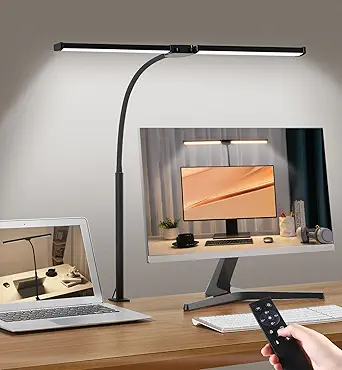
Motumen Led Desk Lamp for Home Office, Eye-Care Architect Light with Clamp, Smart Double Head Computer Monitor Table Clip Lamp, Adjustable Flexible Goose-Neck, 25 Lighting Models, Task Lamp, Black
Compared to the more minimalist options, the Motumen LED Desk Lamp excels in its flexibility and extensive lighting modes. Its dual-head design, adjustable goose-neck, and 25 lighting models make it ideal for detailed art projects or long hours of work where precise lighting control is critical. The sturdy clamp keeps it firmly attached to various monitor sizes, surpassing the clip stability of simpler models like Colorpanda. Unlike the Colorpanda light, which offers basic dimming, the Motumen provides a wide range of color temperatures and brightness levels, giving artists and designers the ability to match ambient light perfectly. However, the larger size and multiple modes may be overkill for users who only need basic lighting. This lamp is best suited for creative professionals and hobbyists who demand highly customizable lighting environments.
Pros:- 25 adjustable lighting modes for versatile use
- Flexible goose-neck for precise positioning
- Strong clamp for stable attachment
- Large, bright output suitable for detailed work
Cons:- Bulky size may clutter small desks
- Complex controls might be overwhelming for casual users
Best for: Artists, designers, or detailed hobbyists requiring versatile, multi-mode task lighting.
Not ideal for: Users seeking a compact, minimal design for simple desk illumination.
- Light Source Type:Multiple LED modes
- Power Source:Corded Electric
- Lighting Method:Adjustable modes
- Control Method:Buttons and remote
- Color Temperature:25 models, 2700K-6500K
- Wattage:22 watts
- Mounting Type:Clamp
- Material:Metal and plastic
- Dimensions:29.5″ H
Bottom line: This flexible, multi-mode lamp is perfect for creative professionals who need precise, customizable lighting for detailed projects.
Quntis Monitor Light RGB Backlight, Eye-Care Computer Lights Bar Gaming Office Desk Lamp, 15 Modes Backlight, 3 Color Temperature & Brightness Dimmable Front Light, Ra95 Screen No Glare Monitor Lamp
This monitor light bar stands out for its dual light source design, combining a front desk light with a backlight that offers 15 RGB modes, making it ideal for creating immersive gaming or work environments. Unlike the YEELIGHT, which emphasizes blue light filtering and color accuracy, the Quntis model provides a broader range of ambient lighting options, though it may be more complex to set up due to its multiple modes. Its ability to minimize glare and flicker improves eye comfort during prolonged use, but the extensive customization could be overwhelming for users seeking simple illumination. The non-slip clip fits monitors from 0.39″ to 1.18″ thick, and the Ra95 color rendering ensures vivid colors, making it perfect for color-critical tasks or gaming. However, its size and feature set make it less suited for users who prefer minimalistic setups or straightforward lighting solutions.
Pros:- Dual front and backlight sources for balanced illumination
- 15 RGB modes for customizable ambiance
- High color rendering index Ra95 for vibrant colors
- Space-saving clip mount fits various monitor sizes
Cons:- Complex mode options can be confusing for some users
- Larger size may not suit small desks or minimal setups
Best for: Gamers and professionals wanting customizable, eye-friendly lighting with immersive effects
Not ideal for: Users seeking a simple, no-frills desk lamp or minimal setup
- Light Source Type:LED
- Color Modes:15 RGB modes
- Color Temperature:3000K-6500K
- CRI:Ra95
- Mounting Type:Clip-on
- Adjustability:Dimmable, rotatable
Bottom line: This pick suits those who want a highly customizable, eye-care lighting environment for gaming or creative work.
YEELIGHT Monitor Light Bar, Computer Monitor Lamp, 250LM No Glare Eye-Care LED Screen Bar, Touch Control USB Reading Desk Lamp for Home Office Work, Stepless Dimming Adjustable Color Temperature
The YEELIGHT Monitor Light Bar excels in protecting your eyes with its high blue light filtering (RG0 rated) and flicker-free design, making it ideal for long work or study sessions. Compared to the Quntis model, which offers extensive RGB effects, YEELIGHT focuses on providing a stable, natural light with adjustable color temperature from 2700K to 6500K, ensuring accurate color rendering and minimal eye strain. Its space-saving, clip-on design fits monitors from 0.3″ to 1.4″ thick, and the full-metal body offers durability and heat dissipation, unlike plastic alternatives. While it lacks the vibrant RGB modes of Quntis, its simplicity and focus on eye health make it better suited for users who prioritize safety and straightforward functionality. The ease of installation and high CRI Ra95 make it an excellent choice for professionals, students, or anyone seeking high-quality, comfortable lighting.
Pros:- High blue light filtering (RG0 rated) for eye safety
- Stepless dimming and adjustable color temperature (2700K-6500K)
- Ultra-high CRI Ra95 for accurate color rendering
- Full-metal durable design and space-saving clip mount
Cons:- Limited to single-color temperature modes, no RGB effects
- Less customizable ambiance compared to RGB models
Best for: Professionals and students seeking reliable, eye-friendly lighting with blue light filtering
Not ideal for: Users wanting colorful ambient effects or dynamic lighting setups
- Color Temperature:2700K-6500K
- Brightness:250 lumens
- CRI:Ra95
- Blue Light Rating:RG0
- Mounting Type:Clip-on
- Power Source:USB
Bottom line: Ideal for those prioritizing eye protection and simple, effective lighting for long hours at the screen.
ONEMIX 42″ LED Desk Lamp with Clamp, Architect Desk Light with Remote, Adjustable 4-Segment Bar, 1800LM Bright, Eye-Caring Desk Lamp for Home Office, Reading, Study, Dual Monitors, Workbench(Black)
This 42-inch LED desk lamp offers broad, high-intensity lighting, making it an excellent choice for users with large or multi-monitor setups who need wide coverage. Unlike the focused or ambient lighting from Quntis or YEELIGHT, ONEMIX provides an expansive, flicker-free illumination up to 80 inches wide, suitable for detailed tasks like drafting or crafting. Its 5 brightness levels and 5 color temperatures (3200K–6500K) give flexible control, but the size and complexity might be excessive for users with minimal space or simple lighting needs. The remote control adds convenience, especially when adjusting multiple settings without reaching across the desk. Its clamp holds securely on desks up to 2.75″ thick, and the independently rotatable segments allow precise positioning. This model is well-suited for creative professionals or those who need a large, adaptable light source but may be too bulky for small or cluttered desks.
Pros:- Ultra-wide coverage up to 80 inches
- Adjustable color temperature and brightness
- Remote control for easy adjustments
- Heavy-duty clamp for stability
Cons:- Large size may be cumbersome on small desks
- Higher energy consumption compared to smaller lamps
Best for: Creative professionals or users with large desks and multi-monitor setups needing broad, adaptable lighting
Not ideal for: Users with limited space or those seeking a minimalistic, compact lamp
- Light Output:1800 lumens
- Color Temperature:3200K-6500K
- Segments:4 independently rotatable
- Control:Wireless remote
- Power Source:AC Adapter
- Clamp Capacity:up to 2.75 inches thick
Bottom line: This lamp is perfect for large workspaces requiring broad, customizable, and adjustable lighting for detailed or creative tasks.

How We Picked
I evaluated these monitor light bars based on several criteria that matter most for desk productivity and eye care. Performance aspects like brightness range, color temperature adjustment, and auto-dimming capabilities were prioritized because they directly affect visual comfort. Usability features such as remote control, touch controls, and ease of setup influenced the overall convenience. Build quality and compatibility with different monitor types were also considered, along with value for the price. The ranking reflects a balance of these factors, favoring options that deliver reliable, adjustable lighting with minimal glare and fuss-free operation.Factors to Consider When Choosing Best Monitor Light Bar For Desk Productivity
When selecting the best monitor light bar for desk productivity, several factors should guide your choice. Understanding these can help you avoid common pitfalls like overpaying for unnecessary features or choosing incompatible models that don’t fit your workspace. The right light bar can reduce eye strain, improve focus, and create a more comfortable work environment, but only if it matches your specific needs and setup.Compatibility and Monitor Size
Ensure the light bar fits your monitor size and shape, especially if you use curved or ultra-wide screens. Some models are adjustable or designed specifically for curved monitors, which can prevent uneven lighting or glare. Choosing a compatible light bar helps maintain a clean aesthetic and effective illumination without cluttering your desk.
Adjustability and Brightness Control
Look for models with stepless dimming and adjustable color temperature. These features allow you to tailor the light to your task, whether reading, coding, or designing. Auto-dimming capabilities are a bonus, reducing manual adjustments and maintaining consistent lighting, which can lessen eye fatigue over long periods.
Ease of Use and Controls
Remote controls, touch-sensitive panels, and physical buttons vary in convenience. Consider how often you’ll need to change settings—if frequently, a remote or touch interface can save time. Simpler controls reduce frustration and make the light bar more accessible during busy work sessions.
Build Quality and Eye Care
Opt for models with flicker-free LEDs and glare reduction features. Good build quality ensures durability, especially if you’ll move or adjust the light often. These features are vital for preventing eye strain, particularly during extended work hours in artificial lighting environments.
Additional Features and Aesthetics
Some light bars include RGB backlighting or motion sensors, adding ambiance or automation. While these can enhance the workspace atmosphere, they may also increase cost or complexity. Balance these extras against your primary goal of improved productivity and eye comfort.
Frequently Asked Questions
Can a monitor light bar reduce eye strain effectively?
Yes, a quality monitor light bar can significantly reduce eye strain by providing consistent, glare-free illumination that minimizes screen contrast and reflections. Proper lighting reduces the workload on your eyes, especially in dim environments, and helps prevent fatigue during long work or gaming sessions. Look for models with flicker-free LEDs and adjustable brightness for best results.
Is it better to choose a light bar with RGB backlight?
RGB backlighting is mainly an aesthetic feature that can add ambiance to your workspace. It doesn’t directly improve eye comfort or productivity but can make your setup more personalized and visually appealing. If your primary goal is improved focus and eye health, prioritize adjustable white light with flicker-free LEDs over RGB features.
Will a monitor light bar fit my curved monitor?
Many modern light bars are designed to accommodate curved monitors, especially those with adjustable mounting or flexible arms. Check the product specifications for compatibility with your monitor’s size and curvature. Choosing a model explicitly made for curved screens ensures proper fit and even lighting without causing glare or obstruction.
How important is color temperature adjustment for desk productivity?
Color temperature adjustment allows you to match the lighting to your environment and activity, which can boost alertness and reduce eye fatigue. Cooler temperatures (around 5000K-6500K) are better for focus, while warmer tones (around 3000K-4000K) create a relaxing atmosphere. A light bar with adjustable color temperature offers flexibility to optimize your workspace for different tasks.
Are more expensive light bars worth the investment?
Higher-priced models often include advanced features like auto-dimming, RGB lighting, and better build quality, which can enhance convenience and durability. If you spend long hours at your desk or require precise lighting control, investing in a premium light bar can pay off by reducing eye strain and improving overall productivity. However, for casual use, a more affordable option with basic features may suffice.
Conclusion
For most users, the BenQ ScreenBar Halo offers the best balance of adjustability, eye care, and ease of use, making it ideal as the overall top pick. Those seeking the best value without sacrificing essential features should consider the Quntis Monitor Light Bar PRO+, which provides auto-dimming and remote control at a competitive price. If you’re new to monitor lighting or prefer a straightforward setup, the Quntis Monitor Light Bar with Remote delivers simplicity and reliable performance. For dedicated gamers or those who want customizable ambient lighting, options with RGB backlights like the Quntis RGB Backlight are worth considering. Finally, if durability and premium features are your priority, investing in higher-end models will ensure long-term satisfaction and eye health.