
Choosing the best curved monitor for home office multitasking involves balancing screen size, resolution, refresh rate, and comfort features. The Samsung 27″ Essential S3 (S36GD) stands out as the top overall pick for its reliable performance and affordability, while the Sceptre 34″ Ultrawide offers expansive real estate for multitasking. For those seeking premium features, the Samsung ViewFinity S50GC combines ultrawide display with advanced color accuracy. The main tradeoffs often come down to size versus desk space, resolution versus affordability, and feature set versus simplicity. Continue reading for a detailed breakdown of each monitor’s strengths and tradeoffs.
Key Takeaways
- Ultrawide monitors like the Sceptre 34″ excel for multitasking due to increased horizontal workspace.
- Higher refresh rates (up to 165Hz) benefit smooth workflow transitions and casual multitasking.
- Color accuracy (sRGB 99%+) makes some monitors better suited for creative tasks alongside productivity.
- Size and curvature radius (e.g., 1000R vs. 1800R) significantly impact comfort and desk fit.
- Budget options often sacrifice resolution or special features, but can still handle multitasking effectively.




More Details on Our Top Picks
Samsung 27″ Essential S3 (S36GD) Curved Monitor – FHD, 1800R Curved Screen, 100Hz, Eye Saver Mode, Game Mode, HDMI D-sub, LS27D36CGANXZA
This Samsung model stands out for its combination of immersive curvature and versatile connectivity, making it ideal for multitasking in a home office. The 1800R curve enhances immersion without distortion, and the 100Hz refresh rate offers smooth visuals for both work and entertainment. Compared with the Sceptre 34-Inch Ultrawide, it provides a more focused experience suited to typical desk setups, though the latter’s ultrawide aspect is better for multitasking with multiple windows. Its Eye Saver Mode reduces eye strain during long hours, which is essential for home use. The monitor’s FHD resolution is sufficient for most tasks but less sharp than higher-res alternatives. The connectivity options, including HDMI and D-Sub, are broad enough for most devices, but it lacks DisplayPort. This pick makes the most sense for users seeking a reliable, immersive, and flexible monitor that balances performance with eye comfort.
Pros:- Immersive 1800R curvature enhances focus and reduces peripheral distractions
- Smooth 100Hz refresh rate suitable for both work and casual gaming
- Eye Comfort technology minimizes blue light and flicker for long sessions
Cons:- Full HD resolution may feel limited for detailed creative work
- Lacks DisplayPort connectivity, which could be a drawback for some devices
Best for: Home office workers who want an immersive, versatile display with good eye comfort and straightforward connectivity.
Not ideal for: Creative professionals needing ultra-high resolution for detailed editing or designers requiring precise color accuracy.
- Display Size:27 inches
- Curvature:1800R
- Refresh Rate:100Hz
- Resolution:1920 x 1080
- Connectivity:HDMI, D-Sub
- Blue Light Filter:Yes
- Flicker-Free:Yes
- Brightness:250 cd/m²
- Contrast Ratio:3000:1
Bottom line: This monitor is perfect for home office users seeking an immersive, versatile display that balances multitasking, gaming, and eye comfort.
Samsung 27″ Essential S3 (S36GD) Series FHD 1800R Curved Computer Monitor, 100Hz, Game Mode, Advanced Eye Comfort, HDMI and D-sub Ports, LS27D366GANXZA, 2024
This Samsung model excels in delivering an engaging experience with its 1800R curved screen and 100Hz refresh rate, making it suitable for home office multitasking combined with light gaming. Its curve helps create a wider field of view, which reduces eye fatigue during long work sessions. Compared to the Sceptre 34-Inch Ultrawide, this monitor is more compact and better suited for smaller desks, though it sacrifices some multitasking real estate. The built-in Eye Comfort tech is a plus for extended use, but the Full HD resolution limits sharpness for detailed tasks like photo editing. The connectivity options are straightforward, with HDMI and D-Sub ports, but lack of higher-end features like USB-C or DisplayPort might limit future-proofing. Overall, it’s a balanced choice for users wanting a comfortable, curved display for everyday multitasking and occasional gaming.
Pros:- Curved design enhances immersion and reduces eye strain
- High refresh rate ensures smooth visuals for casual gaming
- Advanced Eye Comfort reduces fatigue during long hours
Cons:- Full HD resolution may not satisfy professional editing needs
- Lacks USB-C and DisplayPort for future connectivity options
Best for: Home users who need a comfortable, curved monitor for multitasking and light gaming without demanding high resolution.
Not ideal for: Creative professionals or gamers requiring ultra-high resolution or fast response times for competitive gaming.
- Display Size:27 inches
- Curvature:1800R
- Refresh Rate:100Hz
- Resolution:1920 x 1080
- Connectivity:HDMI, D-Sub
- Blue Light Filter:Yes
- Flicker-Free:Yes
- Brightness:250 cd/m²
- Contrast Ratio:3000:1
Bottom line: This monitor fits well for users seeking a comfortable, curved display that balances multitasking with casual gaming and extended use.
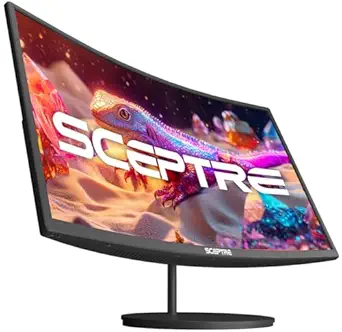
Sceptre 34-Inch Curved Ultrawide WQHD Monitor (3440 × 1440), R1500, up to 180Hz/165Hz, DisplayPort x2, 99% sRGB, 1ms, Built-in Speakers, Machine Black, 2025 (C345B-QUT168)
This Sceptre ultrawide monitor shines for multitasking and creative projects with its expansive 34-inch curved screen and high refresh rate up to 180Hz. The 3440×1440 resolution offers sharp visuals and a broader workspace, ideal for professionals handling multiple applications simultaneously. The 1ms response time and high sRGB coverage support fluid visuals and color accuracy, making it suitable for creative tasks. Compared with the Samsung 27-inch models, this provides significantly more screen real estate, but its larger size may require more desk space and a more powerful GPU. The dual DisplayPorts and built-in speakers add to its versatility, though its overall design is more gaming-oriented. This monitor is a prime choice for those needing a large, vibrant, and responsive display for multitasking, gaming, or content creation.
Pros:- Expansive 34-inch ultrawide screen maximizes multitasking space
- High resolution and 1ms response for sharp, fluid visuals
- 99% sRGB coverage supports color-accurate work
Cons:- Large size may be unwieldy on smaller desks
- Primarily gaming features may be less relevant for basic office use
Best for: Creative professionals and multitaskers who need an ultrawide display with fast response and vivid color accuracy.
Not ideal for: Those with limited desk space or seeking a more traditional, smaller monitor for basic home office tasks.
- Display Size:34 inches
- Resolution:3440 x 1440
- Refresh Rate:180Hz
- Response Time:1ms
- Color Gamut:99% sRGB
- Connectivity:2 x DisplayPort
- Curvature:1500R
- HDR:HDR10
- Built-in Speakers:Yes
Bottom line: Ideal for users who want a large, high-performance ultrawide monitor that enhances multitasking and creative workflows.
Samsung 34″ ViewFinity S50GC Series Ultrawide QHD Monitor, 100Hz, 5ms, HDR10, AMD FreeSync, Ultrawide Screen, Eye Care, Thin Bezels, PIP, PBP, LS34C50DGANXZA, 2023, Black
This Samsung ViewFinity monitor excels in delivering a professional-grade multitasking experience with its 34-inch ultrawide screen and QHD resolution. The 1500R curvature offers a more immersive view without distortion, while the Thunderbolt and HDMI ports provide flexible connectivity options. Its HDR10 support and wide color gamut (DCI-P3 97%) make it suitable for color-critical tasks like photo editing or video production. The PIP and PBP features are particularly useful for multitasking across multiple inputs, a key advantage over standard monitors. The 5ms response time is adequate for most productivity tasks but less ideal for competitive gaming. Its sleek, thin bezel design enhances a seamless multi-monitor setup, but at a premium price point. The monitor makes a compelling choice for professionals seeking color accuracy and multitasking prowess in one device.
Pros:- Wide 34-inch ultrawide screen boosts multitasking and productivity
- Excellent color accuracy with HDR10 and DCI-P3 97%
- PIP and PBP support for efficient multitasking
Cons:- Response time of 5ms may limit competitive gaming performance
- Premium price may be out of reach for casual users
Best for: Creative professionals and multitaskers needing high color fidelity and flexible input management.
Not ideal for: Competitive gamers or users seeking the fastest response times for high-speed gaming.
- Display Size:34 inches
- Resolution:3440 x 1440
- Refresh Rate:100Hz
- Response Time:5ms
- HDR:HDR10
- Color Gamut:DCI-P3 97%
- Connectivity:HDMI, Thunderbolt
- Curvature:1500R
Bottom line: This monitor is best for professionals and multitaskers who value color accuracy and input flexibility over ultra-fast response times.
SANSUI 34-Inch Curved Gaming Monitor UWQHD 3440 x 1440P Up to 200Hz 165Hz Curved 1500R – PIP/PBP, OD 1ms, HDR, 300nits, sRGB 130%, DCI-P3 97%,AI Crosshair,HDMI2.1×2,DP1.4(Cable Included)
This SANSUI 34-inch ultrawide monitor is tailored for gamers and multitaskers who demand high refresh rates and quick response. With up to 200Hz refresh rate and 1ms response time, it ensures ultra-smooth visuals during fast-paced gaming, while the 3440×1440 resolution provides ample workspace for multitasking. The inclusion of HDMI 2.1 and DisplayPort 1.4 supports high bandwidth, suitable for future-proof setups. Its curved 1500R screen enhances immersion, but the gaming-centric features like AI Crosshair and sniper scope are less relevant for typical office tasks. The vivid color support (sRGB 130%, DCI-P3 97%) makes it also suitable for detailed creative work. While larger and more specialized, this monitor is ideal for users who want a versatile, high-performance display for both gaming and productivity.
Pros:- High 200Hz refresh rate and 1ms response time for smooth gaming and fluid multitasking
- Ultra-wide 3440×1440 resolution maximizes workspace
- Supports HDMI 2.1 and DisplayPort 1.4 for high bandwidth connectivity
Cons:- Designed with gaming features that may be unnecessary for basic home office use
- Larger size requires ample desk space and more powerful GPU
Best for: Home gamers and multitaskers who need a fast, responsive display with excellent color accuracy.
Not ideal for: Users seeking a budget-friendly, purely office-focused monitor without gaming features.
- Display Size:34 inches
- Resolution:3440 x 1440
- Refresh Rate:200Hz
- Response Time:1ms
- HDR:HDR
- Color Gamut:130% sRGB, 97% DCI-P3
- Connectivity:HDMI 2.1, DisplayPort 1.4
- Curvature:1500R
Bottom line: This monitor is perfect for users combining gaming, high-speed multitasking, and creative work in a single ultrawide package.
Sceptre Curved 27-inch Prime Monitor up to 100Hz 1080p, HDMI x2, VGA, 99% sRGB, Built-in Speakers, R1500, Machine Black 2025 (C275W-1920RN Series)
This affordable 27-inch curved monitor offers a wide color spectrum with 99% sRGB, making it suitable for multitasking that involves color accuracy. Its 1500R curvature provides an immersive experience, though not as expansive as larger models like the KTC 32-inch. The 75Hz refresh rate is adequate for daily tasks but less optimal for fast-paced gaming or video editing. The multiple ports, including HDMI and VGA, give flexibility in connecting devices, and the built-in speakers save space. Compared with the Samsung LS32D39DGANXZA, this model sacrifices resolution for a lower price, which might affect detailed multitasking. The main tradeoff is its 1080p resolution, which might limit workspace for complex multitasking workflows. This monitor makes the most sense for budget-conscious users who need a reliable large screen but can compromise on resolution. Specs: Display Size: 27 Inches, Resolution: 1080p, Refresh Rate: 75Hz, Ports: HDMI x2, VGA, sRGB: 99%, Brightness: 250 CD/M2, Viewing Angle: 178°, Contrast Ratio: 1000000:1
Pros:- Affordable price point
- Wide color gamut with 99% sRGB
- Multiple connectivity options
Cons:- 1080p resolution limits workspace for multitasking
- Lower refresh rate at 75Hz may impact smoothness
Best for: Home office users needing a large, color-accurate display on a tight budget
Not ideal for: Creative professionals requiring higher resolution or color precision for detailed design work
- Display Size:27 Inches
- Resolution:1080p
- Refresh Rate:75Hz
- Ports:HDMI x2, VGA
- Color Gamut:99% sRGB
- Brightness:250 CD/M2
- Viewing Angle:178°
- Contrast Ratio:1000000:1
Bottom line: This monitor suits budget-conscious users who prioritize color accuracy and a large screen for multitasking over resolution and refresh rate.
KTC 32 Inch FHD 1080p Curved Gaming Monitor – VA 1500R Curved Monitor, 165Hz 1ms MPRT, FreeSync & G-Sync, 122% sRGB, DP/HDMI, VESA, HDR10 for Gaming Home Office Business PC Monitor
This 32-inch curved monitor stands out with a rapid 165Hz refresh rate and 1ms response time, making it ideal for multitasking that involves fast-moving visuals or gaming alongside work. Its 1500R curvature enhances immersion, similar to the Samsung Odyssey G55C but with a slightly larger display and VESA compatibility for versatile mounting. The high color gamut of 122% sRGB and HDR10 support allow vibrant visuals, beneficial for professional tasks requiring color precision. Unlike the Samsung Odyssey G55C, which emphasizes gaming features, this model balances gaming and productivity without sacrificing too much on image quality. The tradeoff involves its somewhat bulkier size and higher power consumption. Compared to the LG 32MR50C-B, it offers higher refresh rates but at a slightly higher price point. This monitor makes sense for users who need a fast, immersive display for multitasking that blends gaming and work. Specs: Display Size: 32 Inches, Resolution: 1080p, Refresh Rate: 165Hz, Response Time: 1ms MPRT, Ports: HDMI, DisplayPort, VESA, Color Gamut: 122%, HDR10, Brightness: Not specified, Curvature: 1500R
Pros:- High refresh rate and fast response time
- Large 32-inch curved display for immersive multitasking
- Supports FreeSync & G-Sync for gaming
Cons:- 1080p resolution limits workspace detail
- Higher power consumption and size
Best for: Gamers and professionals needing a fast, large, and color-rich monitor for multitasking
Not ideal for: Users prioritizing ultra-high resolution (such as 1440p or 4K) for detailed multitasking
- Display Size:32 Inches
- Resolution:1080p
- Refresh Rate:165Hz
- Response Time:1ms MPRT
- Ports:HDMI, DisplayPort
- Color Gamut:122% sRGB
- HDR:HDR10
- Curvature:1500R
Bottom line: This monitor is a strong choice for gamers and multitaskers who want speed, immersion, and color richness in one package.
SAMSUNG 32″ Odyssey G55C Series QHD 1000R Curved Gaming Monitor, 1ms(MPRT), HDR10, 165Hz, AMD Radeon FreeSync, Eye Care, Glare Free, Sharp Resolution LS32CG550ENXZA
This 32-inch QHD curved monitor offers a sharp and vibrant display with 2560×1440 resolution, excelling in multitasking and gaming alike. Its 165Hz refresh rate and 1ms response time deliver smooth visuals, comparable to the KTC 32-inch but with a sharper resolution for detailed multitasking. The 1000R curvature wraps around your peripheral vision, providing a more immersive workspace. Support for HDR10 and AMD FreeSync ensures vibrant visuals and tear-free gaming. Unlike the LG 32MR50C-B, which is more budget-oriented, this model emphasizes high-end gaming features, but still suits a home office multitasker needing crisp visuals. The main tradeoff is its higher cost and potential overkill for purely productivity tasks. This monitor makes the most sense for users who want a versatile, high-performance display blending gaming and work. Specs: Display Size: 32 Inches, Resolution: QHD 1440p, Refresh Rate: 165Hz, Response Time: 1ms MPRT, Ports: HDMI, DisplayPort, VESA, HDR10, Curvature: 1000R
Pros:- Sharp QHD resolution with 1440p clarity
- Fast 165Hz refresh rate and 1ms response time
- Immersive 1000R curvature for better workspace engagement
Cons:- Higher price point compared to simpler models
- Potentially over-featured for simple productivity
Best for: Multitaskers who need high resolution and fast refresh rates for both work and gaming
Not ideal for: Users seeking ultra-high resolution (like 4K) or a non-gaming focused display
- Display Size:32 Inches
- Resolution:QHD 1440p
- Refresh Rate:165Hz
- Response Time:1ms MPRT
- Ports:HDMI, DisplayPort
- HDR:HDR10
- Curvature:1000R
- Color Gamut:Not specified
Bottom line: This monitor is ideal for multitasking users who want a high-resolution, fast, and immersive display blending gaming and professional use.
LG 32MR50C-B Curved Monitor 32-Inch FHD 100Hz AMD FreeSync OnScreen Control Dynamic Action Sync Black Stabilizer Tilt Stand (HDMI) – Black
This 32-inch FHD curved monitor from LG provides vibrant visuals with a 1920×1080 resolution and a 100Hz refresh rate, suitable for everyday multitasking. Its ergonomic tilt stand and eye care features, including blue light reduction, make it a good fit for long work sessions. The AMD FreeSync support is a plus for smooth visuals during casual gaming, though not optimized for high-end gaming. Compared with the Samsung S3 LS32D39DGANXZA, this LG model emphasizes comfort and eye health, but sacrifices some color vibrancy and resolution. Its main drawback is the 1080p resolution, which may limit workspace for complex multitasking or detailed design work. This monitor is ideal for users prioritizing comfort and extended use over ultra-high resolution. Specs: Display Size: 32 Inches, Resolution: 1080p, Refresh Rate: 100Hz, Ports: HDMI, AMD FreeSync, Tilt Stand, Blue Light Filter, Eye Care, Color: Black
Pros:- Ergonomic tilt stand for comfort
- Eye care features like blue light reduction
- Vivid color with decent clarity
Cons:- 1080p resolution limits workspace
- Less suitable for high-end gaming or detailed design
Best for: Long-duration multitaskers seeking comfort and eye health features
Not ideal for: Creative professionals requiring high resolution or color accuracy for detailed work
- Display Size:32 Inches
- Resolution:1080p
- Refresh Rate:100Hz
- Ports:HDMI
- Features:Blue Light Filter, Tilt Adjustment
- Color Gamut:Vivid
Bottom line: This monitor is best suited for users who need a comfortable, eye-friendly display for extended multitasking sessions without high resolution demands.
Samsung 32-inch S3 (S39GD) FHD 100Hz Curved Monitor, Game Mode, Eye Saver Mode, Multiple Connectivity with HDMI Port, Built-in Speakers, LS32D39DGANXZA, 2025
This 32-inch curved monitor from Samsung offers a solid FHD resolution with 100Hz refresh rate, emphasizing eye comfort with Eye Saver Mode and flicker reduction. The curved design helps reduce peripheral distractions, ideal for multitasking over long periods. Its built-in speakers add convenience, and multiple connectivity options support various devices. Compared with the LG 32MR50C-B, this model offers a more balanced feature set for everyday work and leisure, although it doesn’t support higher resolutions or HDR. The main limitation is its 1080p resolution, which might restrict productivity when managing multiple detailed windows. It makes sense for users who want a reliable, comfortable display for hours of multitasking without the need for high-end specs. Specs: Display Size: 32 Inches, Resolution: 1080p, Refresh Rate: 100Hz, Ports: HDMI, Built-in Speakers, Eye Saver Mode, Curvature: Not specified, Brightness: Not specified, Response Time: Not specified
Pros:- Comfortable viewing with curved design
- Eye Saver Mode reduces eye strain
- Built-in speakers for convenience
Cons:- 1080p resolution limits multitasking efficiency
- Lacks HDR and high-end color support
Best for: Office workers and students needing a comfortable, multitasking-friendly display
Not ideal for: Creative professionals requiring high resolution or color accuracy
- Display Size:32 Inches
- Resolution:1080p
- Refresh Rate:100Hz
- Ports:HDMI
- Features:Eye Saver Mode, Flicker-Free
- Curvature:Not specified
Bottom line: This monitor is well-suited for users who need a comfortable, all-day multitasking display with basic features and eye care support.
Samsung 34′ Odyssey G5 Ultra-Wide Gaming Monitor with 1000R Curved Screen, 165Hz, 1ms, FreeSync Premium, Large Display, Eye Comfort, Multiple Ports, WQHD, LC34G55TWWNXZA, Black
This Samsung Odyssey G5 excels at creating an immersive multitasking environment thanks to its 1000R curvature that closely matches the human eye’s natural field of view. Compared to the LG 34SR60QC-W, which offers built-in smart features but less aggressive curvature, this monitor emphasizes pure visual immersion, making it ideal for users who juggle multiple windows or applications. The 165Hz refresh rate and 1ms response time ensure smooth visuals during fast-paced tasks or light gaming, but its primary drawback is that it is optimized for gaming rather than color accuracy or professional editing. Additionally, its VA panel provides high contrast but can have limited viewing angles compared to IPS options. The monitor’s multiple ports support versatile connectivity, and HDR10 enhances contrast and color depth, improving content visibility. Because of the focus on gaming features, it may be less suitable for color-critical work, but it remains excellent for multitasking and extended use. Tradeoff: gaming performance versus professional color workflows.
Pros:- Ultra-wide 34-inch display with 1000R curvature for immersive multitasking
- 165Hz refresh rate and 1ms response time for smooth visuals
- HDR10 support enhances contrast and color depth
- Multiple connectivity options including HDMI, DisplayPort, and USB
Cons:- Limited viewing angles due to VA panel, less ideal for shared viewing
- Less color accuracy compared to IPS monitors, not suited for professional editing
Best for: gamers and multitaskers who prioritize immersive visuals and fast response times
Not ideal for: professional photographers or video editors needing precise color accuracy
- Display Size:34 Inches
- Resolution:3440×1440
- Refresh Rate:165 Hz
- Response Time:1 ms
- Panel Type:VA
- Contrast Ratio:1900:1
Bottom line: Best for users seeking an immersive, fast, and versatile monitor for multitasking and casual gaming.
The LG 34SR60QC-W combines a large ultrawide screen with smart features like webOS, making it a strong choice for users who want a single monitor for work, entertainment, and light gaming. Its 1800R curvature delivers an engaging experience similar to a cinema, surpassing the more gaming-focused Odyssey G5 in visual immersion. The built-in smart platform offers streaming apps such as Netflix, Disney+, and Apple TV, allowing for media consumption without switching devices—something the Samsung gaming monitor lacks. The color performance is excellent with 99% sRGB and HDR10 support, suitable for creative tasks, but its refresh rate of 100Hz is less responsive than the 165Hz of the Samsung, making it less ideal for fast-paced gaming. Its connectivity options include HDMI and USB ports, and the inclusion of AirPlay2 adds seamless content sharing from Apple devices. This monitor’s primary advantage is versatility, but it may fall short for high-end gaming or professional color grading. Tradeoff: smart media features versus maximum refresh rate.
Pros:- Large 34-inch ultrawide curved screen with cinematic 1800R radius
- Built-in webOS platform with streaming apps and AirPlay2 compatibility
- 99% sRGB coverage and HDR10 support for vibrant, color-rich content
- Multiple ports including HDMI, USB, and Bluetooth
Cons:- Refresh rate capped at 100Hz, less responsive for fast gaming
- Not designed for professional color grading or high-end gaming performance
Best for: home users who want a multifunctional monitor for work, streaming, and casual gaming
Not ideal for: competitive gamers or professionals needing ultra-precise color accuracy
- Display Size:34 Inches
- Resolution:3440×1440
- Refresh Rate:100 Hz
- Panel Type:LED
- Color Gamut:99% sRGB
- Built-in Media:webOS
Bottom line: Ideal for home offices seeking a versatile, entertainment-capable monitor with immersive visuals.
The Dell S3425DW offers a balanced approach between productivity, entertainment, and color fidelity, making it well-suited for home office multitasking. Its 3000:1 contrast ratio on a VA panel ensures deep blacks and vibrant colors, surpassing the LG’s contrast, while its 120Hz refresh rate provides smoother visuals than standard office monitors. The inclusion of USB-C with 65W power delivery simplifies desk setup, and its 99% sRGB and 95% DCI-P3 coverage make it suitable for creative tasks that demand accurate color representation. Unlike the Odyssey G5, which emphasizes gaming immersion, and the LG, which offers streaming, this Dell monitor focuses on delivering a harmonious mix of color, speed, and connectivity. Its main drawback is a slightly slower response time than the gaming-focused monitors, and VA panels still have narrower viewing angles than IPS. It’s best for users who need solid color accuracy without sacrificing response speed in multitasking scenarios. Tradeoff: contrast and color depth versus ultra-wide immersion.
Pros:- Deep contrast ratio of 3000:1 for vibrant blacks and colors
- USB-C with 65W power delivery for simplified connectivity
- 120Hz refresh rate for smoother content transitions
- Color coverage of 99% sRGB and 95% DCI-P3 for accurate hues
Cons:- Response time is slower than gaming-centric monitors, at 4.2ms
- VA panel limits wide viewing angles compared to IPS
Best for: home professionals needing a versatile display for work, casual media, and light gaming
Not ideal for: high-end gamers or users requiring ultra-wide viewing angles for shared viewing
- Display Size:34 Inches
- Resolution:3440×1440
- Refresh Rate:120 Hz
- Panel Type:VA
- Contrast Ratio:3000:1
- Color Gamut:99% sRGB, 95% DCI-P3
Bottom line: Best suited for users who want a balanced, color-accurate, and fast monitor for multitasking and media consumption.

How We Picked
The monitors in this roundup were chosen based on their suitability for home office multitasking, considering factors like screen size, resolution, curvature, refresh rate, connectivity options, ergonomic features, and overall build quality. We prioritized models that deliver a good balance of performance and usability without overwhelming the user with unnecessary features. Each product was evaluated for its ability to support multiple open windows, reduce eye strain, and fit into a typical home workspace. The ranking reflects a combination of value, feature set, and user versatility, ensuring each option serves a distinct need within the multitasking category.Factors to Consider When Choosing Best Curved Monitor For Home Office Multitasking
When selecting a curved monitor for multitasking at home, it’s key to think beyond just size and resolution. Consider how the curvature impacts your comfort during long work sessions, and whether the monitor’s connectivity options match your devices. Balancing price with features is essential—sometimes paying more brings noticeable gains in color accuracy or refresh rate, but not always necessary for everyday multitasking. Here are some important factors to keep in mind to make an informed choice.Screen Size and Curvature Radius
Screen size influences how many windows you can comfortably view simultaneously. Larger screens, especially ultrawides, minimize the need to switch between tabs. The curvature radius, measured in millimeters (e.g., 1800R or 1000R), affects how natural the viewing experience feels. A tighter curve (like 1000R) can reduce eye strain and make the display feel more immersive, but may not suit every desk setup. Matching your workspace space with the right curvature ensures comfort and productivity.
Resolution and Display Quality
Higher resolutions, such as QHD (2560×1440) or WQHD (3440×1440), offer sharper images and more workspace for multitasking. For detailed work or color-sensitive tasks, look for monitors with high sRGB or DCI-P3 coverage. However, resolution must align with your graphics hardware to avoid performance issues. A balance between resolution and performance ensures smooth operation without sacrificing clarity or responsiveness.
Refresh Rate and Response Time
While a 60Hz refresh rate suffices for most productivity tasks, higher rates like 120Hz or 165Hz can provide smoother window movements and scrolling. This is particularly noticeable if you frequently switch between multiple applications or work with video content. Response time impacts how quickly pixels update, with 1ms being ideal for reducing motion blur. These features enhance overall fluidity without adding unnecessary complexity for typical multitasking needs.
Connectivity and Ergonomics
Multiple ports, including HDMI, DisplayPort, and USB-C, expand your device compatibility and simplify cable management. Adjustable stands, tilt, and height options improve ergonomics, helping prevent neck and eye strain during long hours. Avoid monitors with limited connectivity or fixed stands if you plan to expand your setup or switch devices frequently. Good ergonomics and flexible connectivity are key for a comfortable, adaptable workspace.
Price and Value
Budget-friendly monitors can handle basic multitasking needs, but might lack advanced features like high refresh rates or color accuracy. Investing in a slightly more expensive model often results in a noticeably better multitasking experience, especially with larger, higher-resolution screens. Consider how much value extra features add to your workflow and whether they justify the higher cost. Smart spending ensures you get the best performance without overspending on unnecessary specs.
Frequently Asked Questions
Is a curved monitor better for multitasking than a flat one?
Curved monitors can provide a more natural viewing experience, especially with ultrawide screens, by reducing distortion and minimizing the need for excessive head movement. They help create a more immersive workspace, which can enhance focus during multitasking. However, the benefits depend on the curvature radius and screen size; some users prefer flat screens for their simplicity and compatibility with multi-monitor setups. Ultimately, the choice hinges on personal preference and desk space.
What resolution should I prioritize for multitasking at home?
For effective multitasking, a resolution of at least QHD (2560×1440) is recommended, as it provides enough screen real estate to have multiple windows open comfortably. If your hardware supports it, WQHD or ultrawide WQHD (3440×1440) can further enhance productivity. Lower resolutions like FHD may limit your workspace, leading to more window switching, while higher resolutions require more powerful hardware. Balance your hardware capabilities with your multitasking needs to pick the right resolution.
Are ultrawide monitors suitable for all home office setups?
Ultrawide monitors offer extensive horizontal space, making them ideal for multitasking, creative work, or data analysis. However, they require ample desk space and may not fit well into smaller rooms. Additionally, some software interfaces might not scale perfectly on ultrawide screens. Consider your available workspace and workflow requirements before opting for an ultrawide, as they excel when you need large, continuous displays but can be overkill for simpler setups.
How important is refresh rate in a multitasking monitor?
While a 60Hz refresh rate is generally sufficient for most office tasks, higher rates like 120Hz or 165Hz can make window switching and scrolling feel smoother, reducing eye fatigue over long periods. If your multitasking involves frequent visual transitions or light multimedia work, investing in a higher refresh rate monitor can improve comfort. For basic document editing and browsing, standard refresh rates are adequate, but higher rates add a noticeable benefit to overall fluidity.
Should I prioritize color accuracy or screen size for home multitasking?
The decision depends on your specific needs. If your work involves color-sensitive tasks like photo editing or design, prioritize high color accuracy, such as high sRGB or DCI-P3 coverage. For general multitasking, screen size and resolution might have a more direct impact on productivity, offering more space for multiple applications. Ideally, look for a monitor that balances both features, but if you must choose, focus on what aligns best with your primary tasks.
Conclusion
For most home office users seeking a reliable, all-around multitasking monitor, the Samsung 27″ Essential S3 (S36GD) offers a balanced mix of affordability and performance. Those with space and a desire for expansive workflows should consider the Sceptre 34″ Ultrawide for maximum screen real estate. If premium features like superior color accuracy and ultrawide capabilities are your priority, the Samsung ViewFinity S50GC is the best choice. Beginners or those on a tighter budget can start with more basic models, while professionals working with visual content should focus on high color fidelity. Ultimately, your choice should reflect your specific workspace, workflow, and budget constraints.