
Choosing the best ultrawide monitor for work from home involves balancing screen real estate, image quality, and usability. The LG 34SR60QC-W stands out for its smart TV features and versatility, making it great for multitasking and entertainment. The SAMSUNG ViewFinity S50GC offers a professional-grade display with color accuracy suited for creative tasks. Meanwhile, the Samsung 49” Odyssey G9 delivers an expansive view ideal for intense multitasking but with a higher price tag. The main tradeoffs involve size versus desk space and resolution versus affordability. Continue reading to see how these and other options compare for your work-from-home setup.

Get business pricing on tech for your team
- Business-only prices and quantity discounts
- Tax-exempt purchasing
- Multiple users, one account, clear invoices
Key Takeaways
- The best ultrawide monitors for work from home balance screen size with resolution to avoid clutter and maintain clarity.
- Color accuracy and HDR support are key for professionals working with visuals, but often come at a higher price.
- Curved screens improve immersion and reduce eye strain, especially on larger models like 34- or 49-inch displays.
- Connectivity options such as USB-C and multiple ports increase flexibility for peripherals and laptops.
- Tradeoffs often involve size and price; larger models boost productivity but require more space and investment.


More Details on Our Top Picks
This LG Smart Monitor offers an impressive balance of size, features, and flexibility, making it ideal for those who want a single screen for work, streaming, and light gaming. Its 34-inch curved 21:9 QHD display is larger than many competitors like the Samsung LS34C50D, providing more screen real estate for multitasking. The built-in webOS platform transforms it into a smart TV, offering access to streaming apps directly without a PC, though this feature isn’t as seamless as dedicated smart TVs. The 100Hz refresh rate ensures smooth visuals for casual gaming or video, but it falls short for serious gamers compared to dedicated gaming monitors. The extensive port selection and AirPlay2 support add convenience, but the lack of ergonomic adjustments and only moderate resolution limits its appeal for intensive professional use. Overall, this monitor excels at blending work and leisure, but some tradeoffs in gaming performance and ergonomic flexibility are worth noting.
Pros:- Large 34-inch curved ultra-wide screen enhances multitasking
- Built-in webOS provides streaming without additional devices
- Multiple ports including HDMI and USB for versatile connectivity
- Apple AirPlay2 and HomeKit compatibility for wireless casting
Cons:- Moderate 100Hz refresh rate is not ideal for high-end gaming
- Lack of ergonomic stand adjustments (tilt only)
- WebOS platform may not be as responsive as a dedicated smart TV
Best for: Work-from-home professionals who want a multi-functional display for productivity and streaming.
Not ideal for: Competitive gamers seeking ultra-high refresh rates and fast response times, or users requiring extensive ergonomic adjustments.
- Display Size:34 Inches
- Resolution:3440×1440 (QHD)
- Refresh Rate:100Hz
- Panel Technology:VA
- Viewing Angle:178 Degrees
- Brightness:300 Candela
- Ports:2 HDMI, 3 USB
- Color Gamut:99% sRGB
- Special Features:webOS, HDR10, AirPlay2
Bottom line: This monitor suits users who want a large, versatile screen that combines work, streaming, and casual gaming in one package.
SAMSUNG 34″ ViewFinity S50GC Series Ultra-WQHD Monitor, 100Hz, 5ms, HDR10, AMD FreeSync, Eye Care, Borderless Design, PIP, PBP, LS34C502GANXZA, 2023, Black
Compared with pricier options like the LG 34SR60QC, the Samsung S50GC delivers a similarly large 34-inch ultra-wide display with a sharp 3440×1440 resolution, making it a strong choice for multitasking and productivity. Its borderless design maximizes screen space, and the 100Hz refresh rate is sufficient for smooth scrolling and casual content consumption, although it’s not aimed at competitive gaming. The monitor’s Eye Care technology reduces eye strain during long work sessions, and the PIP/PBP features enable viewing multiple sources simultaneously—perfect for professionals juggling several applications. The limited USB ports and basic stand may be less flexible than premium models, but its affordability makes it accessible. This monitor is ideal for users prioritizing a large workspace and versatile features without paying for high-end gaming specs or extensive ergonomic options.
Pros:- Large 34-inch ultra-wide display for enhanced multitasking
- Borderless design maximizes screen space
- PIP and PBP features for multiple input sources
- Eye Care technology reduces eye strain during long hours
Cons:- Limited USB ports and basic stand adjustments
- Response time of 5ms not suited for competitive gaming
- Build quality is functional but less premium than high-end models
Best for: Budget-conscious professionals who need a large, multitasking-friendly screen for work and media consumption.
Not ideal for: High-end gamers or users requiring extensive ergonomic adjustments or ultra-fast response times.
- Display Size:34 Inches
- Resolution:3440×1440 (WQHD)
- Refresh Rate:100Hz
- Panel Technology:VA
- Viewing Angle:178 Degrees
- Brightness:300 cd/m²
- Ports:2 HDMI, 2 Component
- Color Gamut:Over 1 Billion Colors
- Special Features:PIP, PBP, Eye Care
Bottom line: This monitor delivers a large, feature-rich workspace at an attractive price point, ideal for productivity-focused users on a budget.
SANSUI 34-Inch Curved Gaming Monitor UWQHD 3440 x 1440P Up to 200Hz 165Hz Curved 1500R – PIP/PBP, OD 1ms, HDR, 300nits, sRGB 130%, DCI-P3 97%,AI Crosshair,HDMI2.1×2,DP1.4(Cable Included)
This SANSUI 34-inch curved monitor stands out for its ultra-fast 200Hz refresh rate and 1ms response time, making it suitable for competitive gaming and fast-paced creative tasks. Its 1500R curvature enhances immersion, closely matching the natural shape of the human eye, unlike flatter displays like the Samsung LS34C50D. Features like AI Crosshair and AI PQ add tailored enhancements for gaming precision and image quality, but the focus on gaming tech means it falls short for professional color-critical tasks compared to monitors with wider color gamuts like the LG 34SR60QC. Its HDMI 2.1 ports and VESA compatibility make it flexible for modern setups, but the aggressive gaming features might be overkill for typical work from home use. This monitor is perfect for users who want a fast, immersive experience for gaming and creative projects, but less so for color accuracy or ergonomic flexibility.
Pros:- Ultra-fast 200Hz refresh rate with 1ms response time
- 1500R curvature for immersive viewing
- Supports VRR with HDMI 2.1 for tear-free gaming
- AI Crosshair and AI PQ for enhanced gaming and image quality
Cons:- Primarily geared toward gaming, less color accuracy for professional editing
- Limited port options beyond HDMI 2.1 and VESA
- No built-in speakers or extensive ergonomic adjustments
Best for: Gamers and creative professionals needing high refresh rates and fast response times in one curved display.
Not ideal for: Color-sensitive work requiring wide color gamuts, or users seeking extensive ergonomic adjustments and office features.
- Display Size:34 Inches
- Resolution:3440×1440 (UWQHD)
- Refresh Rate:200Hz/165Hz
- Response Time:1ms
- Panel Technology:Fast VA
- Curvature:1500R
- Ports:2 HDMI 2.1, 1 DP 1.4
- Color Gamut:130% sRGB, 97% DCI-P3
- Special Features:AI Crosshair, HDR, VRR
Bottom line: This monitor excels for users who prioritize high refresh rates, fast responses, and immersive gaming or creative workflows, but less so for precise color work or ergonomic flexibility.
Samsung 34″ ViewFinity S50GC Series Ultrawide QHD Monitor, 100Hz, 5ms, HDR10, AMD FreeSync, Ultrawide Screen, Eye Care, Thin Bezels, PIP, PBP, LS34C50DGANXZA, 2023, Black
Compared to premium options like the LG 34SR60QC, this Samsung S50GC provides a large 34-inch ultra-wide workspace with a sharp 3440×1440 resolution, perfect for multitasking and professional productivity. Its minimal bezel design maximizes viewing area and the 100Hz refresh rate offers smooth visuals for everyday work and media consumption, though it isn’t suited for high-end gaming. The monitor’s Eye Care features and flicker-free technology help reduce eye strain over long sessions, making it a practical choice for remote work. While the stand offers limited ergonomic adjustments, its affordability and reliable performance make it attractive for users who need a large, versatile display without the extra gaming or high-color accuracy features. Overall, an excellent value for focused work and multitasking in a home office environment.
Pros:- Large 34-inch ultra-wide display for multitasking
- Thin bezels maximize screen real estate
- PIP and PBP features for multiple inputs
- Eye Care technology reduces eye strain during long hours
Cons:- Limited stand adjustments
- Response time of 5ms not suitable for competitive gaming
- Colors are sufficient but not calibrated for professional editing
Best for: Budget-conscious professionals seeking a large, reliable display for multitasking and daily work tasks.
Not ideal for: High-performance gamers or users needing extensive ergonomic adjustments or wide color accuracy for professional editing.
- Display Size:34 Inches
- Resolution:3440×1440 (WQHD)
- Refresh Rate:100Hz
- Panel Technology:VA
- Viewing Angle:178 Degrees
- Brightness:300 nits
- Ports:HDMI, DisplayPort
- Color Gamut:130% sRGB
- Special Features:PIP, PBP, Eye Care
Bottom line: This monitor offers a spacious, reliable workspace with essential features at an affordable price, ideal for everyday multitasking and remote work.
Samsung 27″ Essential S3 (S36GD) Series FHD 1800R Curved Computer Monitor, 100Hz, Game Mode, Advanced Eye Comfort, HDMI and D-sub Ports, LS27D366GANXZA, 2024
This Samsung 27-inch model is a solid choice for those with limited desk space who still want a curved screen for immersive viewing. Its 1800R curvature and 1920×1080 resolution provide a comfortable viewing experience, although it doesn’t match the ultra-wide aspect ratios of 34-inch models like the LG 34SR60QC. The 100Hz refresh rate and Game Mode enhance smoothness and visual clarity for casual gaming and multimedia, but it’s less suitable for multitasking compared to larger screens. The monitor’s ergonomic stand offers tilt adjustments, and its eye comfort technology helps reduce strain during long sessions. While it lacks the expansive real estate of wider monitors, its compact size and decent performance make it ideal for small home offices or secondary screens. It’s a good fit for users prioritizing space and basic productivity over ultra-wide multitasking.
Pros:- Compact 27-inch curved display
- 1800R curvature for immersive viewing
- Tilt-adjustable stand for comfort
- Good eye care features for extended use
Cons:- Lower 1080p resolution limits detail for professional tasks
- Smaller screen size reduces multitasking capacity
- Not suitable for high-end gaming or color-critical work
Best for: Home office users with limited space needing a curved, space-efficient monitor for daily tasks and media.
Not ideal for: Professionals requiring extensive screen real estate or wide-format multitasking, or gamers seeking ultra-fast response times.
- Display Size:27 Inches
- Resolution:1920×1080 (FHD)
- Refresh Rate:100Hz
- Panel Technology:VA
- Curvature:1800R
- Viewing Angle:178 Degrees
- Brightness:250 cd/m²
- Ports:HDMI, D-Sub
- Special Features:Game Mode, Eye Comfort
Bottom line: This monitor offers a space-saving, curved display perfect for small home setups and basic work or media use, but not for demanding multitasking or gaming.
Dell 34 Plus USB-C Curved Monitor – S3425DW
This Dell 34 Plus stands out for its combination of vibrant color accuracy, ultra-wide 3440×1440 resolution, and a 120Hz refresh rate, making it ideal for multitasking without sacrificing visual quality. Its VA panel delivers deep contrast (3000:1) and HDR readiness, enhancing both work and entertainment. Compared to the Samsung 49″ LS49C954UANXZA, it offers a more manageable size that fits typical home setups but still provides ample screen real estate. The USB-C connectivity with 65W power delivery simplifies desk clutter, and the improved ComfortView Plus reduces eye strain for all-day use. However, it lacks the high-end HDR of the Samsung G95C and has limited built-in speakers, which may be a downside for multimedia. This monitor makes the most sense for professionals needing a balanced, versatile display for work and leisure at home.
Pros:- Vivid, true-to-life colors with 99% sRGB and 95% DCI-P3 coverage
- Smooth 120Hz refresh rate with AMD FreeSync Premium
- Single USB-C cable for video, data, and 65W charging
Cons:- Lacks high-end HDR compared to premium gaming or professional monitors
- Speakers offer less depth and power than dedicated audio devices
- VA panel can have narrower viewing angles than IPS options
Best for: Work-from-home professionals who want excellent color, size, and connectivity for multitasking and media consumption.
Not ideal for: Gamers seeking ultra-fast response times or high-end HDR, as this model’s 120Hz is decent but not designed for competitive gaming.
- Display Size:34 inches
- Resolution:3440 x 1440
- Refresh Rate:120Hz
- Panel Technology:VA
- Contrast Ratio:3000:1
- Connectivity:USB-C with 65W power delivery
Bottom line: This monitor is ideal for home professionals who desire a large, color-accurate ultrawide with versatile connectivity.
Alienware 34 Curved Gaming Monitor – AW3425DWM
This Alienware model is designed for users who want a gaming-grade experience coupled with professional usability. Its 34-inch WQHD (3440×1440) display with a 1500R curve and 180Hz refresh rate delivers extremely fluid visuals, ideal for both fast-paced gaming and multitasking. The VESA DisplayHDR 400 and 95% DCI-P3 ensure vibrant, detailed images, comparable to the Samsung 40″ Odyssey G7 but with a more aggressive curve for immersion. It features low blue light technology and a height-adjustable stand, making it suitable for long work sessions. The tradeoffs include higher power consumption (85W) and a price premium over more basic ultrawides, plus the curvature may be too steep for some users. Perfect for home users who want a versatile, immersive display that excels at both work and gaming.
Pros:- 180Hz refresh rate and 1ms response time for ultra-smooth visuals
- VESA HDR 400 and 95% DCI-P3 for rich, accurate colors
- Ergonomic stand with height adjustment and low blue light technology
Cons:- Higher power consumption at 85W
- Steep 1500R curvature may not suit all users
- Premium price point could be prohibitive for some
Best for: Power users who want a high-performance, immersive monitor for creative work, gaming, and multitasking at home.
Not ideal for: Those with limited space or preferring flatter screens, as the 1500R curve may feel overwhelming or uncomfortable.
- Display Size:34 inches
- Resolution:3440 x 1440
- Refresh Rate:180Hz
- Response Time:1ms
- HDR:VESA DisplayHDR 400
- Panel Technology:VA
Bottom line: This monitor is best suited for home users who need a high-end, immersive experience for both work and gaming.
Samsung 40” Odyssey G7 (G75F) WUHD
This Samsung 40″ Odyssey G7 offers a stunning 5120×2160 WUHD resolution with a 1000R curvature, providing an expansive, cinematic workspace or gaming environment. Its VESA DisplayHDR 600 and 95% DCI-P3 coverage deliver extraordinary contrast, deep blacks, and vibrant colors, rivaling the Samsung LS49C954UANXZA but with a smaller footprint. The 180Hz refresh rate and 1ms GtG response make it highly responsive, ideal for demanding work involving detailed visuals or fast-paced gaming. The monitor’s high contrast and HDR capabilities are unmatched in this roundup, but its size and curvature might be overkill for limited home spaces or users preferring flatter screens. The ergonomic stand and multiple input options make it versatile for multitasking and entertainment. It’s best for those who prioritize top-tier picture quality combined with immersive size.
Pros:- VESA DisplayHDR 600 with deep contrast
- Ultra-wide 5120×2160 resolution for expansive workspace
- 180Hz refresh rate with 1ms GtG for responsiveness
Cons:- Very large size may be unsuitable for compact spaces
- Higher power consumption (140W)
- Steep curve may not suit all users’ preferences
Best for: Creative professionals and gamers who want a large, high-contrast ultrawide with exceptional HDR performance for home use.
Not ideal for: Users with small desks or who prefer flatter screens, as the 1000R curve and size could be cumbersome.
- Display Size:40 inches
- Resolution:5120 x 2160
- Refresh Rate:180Hz
- HDR:VESA DisplayHDR 600
- Panel Technology:VA
- Curve Radius:1000R
Bottom line: This monitor is ideal for home users who seek premium HDR, resolution, and size for creative work and entertainment.
Samsung 49” Business Curved Ultrawide Dual QHD
This Samsung 49″ dual QHD monitor offers an expansive 5120×1440 resolution wrapped in a 1000R curve, providing a panoramic workspace that mimics a multi-monitor setup. Its VESA DisplayHDR 400 and 120Hz refresh rate ensure smooth visuals and vibrant contrast, making it perfect for multitasking across applications or working with large spreadsheets and timelines. The built-in USB-C, HDMI, and DisplayPort support streamline connectivity, and the ergonomic stand allows height adjustment for comfort during long hours. The main tradeoff is size—its 49″ width demands ample desk space and might be unwieldy for smaller home setups. Its 32:9 aspect ratio makes it ideal for professionals needing a broad, seamless display, but less suitable for casual users or those with space constraints.
Pros:- Super wide 5120×1440 resolution for multitasking
- 120Hz refresh rate with smooth visuals
- Built-in USB-C and multiple ports for minimal clutter
Cons:- Massive physical size requiring a large desk
- Higher power consumption at 55W
- Potential for backlight bleed on dark screens
Best for: Home professionals who need a wide, seamless display for multitasking, video editing, or detailed data analysis.
Not ideal for: Users with limited desk space or those who prefer traditional, smaller monitors for casual browsing.
- Display Size:49 inches
- Resolution:5120 x 1440
- Refresh Rate:120Hz
- HDR:VESA DisplayHDR 400
- Panel Technology:VA
- Aspect Ratio:32:9
Bottom line: This monitor is best for home users who need a panoramic, all-in-one display for intensive multitasking and productivity.
Sceptre 34-Inch Curved Ultrawide WQHD Monitor
The Sceptre 34″ offers impressive features at an attractive price point, making it a smart choice for budget-conscious home workers. Its 3440×1440 resolution and 1ms response time ensure sharp visuals and fluid motion, suitable for multitasking and media consumption. The 180Hz refresh rate, along with AMD FreeSync Premium, provides a smooth experience comparable to pricier gaming monitors, but at a fraction of the cost. The curved design and 99% sRGB color coverage add to its appeal for creative tasks. The drawbacks include its limited build quality compared to premium brands and some backlight bleed issues on dark screens. Overall, it’s an excellent option for users seeking a high-performance ultrawide without overspending.
Pros:- High 180Hz refresh rate with 1ms response time
- Affordable price point with comparable gaming features
- Good color coverage with 99% sRGB
Cons:- Build quality not on par with premium brands
- Some backlight bleed on dark screens
- Limited ergonomic adjustments
Best for: Home professionals and students needing a capable, budget-friendly ultrawide for multitasking and media.
Not ideal for: Power users desiring top-tier color accuracy or a premium build, as this model prioritizes value over luxury.
- Display Size:34 inches
- Resolution:3440 x 1440
- Refresh Rate:180Hz
- Response Time:1ms
- HDR:DisplayHDR 400
- Panel Technology:VA
Bottom line: This monitor offers excellent value for home users who want a high-performance ultrawide on a budget.
SAMSUNG Viewfinity S65UA Series 34-Inch Ultrawide QHD Curved Monitor, 100Hz, USB-C, HDR10 (1 Billion Colors), Height Adjustable Stand, TUV-certified Intelligent Eye Care (LS34A654UBNXGO),Black
This model stands out for its ultra-wide 34-inch curved display with a 21:9 aspect ratio, making multitasking seamless compared to smaller monitors like the LG 34U530A-W. Its Ultra WQHD resolution combined with HDR10 ensures vibrant, lifelike visuals, which are vital for extended work sessions. The 100Hz refresh rate smooths cursor movement and reduces eye strain, while the USB-C port with 90W charging simplifies cable management—crucial for clutter-free desks. Compared with gaming-centric monitors, this one emphasizes comfort and color accuracy over ultra-fast response times, making it ideal for work. The TUV-certified eye care features further minimize fatigue during long hours. Its tradeoff lies in its premium price, which may be a stretch for budget-conscious users. This monitor is perfect for professionals prioritizing comfort, clarity, and a clutter-free setup, but less suitable for gamers seeking ultra-high refresh rates.
- Pros: Excellent color range with 1 billion colors and HDR10, smooth 100Hz refresh rate, USB-C with 90W charging, height adjustable stand
- Cons: Premium cost, relatively modest contrast ratio compared to high-end gaming monitors, limited built-in speakers
Verdict: An excellent choice for work-from-home users seeking a versatile, comfortable, and visually vibrant ultrawide monitor.
Pros:- Vivid colors with 1 billion hues and HDR10 support
- Smooth 100Hz refresh rate enhances everyday fluidity
- USB-C port with 90W charging reduces cable clutter
- Height adjustable stand for ergonomic positioning
Cons:- High price point may be prohibitive for some users
- Contrast ratio is lower than premium gaming monitors
- Built-in speakers are basic and may lack quality
Best for: Professionals needing a large, color-accurate display with minimal clutter and comfortable viewing.
Not ideal for: Gamers looking for ultra-fast response times and high refresh rates for competitive gaming.
- Display Size:34 Inches
- Aspect Ratio:21:9
- Resolution:3440×1440
- Refresh Rate:100 Hz
- Connectivity:USB-C with 90W, HDMI, DisplayPort
- Eye Care Certification:TUV-certified
Bottom line: Best suited for work-from-home professionals who prioritize color accuracy, ergonomics, and a clutter-free setup.
Samsung 34′ Odyssey G5 Ultra-Wide Gaming Monitor with 1000R Curved Screen, 165Hz, 1ms, FreeSync Premium, Large Display, Eye Comfort, Multiple Ports, WQHD, LC34G55TWWNXZA, Black
This pick excels for gaming and immersive work, thanks to its 1000R curvature that matches the human eye’s natural field of view, surpassing the flatter screens like the LG 34U530A-W. Its 165Hz refresh rate and 1ms response time deliver ultra-smooth visuals, ideal for fast-paced tasks or gaming. The VA panel offers deep contrast ratios, making dark scenes more detailed—great for multimedia editing or gaming marathons. AMD FreeSync Premium reduces tearing and stutter, ensuring stability in competitive scenarios. The monitor’s large size and aggressive curvature may be overwhelming for traditional work tasks, and it’s less suited for multi-monitor setups due to its size and curve. Its price is competitive for gamers, though those focused solely on productivity might find it overkill. This monitor is perfect for gamers who also want a large, immersive workspace, but not ideal for users needing a flat, multi-window environment.
- Pros: Ultra-fast 165Hz, 1ms response time, 1000R curvature for immersion, AMD FreeSync Premium
- Cons: Very large and heavy, less suitable for multitasking with multiple windows, higher cost for non-gamers
Verdict: An optimal choice for gamers who want an ultrawide experience that doubles as a work-from-home monitor with immersive features.
Pros:- 165Hz refresh rate with 1ms response time for smooth visuals
- Deep contrast from VA panel enhances multimedia experience
- 1000R curvature provides immersive viewing
- AMD FreeSync Premium reduces tearing
Cons:- Size and curvature limit placement flexibility
- Less suited for multitasking involving multiple separate windows
- Heavier and bulkier, requiring sturdy mounting
Best for: Gamers who also need an ultrawide monitor for work and multimedia tasks.
Not ideal for: Professionals requiring flat screens for efficient multitasking and multiple window management.
- Display Size:34 Inches
- Aspect Ratio:21:9
- Resolution:3440×1440
- Refresh Rate:165 Hz
- Response Time:1 ms
- Panel Type:VA
Bottom line: Ideal for users blending serious gaming with immersive work environments, but not for those prioritizing flat multi-window setups.
LG 34U530A-W 34-inch UltraWide WFHD (2560 x 1080) IPS Wide Computer Monitor, 100Hz, VESA DisplayHDR 400, HDMI, DisplayPort, USB Type-C, Tilt/Height/Swivel Stand, White
This monitor is notable for its affordability while still offering a 34-inch ultra-wide IPS display with a 21:9 aspect ratio, making it suitable for multitasking compared to smaller or less versatile models. Its Full HD resolution (2560×1080) is adequate for general productivity, though it falls short of the Quad HD clarity of higher-end options like the Samsung Viewfinity S65UA. The IPS panel ensures good color accuracy and wide viewing angles, helping reduce eye fatigue over long work hours. The VESA DisplayHDR 400 support provides decent HDR experience at a lower cost, though it doesn’t match premium HDR monitors. The adjustable stand offers ergonomic flexibility, but the monitor’s overall build quality and contrast ratio are less refined than premium models. It’s a good choice for casual or budget-conscious users, but less ideal for color-critical tasks.
- Pros: Affordable price, IPS panel with wide viewing angles, HDR10 support, ergonomic stand with tilt, height, and swivel
- Cons: Lower resolution (Full HD), contrast ratio lower than gaming/graphic monitors, limited color gamut compared to higher-end models
Verdict: A budget-conscious ultrawide option for general productivity, suitable for users who don’t require high resolution or color accuracy.
Pros:- Affordable price point for a 34-inch ultrawide
- IPS panel offers wide viewing angles and decent color
- VESA DisplayHDR 400 support for enhanced visuals
- Adjustable stand for ergonomic comfort
Cons:- Lower resolution limits sharpness compared to Quad HD or 4K monitors
- Contrast ratio less impressive than gaming or professional screens
- Color gamut is more modest, not ideal for color-sensitive work
Best for: Budget-minded professionals needing a large, versatile display for everyday work tasks.
Not ideal for: Creative professionals requiring high color accuracy or 4K resolution for detailed work.
- Display Size:34 Inches
- Aspect Ratio:21:9
- Resolution:2560×1080
- Refresh Rate:100 Hz
- Panel Type:IPS
- HDR Support:DisplayHDR 400
Bottom line: A practical, budget-friendly ultrawide for everyday work, but not for detailed creative tasks.
LG 34WR55QK-B 34-inch UltraWide WQHD (3440 x 1440) Curved Computer Monitor, 100Hz, 5ms, HDR10, Reader Mode, HDMI, DisplayPort, USB Type-C, Tilt/Height Adjustable Stand, Black
This monitor provides a solid balance of performance and features for work and media consumption, with a 34-inch curved display and WQHD resolution (3440×1440) that surpasses Full HD quality. Its 100Hz refresh rate and 5ms response time are adequate for smooth everyday multitasking and media viewing, though less optimal for fast-paced gaming compared to the Samsung Odyssey G5. The curved screen enhances immersion, especially for creative tasks or watching videos, and HDR10 support improves visual contrast. Its ergonomic stand allows tilt, height, and swivel adjustments, making it adaptable for long hours. The USB Type-C port offers a convenient single-cable connection for data and charging, reducing clutter. However, the 5ms response time and modest contrast make it less suitable for high-end gaming or color-critical work. It’s a versatile, mid-range option for users seeking a curved ultrawide with multimedia capabilities.
- Pros: Curved design for immersion, WQHD resolution, USB-C with charging, ergonomic stand
- Cons: Response time is not ideal for fast gaming, contrast ratio is moderate, not suitable for high-end color work
Verdict: A versatile monitor suited for multitasking, media, and light creative work with a focus on comfort and flexibility.
Pros:- Curved, immersive 34-inch display
- QHD resolution enhances clarity over Full HD
- USB Type-C with charging supports simple connectivity
- Tilt, height, and swivel adjustments for ergonomic comfort
Cons:- Response time of 5ms less ideal for fast-paced gaming
- Contrast ratio moderate, not for high-end color work
- Limited peak brightness compared to high-end HDR monitors
Best for: Creative professionals and multitaskers who want a curved, immersive display without high-end gaming or color accuracy demands.
Not ideal for: Competitive gamers or professionals needing precise color calibration for photo or video editing.
- Display Size:34 Inches
- Aspect Ratio:21:9
- Resolution:3440×1440
- Refresh Rate:100 Hz
- Response Time:5 ms
- HDR:DisplayHDR 400
Bottom line: A well-rounded, curved ultrawide monitor for versatile work and media use, but not for fast gaming or professional color work.
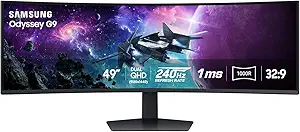
This monitor redefines the ultrawide experience with a 49-inch curved screen, providing unparalleled immersion for both work and entertainment, especially when compared to smaller or less curved options like the Samsung Viewfinity S65UA. Its 240Hz refresh rate and 1ms GTG response time offer ultra-smooth visuals, ideal for fast-paced gaming and demanding multitasking. The high 1000-nit peak brightness and HDR1000 support deliver exceptional contrast and color depth, making it suitable for creative professionals who need detailed visuals. Its VESA compatibility and ergonomic stand allow flexible placement, but its enormous size and weight may limit placement options and require a dedicated space. The high price reflects its premium features, making it less suitable for casual users. This is the ultimate choice for power users who want a large, immersive display for both gaming and productivity, but it’s overkill for standard office tasks.
- Pros: Massive 49-inch curved display, 240Hz and 1ms response, HDR1000 with stunning contrast, AMD FreeSync Premium Pro
- Cons: Very large and heavy, expensive, may require a dedicated space and strong mounting options
Verdict: The best ultrawide for those seeking an immersive, high-performance experience for both work and gaming, with considerable space requirements.
Pros:- Enormous 49-inch curved display for maximum immersion
- High 240Hz refresh rate and 1ms response for smooth visuals
- Peak HDR brightness of 1000 nits for vivid contrast
- Multiple connectivity options and VESA compatibility
Cons:- Requires substantial desk space and a sturdy mount
- Very high cost may be prohibitive for most users
- Size and curve reduce placement flexibility
Best for: Enthusiasts and professionals wanting the largest, most immersive ultrawide for multitasking, creative work, and gaming.
Not ideal for: Users with limited desk space or those seeking a more modest, space-efficient monitor for basic tasks.
- Display Size:49 Inches
- Aspect Ratio:32:9
- Resolution:5120×1440
- Refresh Rate:240 Hz
- Response Time:1 ms
- HDR:DisplayHDR 1000
Bottom line: The ultimate ultrawide for users who demand immersive size and high-end performance, but not for those with space or budget constraints.

How We Picked
I selected these monitors based on a combination of performance, usability, build quality, and value for remote work. Key criteria included screen size and resolution, color accuracy, ergonomic features, and connectivity options. Monitors with flexible adjustments and reliable build quality ranked higher, while models with advanced features like HDR or USB-C were favored for professional tasks. The ranking reflects the balance between affordability and premium features, aiming to guide different types of buyers—from casual remote workers to professionals needing precise color reproduction.Factors to Consider When Choosing Best Ultrawide Monitor For Work From Home
When choosing an ultrawide monitor for work from home, consider how size, resolution, and features align with your daily tasks. Larger screens increase productivity but require ample desk space. Higher resolution ensures sharper images, especially when multitasking or working with detailed visuals. Ergonomics and adjustability can reduce fatigue during long hours, so look for height, tilt, and swivel options. Connectivity options like USB-C simplify cable management and device compatibility. Lastly, assess your budget against desired features, as premium models often deliver better color and build quality but at a higher cost.Size and Resolution
Size impacts how much you can see simultaneously, which is vital for multitasking. A 34-inch ultrawide with 3440×1440 resolution strikes a good balance for most home offices, providing ample space without overwhelming the desk. Larger 40-inch or 49-inch models offer even more workspace but demand significant desk real estate and may be harder to fit into smaller rooms. Resolution should match size; at 3440×1440, the image remains sharp on 34-inch screens, but on larger displays, consider higher resolutions like 3840×1600 or 5120×1440 for crisp visuals. Choosing the right size and resolution can prevent eye strain and improve workflow efficiency.
Color Accuracy and HDR
If you work with visuals, color fidelity matters. Monitors with high sRGB and DCI-P3 coverage deliver more accurate colors, crucial for creative professionals. HDR support, especially HDR10, enhances contrast and brightness, making images more vivid and easier to interpret. However, these features tend to increase cost and may be unnecessary for basic tasks like document editing. For most work-from-home users, a balance of decent color accuracy and HDR support provides excellent value without overspending. Avoid models with poor coverage or no HDR if color is part of your workflow.
Ergonomics and Adjustability
Extended work hours demand good ergonomic features. Monitors with adjustable height, tilt, and swivel help maintain proper posture and reduce neck strain. Curved screens can also lessen eye fatigue by providing a more natural viewing angle, especially on larger displays. VESA compatibility allows mounting on adjustable arms, further customizing your setup. Neglecting ergonomics can lead to discomfort and long-term health issues, so prioritize models that offer flexible positioning and comfortable viewing angles.
Connectivity and Compatibility
Streamlined connectivity options like USB-C simplify cable management and enable single-cable setups for laptops. Multiple HDMI and DisplayPort inputs facilitate connecting multiple devices or peripherals. Built-in speakers, while not essential, can reduce clutter. Compatibility with your existing devices, especially laptops, should guide your choice—ensure the monitor supports your ports and includes features like Power Delivery if needed. Avoid models with limited ports or outdated connections that could hinder your workflow.
Budget and Value
There’s a wide range of ultrawide monitors, from budget-friendly options to high-end models. While spending more often yields better color accuracy, build quality, and additional features, determine what’s necessary for your work tasks. If your focus is basic productivity, a more affordable model might suffice. For creative or professional use, investing in a higher-end display can improve accuracy and reduce eye strain over time. Be mindful of hidden costs like calibration tools or mounting accessories that may be needed to optimize your setup.
Frequently Asked Questions
Is a curved ultrawide monitor better for work from home compared to flat screens?
Curved ultrawide monitors often provide a more natural viewing experience by reducing distortions at the edges and creating a more immersive workspace. This can lead to less eye strain during extended use, especially on larger screens. However, curved screens may not be suitable for all desk setups or personal preferences—some find flat screens easier to position and align with multiple monitors. Ultimately, the choice depends on your workspace size and comfort preferences, but for many, the curve enhances focus and reduces fatigue.
Are high refresh rates necessary for work from home monitors?
While high refresh rates like 120Hz or 144Hz are essential for gaming, they are less critical for typical work tasks. Standard 60Hz to 100Hz refresh rates are sufficient for productivity, video conferencing, and multitasking. Higher refresh rates can make the interface feel smoother, but they do not directly impact productivity unless you use your monitor for fast-paced tasks or video editing. Investing in a higher refresh rate may not be necessary unless your workflow benefits from ultra-smooth motion.
Should I prioritize color accuracy over size?
For creative professionals working with photos, videos, or design, color accuracy takes precedence. A monitor with high sRGB and DCI-P3 coverage ensures your work appears consistent across devices and prints. However, larger size and higher resolution improve overall productivity by allowing more windows to be open simultaneously. For general office tasks, a good balance of size and decent color coverage is sufficient. Determine your primary use—if color matters most, invest in calibration and professional-grade panels.
Is a 34-inch ultrawide enough, or should I go for larger models?
A 34-inch ultrawide is a popular choice for most home offices, offering ample workspace without overwhelming your desk. If your tasks involve multitasking or multiple applications, it provides enough real estate for efficient workflow. Larger models like 40-inch or 49-inch displays provide even more space but require significant room and higher budgets. Consider your desk size and how much visual real estate you need; for many, 34-inch hits the sweet spot between usability and manageability.
What is the most important feature for a work-focused ultrawide monitor?
The most critical feature depends on your specific needs, but generally, a combination of resolution, ergonomics, and connectivity ranks highest. High resolution ensures sharp visuals, while adjustable stands help prevent fatigue. Good connectivity options, especially USB-C, streamline your setup and reduce cable clutter. Prioritizing these features creates a comfortable, efficient workspace that adapts to your workflow and minimizes distractions or discomfort during long work sessions.
Conclusion
For most remote workers, the LG 34SR60QC-W offers excellent versatility, blending productivity and entertainment features at a reasonable price, making it the best overall pick. Professionals who need precise color and HDR support should consider the SAMSUNG ViewFinity S50GC for its color accuracy and professional-grade display. The SAMSUNG 49” Odyssey G9 suits power users requiring maximum screen real estate, though it comes at a premium. Beginners or those with limited space will find the Samsung 34″ Essential S3 a practical entry-level choice. For those seeking ultimate immersion and multitasking, the ultra-wide and curved displays like the Odyssey G7 and G9 stand out, but ensure your workspace can accommodate their size. Ultimately, matching the monitor to your work style and budget is key to creating a productive home office setup.
Halloween Picks
halloween
As an affiliate, we earn on qualifying purchases.