
Finding the best firewall appliance for home lab networks involves balancing performance, flexibility, and ease of use. The Protectli Vault V1610 stands out as the best overall because of its robust hardware and expandability. For those prioritizing security features without complexity, the Firewalla Purple SE offers smart protection with easy setup. Meanwhile, the FortiGate-60F provides enterprise-grade capabilities for advanced users willing to invest more. The main tradeoffs in this category include balancing cost against features, and simplicity versus customization. Continue reading for a detailed breakdown of each option and help in making your choice.
Key Takeaways
- Performance hardware like Intel N6005 and i7 CPUs deliver reliable throughput for home lab environments.
- Modular designs with multiple NICs support complex network setups and VLAN segmentation.
- Security-focused appliances like Fortinet offer enterprise-grade features suitable for advanced users.
- Ease of setup and management varies significantly, with some appliances requiring more technical expertise.
- Price range is broad; investing more typically yields better hardware and advanced features, but not always necessary for casual labs.


More Details on Our Top Picks
Protectli Vault V1610-6 Port, Micro Appliance/Mini PC – Intel N6005, 6X 2.5G NICs, 16GB LPDDR RAM on-Board, 32GB eMMC on-Board, 500GB NVMe SSD
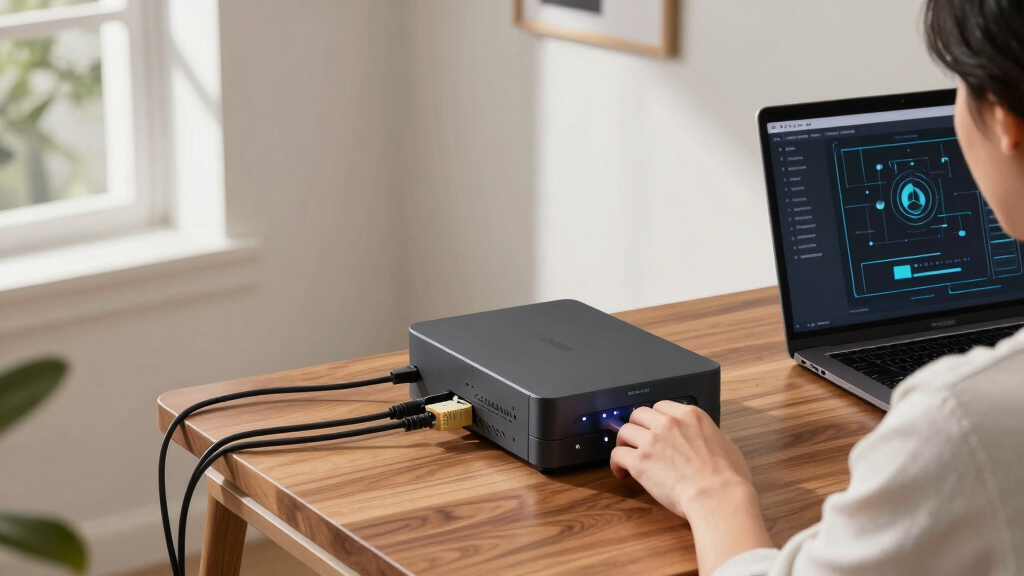
This compact and versatile device stands out for its robust network capabilities, with 6 Intel I226-V 2.5G NICs enabling high-speed internal traffic, making it ideal for large home labs with multiple containers, including AI workloads. Compared to the FortiGate-40F, it offers greater customization flexibility, especially in open-source firewall setups, though it lacks integrated security features out of the box. Its on-board 16GB RAM and NVMe SSD ensure smooth performance under heavy load, but the absence of pre-installed OS means additional setup time. This pick makes the most sense for users comfortable with Linux or OPNsense who want a silent, energy-efficient, high-throughput platform with extensive port options.
Pros:- Six 2.5G NICs provide exceptional internal bandwidth for containerized environments.
- On-board 16GB RAM and NVMe SSD support heavy workloads and fast data access.
- Compact, silent design fits easily into a home lab rack.
Cons:- Requires manual OS installation and configuration, which may be daunting for beginners.
- Lacks integrated security features, relying on external firewall software.
Best for: Home lab builders needing maximum port density and configurability for complex network setups.
Not ideal for: Users seeking an all-in-one security appliance with pre-installed security services and minimal setup.
- Processor:Intel N6005 Quad Core 2.0 GHz
- Ports:6 x 2.5G NICs, 4 x USB 3.2, 1 x USB-C, HDMI
- Memory:16GB LPDDR4
- Storage:32GB eMMC, 500GB NVMe SSD
- Dimensions:5.6 x 4.75 x 2.15 inches
- Weight:1.81 pounds
Bottom line: This device is perfect for tech-savvy users who want a high-performance, customizable firewall platform for demanding home labs.
Firewalla: Cyber Security Firewall for Home & Business, Protect Network from Malware and Hacking | Smart Parental Control | Block Ads | VPN Server and Client | No Monthly Fee (Purple SE)
This device excels as an all-in-one security solution with built-in intrusion prevention, parental controls, ad blocking, and VPN features, making it ideal for families and small offices. Compared to the Protectli, it offers a simple setup with a user-friendly app and integrated security, though it doesn’t provide the same high port density or customizable open-source options. Its 3GB RAM and limited IPS throughput (500 Mbps) make it less suitable for heavy internal traffic or complex lab environments but perfect for straightforward network protection. This pick makes the most sense for those who want hassle-free security and control with minimal configuration effort, especially in mixed device households.
Pros:- User-friendly app simplifies setup and management.
- Built-in intrusion prevention and parental controls enhance security.
- No monthly fees make it cost-effective long-term.
Cons:- Limited IPS throughput may bottleneck high-traffic scenarios.
- Fewer ports and limited customization restrict use in complex lab environments.
- Requires compatible router setup and may have compatibility issues.
Best for: Small home users or parents wanting a plug-and-play security device with parental controls and ad blocking.
Not ideal for: Advanced home lab builders requiring extensive port options or open-source firewall customization.
- Processor:Custom hardware
- Memory:3 GB RAM
- Connectivity:1 x LAN, Wi-Fi
- Throughput:500 Mbps IPS
- Features:Parental controls, ad block, VPN
- OS:Proprietary Firewalla OS
Bottom line: Ideal for families seeking straightforward, comprehensive network protection without complex setup or high port demands.
FortiGate-40F Firewall Appliance – 5 Gigabit Ethernet RJ45 Ports, Ideal for Small Businesses (Appliance Only, No Subscription) (FG-40F)
Compared to the Protectli, the FortiGate-40F offers built-in security features, including up to 1 Gbps IPS throughput and Fortinet’s threat intelligence, making it a strong choice for security-focused home labs or small businesses. Its compact, fanless design allows for quiet operation, while the 5 Gigabit ports provide ample connectivity options. The device’s pre-installed FortiOS simplifies deployment, but it’s less flexible for open-source customization, and its higher cost reflects its enterprise-grade security capabilities. This makes it suitable for users who prioritize security and ease of management over port density or open-source flexibility.
Pros:- Pre-installed FortiOS ensures quick deployment with enterprise features.
- High threat protection throughput and integrated security services.
- Compact, fanless design minimizes noise and space.
Cons:- Limited port flexibility compared to open-source solutions.
- No included subscription services may increase long-term costs for advanced features.
- Higher price point for a device with fewer ports than open hardware.
Best for: Home lab operators prioritizing integrated security with enterprise-grade threat protection and simplified management.
Not ideal for: DIYers seeking extensive open-source firewall customization or maximum port density for containerized environments.
- Ports:5 x Gigabit RJ45
- Throughput:1 Gbps IPS, 600 Mbps threat
- Form Factor:Fanless desktop
- OS:FortiOS
- Size:Compact
- Security:Integrated FortiGuard threat intelligence
Bottom line: Great for security-conscious users wanting enterprise-grade protection in a straightforward, compact package.
FortiGate-30G Firewall for Small Offices with 4 Gigabit Ethernet RJ45 Ports (FG-30G)
Compared to the Protectli, the FortiGate-30G simplifies deployment with zero-touch setup and includes integrated SD-WAN and Wi-Fi management, making it suitable for small business environments. Its 4 Gigabit ports are adequate for basic network segmentation, but it offers lower port density than the Protectli, which limits flexible internal network design in more complex setups. The device delivers up to 800 Mbps IPS throughput, making it capable for small offices with moderate traffic, though it lacks open-source customization options. This makes it ideal for users who want a secure, managed solution with integrated wireless and SD-WAN features, without extensive manual configuration.
Pros:- Zero-touch deployment accelerates setup.
- Integrated SD-WAN and Wi-Fi controller reduce complexity.
- High security throughput suitable for small offices.
Cons:- Limited port options for complex internal segmented networks.
- Less open-source flexibility compared to Protectli devices.
- No subscription services included, which might increase costs for advanced features.
Best for: Small office users seeking an all-in-one security appliance with SD-WAN and Wi-Fi management included.
Not ideal for: Home lab builders or users needing high port density or open-source firewall flexibility.
- Ports:4 x Gigabit RJ45
- Throughput:800 Mbps IPS
- Form Factor:Compact
- OS:FortiOS
- Wi-Fi:Built-in
- Features:SD-WAN, wireless controller
Bottom line: Excellent for small businesses wanting a secure, managed, all-in-one appliance with minimal setup effort.
FortiGate-60F Firewall Appliance – 10 Gigabit Ethernet RJ45 Ports, Includes DMZ, WAN & Internal Ports (Appliance Only, No Subscription) (FG-60F)
The FortiGate-60F stands out for its extensive connectivity options and high throughput, making it ideal for users who need a robust security appliance with enterprise-grade features. Its 10 GE ports, including dedicated WAN and DMZ interfaces, outperform smaller models like the FortiGate-40F, providing greater flexibility for complex home lab setups. The hardware-accelerated firewalling and advanced security features, supported by FortiOS, ensure top-tier threat protection with minimal latency. Compared to the Fanless Mini PC, the 60F offers a more straightforward, managed security solution, though it does come with a higher power draw and complexity. This device makes the most sense for experienced hobbyists or professionals aiming for enterprise-like performance at home, but those seeking a simple, low-power setup may find it overkill.
Pros:- 10 Gbps total port bandwidth supports multiple high-speed connections
- Excellent threat protection with integrated IPS and SSL inspection
- Supports SD-WAN and advanced routing protocols like BGP and OSPF
- User-friendly GUI with SSH access for detailed management
Cons:- Higher power consumption at around 21W, increasing operational costs
- IPv6 interfaces are not configurable via GUI, requiring CLI setup
- No included subscription, leading to additional costs for full threat intelligence services
Best for: Advanced home lab enthusiasts who require high throughput, multiple VLANs, and enterprise security features.
Not ideal for: Beginners or users with limited networking experience, as the configuration and management are more complex.
- Ports:10 Gigabit Ethernet RJ45
- Total throughput:1.4 Gbps IPS
- Security features:IPS, SSL Inspection, Threat Intelligence
- Routing protocols:BGP, OSPF
- Power consumption:21W
- Management:GUI, SSH
Bottom line: This appliance is ideal for experienced users demanding high performance and advanced security features in a home lab environment.
Fanless Firewall Appliance 6X Intel i226 LAN Mini PC Intel N3710 4C/4T,8G DDR3 128G mSATA SSD, Network Gateway Soft Router Test with P-F-Sense/OPN-Sense AES NI HD/Type-C/SIM Card/TF/Wi-Fi
The Fanless Mini PC with Intel N3710 is a compact, silent option suited for users who want a space-efficient, low-power firewall node. Its fanless design, combined with a small footprint of just over 5 inches, makes it perfect for mounting behind a monitor or within a tight home lab rack. While it doesn’t match the high throughput of the FortiGate-60F, its 6 Intel i226 2.5GbE ports provide sufficient bandwidth for most home lab scenarios, especially when running open-source firewall software like pfSense or OPNsense. Compared to the FortiGate-60F, it lacks enterprise security features and advanced routing protocols but offers excellent flexibility for DIY enthusiasts who prefer Linux-based or open-source solutions. Its low power draw of just 6W and VESA compatibility make it ideal for those wanting a quiet, energy-efficient device for basic firewall and routing tasks.
Pros:- Fanless design ensures silent operation and low heat output
- Compact size with VESA mount, ideal for space-limited setups
- Supports multiple open-source firewall OSes like pfSense/OPNSense
- Low power consumption at only 6W
Cons:- Limited to moderate throughput, not suitable for very high traffic loads
- Lacks enterprise security features, relying on open-source solutions for security
- No built-in Wi-Fi or advanced hardware acceleration
Best for: Home lab users with limited space who prioritize silent operation and open-source flexibility.
Not ideal for: Users needing enterprise-grade security or high throughput for multiple heavy connections.
- CPU:Intel N3710 4C/4T
- Network ports:6 x Intel i226 2.5GbE
- RAM:8GB DDR3
- Storage:128GB mSATA SSD
- Power:6W
- Size:5.27 x 4.98 x 1.43 inches
- Design:Fanless, VESA mount
Bottom line: This mini PC is best suited for space-conscious home lab users who prefer open-source firewall solutions without the need for enterprise features.

How We Picked
Products were selected based on their hardware capabilities, expandability, ease of use, and suitability for home lab environments. We prioritized appliances with reliable performance, flexible network interfaces, and good build quality. Cost was a consideration, but we focused on value for features rather than just lowest price. Devices that cater to different skill levels and use cases were included to help a broad range of home lab enthusiasts. The ranking reflects a balance of performance, versatility, and user-friendliness tailored for home networks.Factors to Consider When Choosing Best Firewall Appliance For Home Lab Networks
Choosing the best firewall appliance for your home lab involves several factors that impact usability, security, and future-proofing. Beyond hardware specs, consider how much control you want over configurations, your familiarity with network management, and your budget. Making the right choice can prevent frustration and ensure your network remains secure and scalable as your needs grow.Performance and Hardware Capabilities
The core of a good firewall is its hardware. Look for appliances with multi-core processors and sufficient RAM to handle your expected traffic volume and future expansion. Devices with multiple gigabit ports support complex network setups, VLANs, and VPNs without bottlenecks. Avoid underpowered units if you plan to run multiple security features or increase network load over time.
Expandability and Network Interfaces
Flexibility in port count and type is key for a scalable home lab. Devices with multiple NICs or support for PCIe expansion allow you to tailor your network topology, such as segregating traffic or creating dedicated management networks. Consider your current and future network design—over-specifying can lead to unnecessary costs, but under-specifying limits growth.
Security Features and Firmware Support
Advanced security features like intrusion detection, VPN support, and threat mitigation can vary widely. Appliances from established vendors like Fortinet or pfSense-based solutions often provide more granular control and regular firmware updates. For less experienced users, ease of management and clear documentation are equally important to maintain security without hassle.
Ease of Setup and Management
Some appliances come with user-friendly interfaces and preconfigured profiles, making setup straightforward for beginners. Others offer extensive customization options suited for advanced users but require more technical knowledge. Think about your comfort level—investing in a simpler device can save time and reduce frustration, while experienced users may want the control that complex systems provide.
Cost and Long-Term Value
Home labs range from budget-friendly options to high-end appliances. Cheaper units may lack features or performance needed for larger or more complex networks, leading to potential bottlenecks or security gaps. Conversely, higher-priced appliances often include enterprise-grade features and longer support cycles. Balance your current needs with potential future requirements to avoid unnecessary upgrades or costs.
Frequently Asked Questions
Can I use a consumer router as a firewall in a home lab?
While consumer routers often include basic firewall features, they typically lack the advanced security controls, VLAN support, and configurability needed for a robust home lab. Using dedicated appliances provides better segmentation, customization, and performance. If your lab requires sophisticated network management or security, investing in a dedicated firewall appliance is generally a better choice.
Is a more expensive firewall appliance worth it for a home lab?
Not always. If your home lab’s primary goal is learning or testing simple setups, a budget-friendly device might suffice. However, if you plan to simulate enterprise environments, experiment with complex network topologies, or require high throughput and security features, investing more can provide significant benefits. Balance your current needs with potential growth to decide if the higher cost is justified.
Do I need a rackmount firewall for my home lab?
Rackmount appliances are common in professional environments but are often overkill for most home labs. Compact, mini PC-based firewalls like the Protectli Vault or fanless mini PCs can deliver excellent performance without taking up much space. If your setup is limited in space or you prefer simplicity, a small form factor device can be just as capable.
How important is firmware update support for my firewall?
Regular firmware updates are vital for security and stability. Devices from reputable vendors tend to provide consistent updates that patch vulnerabilities and improve functionality. Choosing a device with active support ensures your home lab remains protected against emerging threats and compatible with evolving network standards.
Should I prioritize hardware specs or security features when choosing a firewall?
Both are important, but the best approach balances performance with security capabilities. High-performance hardware ensures smooth operation under load, while robust security features protect your network from threats. For most home labs, a device with decent hardware and comprehensive security options offers the best overall value. Prioritize based on your specific use case—security-focused setups benefit from advanced features, while basic testing may only need decent hardware.
Conclusion
For general home lab users seeking a balance of ease and power, the Protectli Vault V1610 makes an excellent choice as the best overall pick. If security and enterprise features are your priority, the FortiGate-60F offers advanced capabilities for a higher price. Budget-conscious hobbyists will find the Firewalla Purple SE provides solid protection without complexity. Beginners should consider simpler, plug-and-play options, while advanced users needing extensive customization might prefer modular, rackmount solutions. Match your selection to your technical comfort, network complexity, and future plans to get the best fit for your home lab in 2026.