
Finding the best laser printer for home office documents involves balancing print quality, speed, ease of use, and overall value. The Brother DCP-L2640DW stands out as the top choice for its reliable performance and versatile features, making it ideal for everyday document printing, copying, and scanning. The Canon imageCLASS MF3010 offers a compact, affordable option for those with limited space, while the HP LaserJet Pro MFP 3101sdw provides a robust all-in-one experience for busy home offices. Each of these options has tradeoffs, such as higher upfront costs versus ongoing savings, or multifunction capabilities versus simplicity. Continue reading for the full breakdown to find the best fit for your home office needs.

Get business pricing on tech for your team
- Business-only prices and quantity discounts
- Tax-exempt purchasing
- Multiple users, one account, clear invoices
Key Takeaways
- The top models balance print speed and quality, with most offering fast monochrome output suitable for frequent document printing.
- Multifunction features like scanning and copying are common in higher-ranked options, but often come with increased price and complexity.
- Wireless and mobile printing capabilities are standard in the best models, providing flexibility for various devices and setups.
- Print volume and cost per page are critical considerations; models with higher duty cycles tend to be more durable and cost-effective over time.
- Compact design and ease of setup distinguish beginner-friendly options from more advanced, feature-rich models.
| Brother DCP-L2640DW Wireless Monochrome Multi-Function Printer, Copy, Scan, Duplex, Mobile Printing |  | Best Overall for Small Home Offices | Print Speed: up to 36 ppm | Scan Speed: up to 23.6/7.9 ipm | Auto Document Feeder: 50 pages | VIEW LATEST PRICE | See Our Full Breakdown |
| Canon imageCLASS MF3010 VP Monochrome Laser Printer with Scanner and Copier |  | Best for Budget-Conscious Users with Space Constraints | Printer Type: Monochrome Laser | Functions: Print, Scan, Copy | Print Speed: 19 PPM | VIEW LATEST PRICE | See Our Full Breakdown |
| HP LaserJet Pro MFP 3101sdw Wireless Black and White All-in-One Laser Printer |  | Best for Small Teams Needing Speed and Duplexing | Print Speed: up to 35 ppm | Functions: Print, Scan, Copy | Auto Duplex: Yes | VIEW LATEST PRICE | See Our Full Breakdown |
| HP LaserJet MFP M234sdw Wireless Printer, Print, Scan, Copy, Fast Speeds, Easy Setup, Mobile Printing |  | Best for Small Teams Needing Secure Wireless Printing | Print Speed: up to 30 ppm | Functions: Print, Scan, Copy | Auto Document Feeder: Yes | VIEW LATEST PRICE | See Our Full Breakdown |
| Brother HL-L2405W Wireless Monochrome Laser Printer with Mobile Printing |  | Best for Home Users Who Need Speed and Large Paper Capacity | Print Speed: 30 pages per minute | Connectivity: Wi-Fi (dual-band), USB | Paper Capacity: 250 sheets | VIEW LATEST PRICE | See Our Full Breakdown |
| Brother HL-L2460DW Wireless Monochrome Laser Printer with Duplex and Mobile Printing |  | Best Overall for Home Office Documents | Print Speed: 36 pages per minute | Connectivity: Wi-Fi (2.4GHz/5GHz), Ethernet, USB | Paper Capacity: 250 sheets | VIEW LATEST PRICE | See Our Full Breakdown |
| Brother MFC-L2820DW Wireless Monochrome All-in-One Laser Printer | 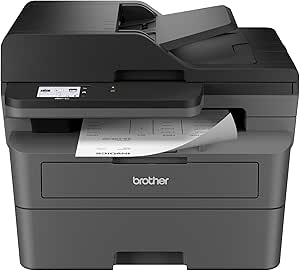 | Best for Small Offices Needing Multi-functionality | Print Speed: 36 ppm | Scan Speed: 23.6/7.9 ipm | Auto Document Feeder: 50 pages | VIEW LATEST PRICE | See Our Full Breakdown |
| laser printer for home office document | Print Speed | Connectivity | Functions |
|---|---|---|---|
| Brother DCP-L2640DW Wireless M | up to 36 ppm | Wireless (2.4GHz / 5GHz), Ethernet, USB | Print, Scan, Copy |
| Canon imageCLASS MF3010 VP Mon | 19 PPM | USB | Print, Scan, Copy |
| HP LaserJet Pro MFP 3101sdw Wi | up to 35 ppm | Wireless | Print, Scan, Copy |
| HP LaserJet MFP M234sdw Wirele | up to 30 ppm | Wi-Fi, Ethernet | Print, Scan, Copy |
| Brother HL-L2405W Wireless Mon | 30 pages per minute | Wi-Fi (dual-band), USB | — |
| Brother HL-L2460DW Wireless Mo | 36 pages per minute | Wi-Fi (2.4GHz/5GHz), Ethernet, USB | — |
| Brother MFC-L2820DW Wireless M | 36 ppm | Wireless (2.4GHz/5GHz), Ethernet, USB | — |
More Details on Our Top Picks
Brother DCP-L2640DW Wireless Monochrome Multi-Function Printer, Copy, Scan, Duplex, Mobile Printing
The Brother DCP-L2640DW stands out as the best choice for small home offices needing a versatile, space-saving device. Its fast print speed of 36 ppm and efficient scanning make it well-suited for frequent document handling, especially compared to the slower Canon MF3010 at just 19 ppm. The wireless and Ethernet connectivity options mean you can easily share it across multiple devices without cluttering your workspace. However, its monochrome-only output limits its usefulness if color printing becomes necessary, and it lacks automatic duplexing, which could trip up users seeking maximum convenience. This model makes the most sense for users prioritizing speed, multifunctionality, and compactness in a single device, with a focus on black-and-white documents.
Pros:- Fast print and scan speeds enhance productivity
- Compact design fits small spaces easily
- Multiple connectivity options including wireless and Ethernet
- Mobile printing support via Brother Mobile Connect app
Cons:- Limited to monochrome output only
- No automatic duplex printing
Best for: Small home office users who need fast, multifunction printing without color
Not ideal for: Users requiring color printing or automatic duplexing for high-volume document workflows
- Print Speed:up to 36 ppm
- Scan Speed:up to 23.6/7.9 ipm
- Auto Document Feeder:50 pages
- Connectivity:Wireless (2.4GHz / 5GHz), Ethernet, USB
- Functions:Print, Scan, Copy
Our verdict“This printer is ideal for small offices prioritizing speed and multifunctionality in a compact form.”
Canon imageCLASS MF3010 VP Monochrome Laser Printer with Scanner and Copier
The Canon imageCLASS MF3010 VP offers a straightforward, budget-friendly solution for those who need basic monochrome printing combined with scanning and copying. Its 19 PPM speed is adequate for low to moderate workloads, especially when compared with the faster Brother DCP-L2640DW. The compact size makes it suitable for very small setups, but its reliance solely on USB limits flexibility—no wireless means more cables and less convenience. The 150-sheet paper capacity is sufficient for light use but could be a bottleneck for higher-volume needs. This model makes the most sense for users who prioritize affordability, space efficiency, and basic functionality over speed and wireless features.
Pros:- Compact design ideal for small spaces
- Includes scanner and copier functions
- High toner yield of up to 2,300 pages
- Affordable upfront cost
Cons:- Limited to monochrome printing only
- No wireless connectivity, requiring USB connection
Best for: Budget-conscious home users with limited space needing basic multifunctionality
Not ideal for: High-volume or fast-paced offices where wireless connectivity and speed are critical
- Printer Type:Monochrome Laser
- Functions:Print, Scan, Copy
- Print Speed:19 PPM
- Toner Yield:2,300 pages
- Paper Capacity:150 sheets
- Connectivity:USB
Our verdict“This printer suits users seeking a low-cost, space-efficient monochrome multifunction device for light workloads.”
HP LaserJet Pro MFP 3101sdw Wireless Black and White All-in-One Laser Printer
The HP LaserJet Pro MFP 3101sdw shines for small teams requiring rapid black-and-white printing and reliable wireless connectivity. Its impressive speed of up to 35 ppm surpasses many competitors like the Canon MF3010, and the automatic duplex feature promotes efficiency and paper savings. Its 250-sheet input tray supports moderate workloads without frequent refills, making it well-suited for busy small offices. Yet, it only prints in black and white, which could be a limitation for users needing color. Also, its compatibility is restricted to HP chips or circuitry cartridges, which might increase ongoing costs. This pick is tailored for small teams that prioritize speed, duplexing, and seamless wireless integration.
Pros:- Fast printing speeds of up to 35 ppm
- Automatic duplex printing saves paper
- Large 250-sheet input tray for high-volume tasks
- Reliable wireless connectivity
Cons:- Limited to black-and-white printing
- Designed primarily for small teams, not larger offices
Best for: Small teams or home offices with frequent monochrome printing needs and a focus on productivity
Not ideal for: Large offices or users needing color printing or budget-friendly options
- Print Speed:up to 35 ppm
- Functions:Print, Scan, Copy
- Auto Duplex:Yes
- Input Tray Capacity:250 sheets
- Connectivity:Wireless
- Color:Black and White
Our verdict“This all-in-one laser printer is perfect for small teams emphasizing speed and duplexing in a wireless setup.”
HP LaserJet MFP M234sdw Wireless Printer, Print, Scan, Copy, Fast Speeds, Easy Setup, Mobile Printing
The HP LaserJet MFP M234sdw is tailored for small teams that need secure, fast monochrome printing combined with mobile-friendly features. Its print speeds of up to 30 ppm and dual-band Wi-Fi ensure it keeps pace with small workgroups, comparable to the Brother HL-L2405W but with added security features. The automatic document feeder and mobile printing options make it easier to handle multi-page documents and print from various devices, including AirPrint and Chromebook. However, it shares the monochrome limitation, and its feature set is geared toward small teams, making it less suitable for larger or color-dependent tasks. This machine makes the most sense for users valuing security, speed, and mobile connectivity in a compact package.
Pros:- Fast speeds of up to 30 ppm
- Secure built-in security features
- Wireless and mobile printing capabilities
- Auto document feeder simplifies multi-page tasks
Cons:- Limited to monochrome printing
- Designed mainly for small teams, not larger scale use
Best for: Small professional teams prioritizing security, speed, and mobile printing capabilities
Not ideal for: Large offices or users requiring color output or high-volume printing
- Print Speed:up to 30 ppm
- Functions:Print, Scan, Copy
- Auto Document Feeder:Yes
- Connectivity:Wi-Fi, Ethernet
- Security:Built-in security features
Our verdict“This printer is best for small teams that need secure, fast monochrome printing with simple mobile setup.”
Brother HL-L2405W Wireless Monochrome Laser Printer with Mobile Printing
The Brother HL-L2405W is a dependable choice for home users who want a balance of speed and capacity. With a solid 30 ppm print rate, it matches the speed of the HP MFP 3101sdw but offers a straightforward, no-frills experience focused on monochrome printing. Its 250-sheet paper tray reduces the need for frequent refills, making it well-suited for high-volume tasks. Its wireless and USB connectivity provide flexible printing options, and mobile printing via Brother Mobile Connect makes it easy to print from smartphones and tablets. The main tradeoff is its lack of scanner or copier functions, limiting its versatility for those who need all-in-one features. This model is ideal for users who primarily print large volumes of black-and-white documents at home or in small offices.
Pros:- Fast printing speed of 30ppm
- Large 250-sheet paper tray for high volume
- Wireless and USB connectivity options
- Mobile print support via app
Cons:- Only supports monochrome printing
- Lacks scanning and copying functions
Best for: Home users or small offices needing high-volume monochrome printing with mobile support
Not ideal for: Users needing multifunction capabilities like scanning or copying
- Print Speed:30 pages per minute
- Connectivity:Wi-Fi (dual-band), USB
- Paper Capacity:250 sheets
- Printer Type:Monochrome laser
- Warranty:1 year limited
Our verdict“This printer suits those who prioritize fast, high-volume black-and-white printing with simple wireless setup.”
Brother HL-L2460DW Wireless Monochrome Laser Printer with Duplex and Mobile Printing
The Brother HL-L2460DW stands out as the best overall choice for home offices focused on document printing. Its impressive speed of 36 pages per minute ensures quick turnaround for large batches, surpassing many competitors like the Brother HL-L2405W, which is slower and less feature-rich. The automatic duplex printing feature not only saves time but also reduces paper costs, making it ideal for users with frequent printing needs. Its wireless and Ethernet options provide flexible connectivity, while mobile support via the Brother Mobile Connect app makes printing from smartphones effortless. The main tradeoff is its monochrome-only output, which limits use cases to black-and-white documents. The manual feed slot, though useful for specialty media, can be slightly less convenient for high-volume tasks. Best suited for small teams or home users who prioritize speed and cost efficiency.
Pros:- Fast printing speed of 36 ppm ensures quick document output
- Wireless and Ethernet connectivity offers flexible setup options
- Automatic duplex printing reduces paper use and saves time
- Supports mobile printing via dedicated app
Cons:- Limited to monochrome printing; not suitable for color needs
- Manual feed slot may be less convenient for high-volume specialty printing
Best for: Small home office users needing fast, reliable black-and-white printing with wireless flexibility
Not ideal for: Users requiring color printing or those who print infrequently and prefer simpler, less expensive models
- Print Speed:36 pages per minute
- Connectivity:Wi-Fi (2.4GHz/5GHz), Ethernet, USB
- Paper Capacity:250 sheets
- Automatic Duplex Printing:Yes
- Supported Paper Types:Envelopes, specialty paper
Our verdict“This model is perfect for small offices or home users who need fast, cost-effective black-and-white document printing with easy connectivity.”
Brother MFC-L2820DW Wireless Monochrome All-in-One Laser Printer
The Brother MFC-L2820DW excels as a compact, versatile solution for small offices that require printing, scanning, copying, and faxing in one device. Its 36 ppm speed is comparable to the HL-L2460DW, but the added scanning and copying functionalities make it a more comprehensive choice for multitasking. The 50-page auto document feeder streamlines workflows, especially for scanning or copying multi-page documents. Its user-friendly 2.7-inch touchscreen simplifies operation, and the wireless and Ethernet options enable seamless integration into shared office networks. Unlike the HL-L2460DW, it offers more functionality, but the tradeoff is a slightly larger footprint and higher toner costs, especially if frequent replacements are needed without a subscription. This makes it ideal for small teams that need a reliable all-in-one device. Best suited for small offices or home workers who need more than just printing capabilities.
Pros:- All-in-one functionality including scan, copy, and fax
- Fast print and scan speeds enhance productivity
- Auto document feeder simplifies handling multiple pages
- Intuitive touchscreen interface for easy operation
Cons:- Limited to monochrome output, no color printing
- Frequent toner replacements may increase ongoing costs without a subscription
- Slightly larger footprint compared to single-function printers
Best for: Small businesses or home offices needing integrated printing, copying, scanning, and faxing with easy management
Not ideal for: Users who only need simple printing or are very space-constrained, as it takes up more room than single-function models
- Print Speed:36 ppm
- Scan Speed:23.6/7.9 ipm
- Auto Document Feeder:50 pages
- Touchscreen:2.7 inches
- Connectivity:Wireless (2.4GHz/5GHz), Ethernet, USB
Our verdict“This device is ideal for small offices requiring a multifunction printer that balances speed with comprehensive document management.”

How We Picked
The products in this roundup were evaluated based on performance, ease of use, build quality, and value for home office users. We prioritized printers offering reliable black-and-white printing with fast speeds, as most home office documents are monochrome. Additional factors included multifunctionality (print, scan, copy), wireless connectivity, and upfront costs versus ongoing expenses like toner. Models were ranked to reflect a balance between affordability and features, with special attention to user-friendliness for non-technical users. This approach ensures that each recommended printer suits different needs, whether for casual use or more frequent, volume-heavy printing.Factors to Consider When Choosing Best Laser Printer For Home Office Documents
Choosing the right laser printer for your home office involves several key considerations beyond just brand and price. Understanding these factors helps avoid common pitfalls like overpaying for unnecessary features or selecting a model that can’t handle your workload. Here are the main points to keep in mind:Print Speed and Volume
Assess your typical printing volume to select a model with an appropriate duty cycle and speed. For occasional printing, slower but more affordable models suffice, but high-volume users should prioritize faster printers with higher duty cycles to avoid frequent jams or maintenance issues. This balance helps prevent frustration and keeps workflow smooth.
Multifunctionality
If you need to scan, copy, or fax regularly, look for an all-in-one model. However, be aware that multifunction printers often come with a higher price tag and potentially more complex setups. Decide whether these extra features justify the cost and complexity based on your specific needs.
Connectivity Options
Wireless capabilities are now standard in most models, but ensure the printer supports your preferred connection types—Wi-Fi, Ethernet, or mobile printing. Compatibility with your devices can save hours of setup frustration and improve overall workflow.
Cost of Consumables
Consider toner prices and page yields. Cheaper toner cartridges might save money upfront but could be less efficient or require more frequent replacements. A higher initial investment in a model with lower cost per page can pay off over time, especially for frequent printing.
Size and Placement
For home offices with limited space, compact models or those with a small footprint are preferable. Also, consider ease of access for replacing toner and paper, as inconvenience can lead to delays or skipped maintenance.
Ease of Use and Setup
Look for models with straightforward setup procedures and user-friendly interfaces. For users less comfortable with technology, intuitive controls and clear instructions can make a significant difference in overall satisfaction.
Frequently Asked Questions
How do I determine the right print speed for my home office?
Print speed is measured in pages per minute (PPM). If you print only a few pages occasionally, a slower model might suffice. However, if you regularly print large documents or multiple copies daily, choosing a printer with a higher PPM rating — typically above 30 — can save time and prevent bottlenecks. Matching the printer’s speed to your workload ensures efficiency without overspending on unnecessary capacity.
Are multifunction printers worth the extra cost?
Multifunction printers combine printing, scanning, copying, and sometimes faxing in one device, which can be highly convenient for a busy home office. While they tend to cost more upfront, they can eliminate the need for multiple devices, saving space and money in the long run. However, they may also introduce more points of potential failure or complexity, so consider whether you regularly need all these features before choosing one.
What is the true cost of running a laser printer?
The ongoing expenses include toner cartridges, drum units, and maintenance. Toner costs vary widely, so calculating the cost per page based on yield is wise. Higher-yield cartridges typically offer a lower cost per page, making them more economical for frequent printing. Budget models with cheaper toner may seem attractive initially but can end up costing more over time.
Should I prioritize wireless connectivity or a wired connection?
Wireless connectivity offers greater flexibility, especially if multiple devices or family members need to access the printer without cluttering your workspace. However, a wired Ethernet connection can provide more stable, faster printing in some setups and is less prone to interference. For most home offices, wireless is sufficient and more convenient, but wired connections are better for high-volume or latency-sensitive tasks.
How important is print resolution for home office documents?
For standard text documents, a resolution of 600 dpi is generally adequate, providing clear and sharp output. Higher resolutions are mainly necessary for detailed graphics or professional-quality presentations. Since most home office printing involves basic documents, prioritizing speed and cost-efficiency over ultra-high resolution makes sense unless you frequently print graphics or images.
Conclusion
For most home office users, the Brother DCP-L2640DW offers a balanced mix of speed, multifunctionality, and ease of use, making it the best overall choice. Those prioritizing affordability and simplicity should consider the Canon imageCLASS MF3010, especially if space is limited. For users with higher volumes or who need robust all-in-one capabilities, the HP LaserJet Pro MFP 3101sdw is a solid premium pick. Beginners or those with minimal technical experience will benefit most from models with straightforward setup and intuitive controls, while advanced users might focus on models with lower running costs and higher duty cycles. Ultimately, your specific needs and budget will determine the best fit.Fall Picks
fall essentials
As an affiliate, we earn on qualifying purchases.