
This checklist is for people building an AI automation workflow and choosing storage and network gear for its data. The right setup depends on what you need to keep, where you need to access it, and how your devices connect.

Get business pricing on tech for your team
- Business-only prices and quantity discounts
- Tax-exempt purchasing
- Multiple users, one account, clear invoices
The sections are organized by equipment type: portable and network storage, power protection, removable media, and networking. Each pick has a focused role, so consider how it fits with the rest of your setup.
Use the notes to check capacity, connection, and compatibility against your own devices and workflow before buying. Confirm supported interfaces, operating systems, and any management or security requirements for your specific environment.
Portable SSD
A portable SSD can serve as working storage on the go for files you need to move between compatible devices. Before choosing one, check that its capacity suits the material you expect to carry and that the connection works with your computer or other intended host. A drive’s capacity alone does not confirm compatibility with every device or workflow.
A common mistake is to assume that a portable drive automatically fits every use: verify the required cable or port, operating-system support, and whether your workflow needs encryption or another security feature. Also consider how the drive will be carried and stored. Keep a separate copy of important data, since a portable drive is still a single storage device and can be misplaced or damaged.
The SanDisk 8TB Extreme Portable SSD is the pick in this slot. Confirm its current specifications and connection requirements against your devices, and decide whether its portable form and listed capacity match the files you plan to access away from your main setup.
What to look for:
- Confirm the host device supports the drive’s connection
- Check operating-system and file-system compatibility
- Match capacity to the files you plan to carry
- Verify whether your workflow requires encryption
- Plan a separate backup for important files
SanDisk 8TB Extreme Portable SSD

The SanDisk 8TB Extreme Portable SSD offers high-speed NVMe performance with up to 1050MB/s read and 1000MB/s write speeds. It features rugged durability with drop, water, and dust resistance, along with password protection and a 5-year warranty, making it ideal for active lifestyles and professional use.
Pros:
- High-speed data transfer with up to 1050MB/s read and 1000MB/s write speeds
- Rugged design with drop, water, and dust resistance for durability
- Includes password protection with 256-bit AES encryption for security
- Compact and portable, ideal for travel and on-the-go use
Cons:
- Performance may vary depending on host device and conditions
- Limited to USB 3.0 and USB 3.2 Gen 2 connectivity, may require compatible ports
- Price not specified, which could be a consideration for budget-conscious buyers
Best for: People who need portable storage for compatible devices.
Not ideal for: Setups that need shared, always-connected storage.
Bottom line: Choose it when portable SSD storage and the listed capacity suit your devices and workflow.
Network Attached Storage
A NAS can provide a shared storage point for devices and workflows on a network. Before choosing one, identify who or what needs access, how it will connect to your network, and what storage configuration your workflow requires. The product name identifies an eight-bay model, but it does not by itself establish which drives, software, or network setup will meet your needs.
A frequent buying mistake is treating the enclosure’s bay count as a complete storage plan. Check drive compatibility, supported configurations, setup requirements, and the network interfaces needed by your computers and other equipment. Consider where the NAS will sit and how you will manage access. A shared location can simplify access, but it should not be treated as the only copy of important data.
The UGREEN NAS DXP8800 Plus 8-Bay Enterprise-Grade Network Attached Storag is the listed pick. Its product name appears truncated, so confirm the exact model and current specifications before buying. Check that its drive support, network connections, and management features fit your environment and that you have a separate backup plan.
What to look for:
- Confirm the exact model name and specifications
- Check supported drives and storage configurations
- Match network interfaces to your existing equipment
- Review setup, access, and management requirements
- Plan a separate backup of important NAS data
UGREEN NAS DXP8800 Plus 8-Bay Enterprise-Grade Network Attached Storage
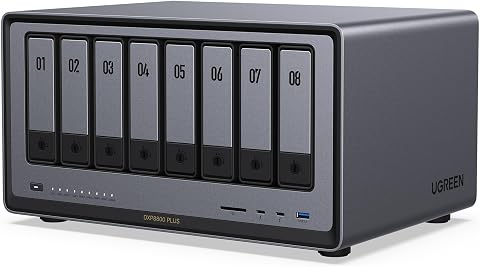
The UGREEN NAS DXP8800 Plus is a high-performance 8-bay storage solution designed for demanding businesses, offering up to 272TB capacity, dual 10GbE ports, and robust security features. It supports multiple operating systems, RAID configurations, and virtualization for efficient data management and collaboration.
Pros:
- High storage capacity up to 272TB for large data needs
- Fast data transfer with dual 10GbE ports and aggregation
- Supports multiple RAID levels for data protection
- Compatible with various operating systems and third-party drives
Cons:
- Drives are not included and must be purchased separately
- Limited to wired Ethernet connections, no Wi-Fi support
- Speed may vary depending on network and hardware setup
Best for: Teams or setups that need network-accessible storage.
Not ideal for: Anyone who needs a simple drive without network setup.
Bottom line: Verify the full model and configuration before making it your shared storage hub.
Uninterruptible Power Supply
A UPS is intended to provide battery backup and surge protection for connected equipment. For an automation setup, first list the devices you want to connect and check their power requirements. Compare the combined load with the UPS rating, and decide which equipment needs backup during an outage versus which devices can shut down safely.
A common mistake is relying on the VA figure alone or assuming a UPS will keep every connected device running for a particular length of time. Check both the listed wattage and VA rating, the number and type of outlets, and the manufacturer’s guidance for runtime at your expected load. Confirm the plug and outlet arrangement works in your location, and leave room for the equipment’s actual power draw.
The GoldenMate 1500VA/1200W Lithium UPS Battery Backup & Surge Protector is the pick for this category. Verify the current specifications, battery and maintenance guidance, and outlet details for your setup. Connect only the equipment you intend to protect, and make sure the load remains within the unit’s stated limits.
What to look for:
- Add up the wattage of intended connected devices
- Check both VA and wattage ratings
- Confirm outlet types and available connections
- Review runtime guidance at your expected load
- Follow the manufacturer’s battery and maintenance instructions
GoldenMate 1500VA/1200W Lithium UPS Battery Backup & Surge Protector, Gray

The GoldenMate UPS uses a LiFePO4 battery pack (51.2 V, 5.8 Ah) that delivers over 10 years of life and more than 3,000 charge cycles, eliminating the need for regular replacements. It provides 1500 VA/1200 W pure sine wave output with Automatic Voltage Regulation, eight widely spaced NEMA outlets, and front‑panel USB‑C/A charging ports, all monitored by an LCD display.
Pros:
- LiFePO4 battery offers >10‑year lifespan and >3,000 charge cycles
- 1500 VA/1200 W pure sine wave output with AVR protects sensitive equipment
- Eight widely spaced outlets plus USB‑C/A charging ports for versatile connectivity
- LCD display provides real‑time monitoring and mute/LCD off control
Cons:
- Heavy at 15 kg and relatively large footprint
- Only supports 90–140 V AC input; generator power may not be recognized
Best for: Setups that need backup power for selected equipment.
Not ideal for: Devices whose combined load exceeds the stated limits.
Bottom line: Choose it only after confirming the intended equipment fits its power and outlet specifications.
External Hard Drive
An external hard drive can provide separate removable storage for files or backup copies. For this pick, check the capacity against the data you plan to store and verify that its USB connection works with the host devices you intend to use. If you need to move files between systems, confirm the supported operating systems and file-system requirements first.
A common mistake is assuming that a security certification or product label automatically satisfies a particular organization’s policy. The product name identifies this drive as FIPS Level 3 validated and hardware-based, but verify the exact model, validation details, and any required management process against your own security requirements. Also plan how the drive will be stored, who can access it, and how you will maintain another copy of important data.
The Apricorn 5TB Aegis Fortress L3 FIPS Level 3 Validated USB 3.0 Hardware is the listed pick. Its name appears incomplete, so confirm the full product name and current specifications. Check the USB 3.0 connection, capacity, and security details for compatibility with your devices and policies before relying on it.
What to look for:
- Confirm the full product name and exact model
- Check USB connection and host compatibility
- Match the listed capacity to your backup needs
- Verify validation details against your organization’s policy
- Plan secure storage and another copy of critical files
Apricorn 5TB Aegis Fortress L3 FIPS Level 3 Validated USB 3.0 Hardware Encrypted

The Apricorn Aegis Fortress L3 is a rugged, 5 TB portable hard drive with full NIST FIPS‑140‑2 Level 3 validation. It provides on‑the‑fly AES‑XTS 256‑bit hardware encryption, two read‑only modes and brute‑force defense without requiring any software or drivers.
Pros:
- Full FIPS Level 3 validation for high security compliance
- Rugged aircraft‑grade aluminum enclosure
- No software/driver installation required; works on any USB‑enabled system
- Built‑in brute‑force defense with crypto‑erase and two read‑only modes
Cons:
- Relatively heavy for a portable drive at 16 oz
- 5400 rpm spindle speed limits performance compared to SSDs
- Advanced configuration requires separate Apricorn Aegis Configurator software (sold separately)
Best for: People whose workflow calls for a hardware-encrypted external drive.
Not ideal for: Anyone whose devices or policies do not support its connection or security approach.
Bottom line: Check the exact model and validation details against your devices and requirements.
USB Flash Drive
A USB flash drive offers removable storage in a compact format for compatible devices. Consider what files you intend to carry, which computers will need to read them, and how often the drive will move between locations. Confirm that the connection and supported operating systems fit every device in your planned workflow.
One common mistake is treating a hardware-encrypted drive as compatible with every security policy or computer. Check how the device is unlocked and managed, whether its controls work in your environment, and what happens if a user forgets access details. The product name lists a 2TB capacity, but confirm the current product specifications and make sure the actual usable storage meets your needs.
The Apricorn Aegis Padlock 2TB Hardware-Encrypted Portable External Hard D is the pick for this slot. The supplied name is truncated, so verify the complete model and its connection type before purchase. Decide whether you need this removable format for transfer or a separate copy, and keep important files backed up elsewhere.
What to look for:
- Confirm the complete model name and connection type
- Check compatibility with each intended host device
- Verify the unlocking and management process
- Match usable capacity to the files you plan to carry
- Keep another copy of important data
Apricorn Aegis Padlock 2TB Hardware-Encrypted Portable External Hard Drive

This portable 2TB drive uses 256-bit AES XTS hardware encryption and an integrated keypad for PIN-based access. It connects over USB 3.0, requires no software or administrator rights, and supports up to five user PINs plus an administrator PIN.
Pros:
- Hardware encryption with keypad-based PIN access
- Works without software installation or administrator rights
- Compatible with PC, Mac, and USB-enabled operating systems
- Rugged design with epoxy coating and brute-force self-destruct feature
Cons:
- Uses a rotating 5400 rpm hard drive
- Requires PIN entry through the integrated keypad
Best for: People who need removable storage for compatible devices.
Not ideal for: Workflows that require shared or permanently connected storage.
Bottom line: Verify the full model and security workflow before using it to carry sensitive files.
Ethernet Switch
An Ethernet switch connects compatible wired devices on a local network. For an AI automation setup, map the computers, storage, and other equipment that need wired connections, then check which ports and network speeds each device supports. The switch’s product name identifies a ten-port multi-gigabit model, but confirm the exact port mix and capabilities in its current specifications.
A frequent mistake is buying based on the headline speed or port count without checking the devices and cabling at both ends. A connection can only use capabilities supported across the connected equipment and cabling. Review whether you need managed features, how the switch will be configured, and whether its physical size and power arrangement suit the intended location.
The NETGEAR MS510TXM 10-Port 10G Multi-Gigabit Smart Managed Switch is the pick in this category. Confirm its specific port speeds, management features, and compatibility with your router, storage, and network adapters. Check that you have appropriate cables and a plan for configuring the network before adding the switch to a working setup.
What to look for:
- Map the devices that need wired network connections
- Match port speeds to the connected equipment
- Confirm the exact port mix and supported features
- Check whether managed features fit your network needs
- Verify cable types and configuration requirements
NETGEAR MS510TXM 10-Port 10G Multi-Gigabit Smart Managed Switch

The NETGEAR MS510TXM is a smart managed switch with eight Multi-Gigabit Ethernet ports and two 10G SFP+ fiber ports. It supports multiple connection speeds, remote management through NETGEAR Insight for one year, and desktop or rack mounting; its fanless design provides silent operation.
Pros:
- Supports connection speeds up to 10 Gbps
- Auto-negotiating ports work with existing Cat5e or Cat6 cables
- Fanless design operates silently
- Supports desktop and rack mounting
Cons:
- Only eight ports are RJ-45 Ethernet ports
- Remote management subscription is included for one year
Best for: Setups connecting several compatible wired devices.
Not ideal for: Networks that do not need additional wired ports or management.
Bottom line: Match the switch’s ports, speeds, and management features to your actual network equipment.
Start with the core need in your workflow: storage for active files, shared access, removable copies, reliable power for selected gear, or more wired connections. Confirm device compatibility and requirements first, then add supporting equipment that fits the setup. Keep a separate copy of important data as part of your backup plan.
You can build this setup one compatible piece at a time. Check full model names where the supplied product names are truncated, review current specifications, and choose the equipment that solves a real need in your workflow. A clear plan makes it easier to maintain and expand your data setup.