Finding the best all-in-one printer for automated document workflows requires balancing speed, reliability, and cost. The Epson EcoTank ET-4800 stands out for its cartridge-free design and high-volume capacity, making it ideal for busy offices. The Brother MFC-L5915DW offers fast monochrome printing with robust scanning features suitable for high-volume tasks. Meanwhile, the Canon PIXMA TR8620a provides versatile connectivity and user-friendly features for smaller teams or home offices. Each of these options presents tradeoffs around upfront cost, maintenance, and feature set. Continue reading for the full breakdown to find the best fit for your workflow needs.

Get business pricing on tech for your team
- Business-only prices and quantity discounts
- Tax-exempt purchasing
- Multiple users, one account, clear invoices
Key Takeaways
- The top picks balance speed, automation features, and cost-effectiveness, with the Epson EcoTank leading in volume capacity.
- Laser-based models like the Brother MFC-L5915DW excel in high-volume, monochrome workflows, but may lack color versatility.
- Connectivity and automation features, such as wireless and mobile printing, are crucial for seamless workflows and vary widely among models.
- Higher upfront investment often correlates with better durability, faster printing, and advanced automation options.
- Choosing the right printer depends heavily on specific workflow needs, volume, and whether color printing or monochrome is prioritized.
| Epson EcoTank ET-4800 Wireless All-in-One Cartridge-Free Supertank Printer with Scanner, Copier, Fax, ADF, Ethernet, White |  | Best Overall for Automated Document Workflows | Printer Type: All-in-One | Connectivity: Wireless, Ethernet | Color: White | VIEW LATEST PRICE | See Our Full Breakdown |
| Brother MFC-L5915DW All-in-One Monochrome Laser Printer with Scanner and Copier |  | Best for High-Speed, Heavy-Duty Text Document Workflows | Print Speed: 50 ppm | Auto Document Feeder Capacity: 70 pages | Toner Cartridge: TN920UXXL, 18,000 pages | VIEW LATEST PRICE | See Our Full Breakdown |
| Canon PIXMA TR8620a All-in-One Printer with Wireless Connectivity and Alexa Integration |  | Best for Versatile Home Office with Voice Control | Printer Type: Inkjet | Functions: Print, Copy, Scan, Fax | Print Speed: 15 pages per minute (black & white) | VIEW LATEST PRICE | See Our Full Breakdown |
| Canon PIXMA TR7120 Wireless Color Inkjet Printer, Duplex Printing, White |  | Best Compact Versatile Printer for Light Document Work | Printer Type: Wireless Color Inkjet | Functions: Print, Scan, Copy | Connectivity: Wi-Fi | VIEW LATEST PRICE | See Our Full Breakdown |
| Canon PIXMA TR4720 All-in-One Wireless Printer, Home Use with Auto Document Feeder, Mobile Printing and Built-in Fax |  | Best for Compact, Basic Home Office Automation | Printer Type: Inkjet | Functions: Print, Copy, Scan, Fax | Wireless: Yes | VIEW LATEST PRICE | See Our Full Breakdown |
| Brother MFC-L8930CDW Business Color Laser All-in-One Printer with Duplex Print, Scan, Copy, Security, and Wireless Connectivity |  | Best Overall for High-Demand Business Environments | Print Speed: up to 33 ppm | Scan Speed: up to 104 ipm | Auto Document Feeder: 80 pages | VIEW LATEST PRICE | See Our Full Breakdown |
| HP OfficeJet Pro 9730 Wide-Format Wireless All-in-One Color Inkjet Printer |  | Best for Wide-Format, High-Volume Color Printing | Print Speed (Black): 22 ppm | Print Speed (Color): 18 ppm | Maximum Print Size: 11×17 inches | VIEW LATEST PRICE | See Our Full Breakdown |
| Brother MFC-L9570CDW Wireless Color Laser All-in-One Printer |  | Best for High-Speed, Large-Volume Laser Workflows | Print Speed: 33 ppm | Scan Speed: 52 ipm simplex, 104 ipm duplex | Auto Document Feeder: 80 pages | VIEW LATEST PRICE | See Our Full Breakdown |
| Canon imageCLASS MF753Cdw Wireless Duplex Color Laser Printer, All-in-One with Scanner, Copier, Fax, Auto Document Feeder, Mobile Ready, 3-Year Warranty, 35 PPM, White |  | Best for Medium-Sized Business Color Laser Automation | Printer Type: Laser | Functions: Print, Scan, Copy, Fax | Print Speed: 35 ppm | VIEW LATEST PRICE | See Our Full Breakdown |
| HP OfficeJet Pro 9135 Wireless All-in-One Color Inkjet Printer |  | Best for Versatile Office Color Printing on a Budget | Print Speed: 25 ppm black, 20 ppm color | Paper Capacity: 500 sheets | Touchscreen: 4.3-inch color | VIEW LATEST PRICE | See Our Full Breakdown |
| HP Envy 6155 Wireless All-in-One Color Inkjet Printer, Print, Scan, Copy, Duplex Printing |  | Best for Budget-Conscious Home Users | Print Speed (Black): 10 ppm | Print Speed (Color): 7 ppm | Input Tray Capacity: 100 sheets | VIEW LATEST PRICE | See Our Full Breakdown |
| HP OfficeJet Pro 9125 Wireless All-in-One Color Inkjet Printer |  | Best for Small Office Environments Needing Speed and Security | Print Speed: 22 ppm black, 18 ppm color | Input Tray Capacity: 250 sheets | Touchscreen: 2.7-inch color touchscreen | VIEW LATEST PRICE | See Our Full Breakdown |
| Kyocera ECOSYS MA4000cix Multifunction Color Laser Printer, 42 ppm |  | Best for High-Volume, High-Quality Color Printing in Larger Workgroups | Print Speed: 42 ppm | Output Resolution: 1200 x 1200 dpi | Scanner Type: ADF and flatbed | VIEW LATEST PRICE | See Our Full Breakdown |
| HP OfficeJet Pro 8125 Wireless All-in-One Color Inkjet Printer | 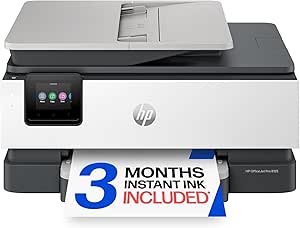 | Best for Home Offices with Moderate Speed and Security Needs | Print Speed (Black): up to 20 ppm | Print Speed (Color): up to 10 ppm | Paper Capacity: 225 sheets | VIEW LATEST PRICE | See Our Full Breakdown |
| all-in-one printer for automated document workflow | Connectivity | Print Speed |
|---|---|---|
| Epson EcoTank ET-4800 Wireless | Wireless, Ethernet | — |
| Brother MFC-L5915DW All-in-One | Gigabit Ethernet, Dual-band WiFi | 50 ppm |
| Canon PIXMA TR8620a All-in-One | — | 15 pages per minute (black & white) |
| Canon PIXMA TR7120 Wireless Co | Wi-Fi | — |
| Canon PIXMA TR4720 All-in-One | — | — |
| Brother MFC-L8930CDW Business | Dual-band Wi-Fi, Gigabit Ethernet | up to 33 ppm |
| HP OfficeJet Pro 9730 Wide-For | Wireless, dual-band Wi-Fi | — |
| Brother MFC-L9570CDW Wireless | Wireless, NFC, Ethernet | 33 ppm |
| Canon imageCLASS MF753Cdw Wire | Wireless, Mobile, Network | 35 ppm |
| HP OfficeJet Pro 9135 Wireless | Wireless, dual-band Wi-Fi | 25 ppm black, 20 ppm color |
| HP Envy 6155 Wireless All-in-O | — | — |
| HP OfficeJet Pro 9125 Wireless | Wireless, dual-band Wi-Fi | 22 ppm black, 18 ppm color |
| Kyocera ECOSYS MA4000cix Multi | Ethernet, USB | 42 ppm |
| HP OfficeJet Pro 8125 Wireless | Wireless, dual-band Wi-Fi | — |
More Details on Our Top Picks
Epson EcoTank ET-4800 Wireless All-in-One Cartridge-Free Supertank Printer with Scanner, Copier, Fax, ADF, Ethernet, White
The Epson EcoTank ET-4800 stands out for its cartridge-free, high-capacity ink tanks that drastically reduce ongoing supply costs—a key advantage over traditional cartridge printers like the Canon PIXMA TR8620a. Its wireless and Ethernet connectivity support seamless integration into automated workflows, especially when paired with its scanner, copier, and fax functions. While the initial investment is higher, the long-term savings on ink and maintenance make it appealing for busy offices managing large document volumes. Its size may be a consideration for limited space, but its eco-friendly operation and high-quality sharp text ensure it’s well-suited for continuous document processing.
Pros:- Eco-friendly with cartridge-free, high-capacity ink tanks
- High-quality, sharp text and vibrant color printing
- Includes scanner, copier, fax, and Ethernet connectivity
Cons:- Higher initial cost compared to cartridge-based printers
- Large footprint may require significant space
Best for: Small to medium home offices or remote teams needing cost-effective, high-volume document handling without frequent cartridge replacements
Not ideal for: Users requiring color printing or compact setups, as its size and focus on monochrome efficiency may be limiting
- Printer Type:All-in-One
- Connectivity:Wireless, Ethernet
- Color:White
- Features:Cartridge-Free, High-Capacity Ink Tanks, Scanner, Copier, Fax, ADF
Our verdict“This pick is ideal for offices that prioritize low ongoing costs and eco-friendly operation in their automated workflows.”
Brother MFC-L5915DW All-in-One Monochrome Laser Printer with Scanner and Copier
Compared with the Epson ET-4800, the Brother MFC-L5915DW excels in speed, offering up to 50 pages per minute, making it ideal for high-volume document processing. Its large 70-page auto document feeder and high-yield toner cartridges significantly improve efficiency in busy offices. While it’s monochrome-only, this focus on black-and-white printing ensures sharp, fast output for text-heavy workflows—especially suitable for legal, administrative, or technical documents. However, its bulk and complex setup can be disadvantages for smaller or less tech-savvy environments. If color isn’t required, this laser model offers a compelling balance of speed, volume, and security features.
Pros:- Fast print and copy speeds of up to 50 ppm
- High-volume, 70-page auto document feeder
- Flexible connectivity including Ethernet and dual-band WiFi
- High-yield toner reduces ongoing costs
Cons:- Limited to monochrome printing, not suitable for color needs
- Large size may require dedicated space
- Setup complexity may challenge some users
Best for: Corporate or legal offices needing rapid, high-volume monochrome document workflows with robust security
Not ideal for: Small businesses or home users needing color printing or more compact equipment
- Print Speed:50 ppm
- Auto Document Feeder Capacity:70 pages
- Toner Cartridge:TN920UXXL, 18,000 pages
- Connectivity:Gigabit Ethernet, Dual-band WiFi
Our verdict“This model is best for high-demand environments prioritizing speed, security, and monochrome volume efficiency.”
Canon PIXMA TR8620a All-in-One Printer with Wireless Connectivity and Alexa Integration
The Canon PIXMA TR8620a offers a flexible solution for home offices that need both document handling and occasional photo printing, with wireless and Alexa voice command capabilities. Its auto duplex printing and 200-sheet capacity streamline routine document workflows, making it a solid alternative to the Epson or Brother models for smaller, less volume-intensive tasks. While its print speed is modest, the high-resolution output and voice control make it convenient for occasional use. The larger size and higher ink costs may be downsides for tight spaces or budget-conscious setups. It’s a good fit for users seeking smart connectivity and multi-functionality in a single device.
Pros:- Wireless printing and scanning with Alexa voice control
- Auto duplex printing reduces paper usage
- High-resolution photo printing for versatile use
Cons:- Relatively large and heavy for small desks
- Limited to a single USB port
- Potentially high ink costs over time
Best for: Small teams or home users who want a combination of voice control, high-quality printing, and auto duplex features
Not ideal for: Workplaces with high-volume or color-intensive workflows where speed and volume matter more
- Printer Type:Inkjet
- Functions:Print, Copy, Scan, Fax
- Print Speed:15 pages per minute (black & white)
- Maximum Print Resolution:4800 x 1200 dpi
- Additional Features:Auto duplex, Alexa integration
Our verdict“This model suits users who value flexibility, voice control, and multi-functionality in a home or small office setting.”
Canon PIXMA TR7120 Wireless Color Inkjet Printer, Duplex Printing, White
The Canon PIXMA TR7120 offers a budget-friendly, compact solution for home users who need quality color printing alongside scanning and copying. Its auto document feeder and duplex printing make it more efficient than single-function printers like the Canon PIXMA TR4720. However, its slower speed and smaller media capacity limit its suitability for heavier workflows or large volumes. Its small OLED display is easy to operate but may be less visible in bright environments. Compared to the Epson ET-4800, it lacks the large ink tanks and eco-friendly focus but makes up for affordability and versatility for occasional document automation.
Pros:- Affordable, versatile all-in-one functionality
- High-quality, vibrant color output
- Easy setup with mobile printing options
- Compact size suitable for small spaces
Cons:- Limited media size support
- Smaller OLED display less visible in bright light
- Slower print speeds compared to professional models
Best for: Home users needing a versatile, space-saving printer with good color quality and auto duplexing
Not ideal for: Offices with high-volume or fast-paced document workflows requiring speed and larger media handling
- Printer Type:Wireless Color Inkjet
- Functions:Print, Scan, Copy
- Connectivity:Wi-Fi
- Display:1.42-inch Monochrome OLED
- Auto Document Feeder:Yes
Our verdict“This printer is well-suited for light, occasional document workflows in compact home environments.”
Canon PIXMA TR4720 All-in-One Wireless Printer, Home Use with Auto Document Feeder, Mobile Printing and Built-in Fax
The Canon PIXMA TR4720 is designed for small, budget-conscious home offices that value simplicity and wireless convenience. Its auto document feeder and auto duplex printing help automate basic document workflows, but its slower speed and limited capacity are less suitable for larger volumes. While it offers the essential features for casual use, it falls behind more robust models like the Epson ET-4800 or Brother MFC-L5915DW in handling demanding workflows. Its small footprint and straightforward operation make it appealing for limited space, though ongoing ink costs and slow speed are potential drawbacks for more intensive document handling.
Pros:- Wireless printing, scanning, and faxing
- Auto duplex printing saves paper
- Compact size and easy to load 100-sheet tray
Cons:- Slow print speed for high-volume tasks
- Limited features without advanced office functions
- Costly ink cartridges for frequent use
Best for: Small home offices or individuals needing basic automation in a compact, easy-to-use device
Not ideal for: High-volume or fast-paced workflows requiring speed and large capacity
- Printer Type:Inkjet
- Functions:Print, Copy, Scan, Fax
- Wireless:Yes
- Auto Document Feeder:Yes
- Paper Capacity:100 sheets
Our verdict“This printer fits light, casual document automation needs where space and simplicity are priorities.”
Brother MFC-L8930CDW Business Color Laser All-in-One Printer with Duplex Print, Scan, Copy, Security, and Wireless Connectivity
The Brother MFC-L8930CDW stands out as the best choice for teams that prioritize speed, security, and robust connectivity. Its rapid print speed of up to 33 ppm and high-speed duplex scanning make it ideal for automated workflows that demand quick turnaround. Compared with the Brother MFC-L9570CDW, it offers a slightly more compact footprint but sacrifices some advanced features like NFC. Its security suite, including NFC card reader, is a significant advantage for sensitive documents. However, the high toner costs and large size could be drawbacks for smaller or budget-conscious offices. The setup complexity might also challenge less tech-savvy users, but overall, this model delivers professional-grade performance for demanding environments.
Pros:- High-quality color and black printing at fast speeds
- Advanced security with NFC authentication
- Flexible wireless and wired connectivity
Cons:- Expensive toner replacements over time
- Large physical footprint requiring significant space
- Complex setup process for some users
Best for: Large teams in need of fast, secure, and reliable color printing with high-volume scanning.
Not ideal for: Small or budget-sensitive offices due to its size and maintenance costs.
- Print Speed:up to 33 ppm
- Scan Speed:up to 104 ipm
- Auto Document Feeder:80 pages
- Touchscreen:7-inch color
- Connectivity:Dual-band Wi-Fi, Gigabit Ethernet
- Security:Triple Layer Security, NFC card reader
Our verdict“This printer is best suited for high-demand, security-conscious offices that need speed and reliability.”
HP OfficeJet Pro 9730 Wide-Format Wireless All-in-One Color Inkjet Printer
The HP OfficeJet Pro 9730 excels in delivering high-quality wide-format color prints, making it well-suited for offices that need to handle larger documents efficiently. Its ability to print up to 11×17 inches and a fast speed of 18 ppm in color makes it ideal for creative or technical workflows. Unlike the laser-focused Brother models, this inkjet offers versatile mobile printing and a user-friendly 4.3-inch touchscreen. Its larger paper capacity (500 sheets) supports automated document handling, but the tradeoff is its bulkiness, which could be cumbersome in smaller spaces. Additionally, reliance on ink subscriptions may lead to ongoing costs, but for those prioritizing wide-format capabilities, it offers compelling value.
Pros:- High-quality wide-format color printing
- Fast print speeds with duplex scanning
- Large paper capacity supports automation
Cons:- Requires ongoing ink subscription for savings
- Bulky design limits placement options
- Some features depend on internet connectivity
Best for: Design teams or technical offices needing large-format color printing with automation-friendly features.
Not ideal for: Small offices with limited space or those seeking laser printing for high-volume monochrome tasks.
- Print Speed (Black):22 ppm
- Print Speed (Color):18 ppm
- Maximum Print Size:11×17 inches
- Paper Capacity:500 sheets
- Touchscreen:4.3-inch color
- Connectivity:Wireless, dual-band Wi-Fi
Our verdict“This printer is ideal for offices that need reliable, large-format color output with automated document workflows, despite its size and ongoing ink costs.”
Brother MFC-L9570CDW Wireless Color Laser All-in-One Printer
The Brother MFC-L9570CDW offers a compelling combination of speed, capacity, and feature set for busy offices that handle large volumes of color documents. Its impressive 33 ppm speed and duplex capabilities make it comparable to the Brother MFC-L8930CDW, but with a larger touch-enabled display for easier operation. Its high-resolution output, extensive paper input options, and multi-functionality (including fax) support complex automated workflows efficiently. The tradeoff is its weight—over 65 pounds—and a somewhat complex initial setup, which could be a hurdle for smaller firms. Nonetheless, if your priority is high-speed, high-capacity laser printing with automation, this model delivers.
Pros:- Fast printing and scanning speeds for busy environments
- High-resolution output and large paper capacity
- Multiple connectivity options including NFC and Ethernet
Cons:- Heavy and large footprint requiring substantial space
- Higher initial investment
- Setup can be complex for non-technical users
Best for: Large offices with high-volume, color laser printing needs and demanding document workflows.
Not ideal for: Small teams or offices with limited space due to its size and weight.
- Print Speed:33 ppm
- Scan Speed:52 ipm simplex, 104 ipm duplex
- Auto Document Feeder:80 pages
- Display:7″ Color Touchscreen
- Connectivity:Wireless, NFC, Ethernet
- Maximum Paper Input:250-sheet tray
Our verdict“This model is perfect for large, fast-paced offices needing high-volume laser printing with integrated automation features.”
Canon imageCLASS MF753Cdw Wireless Duplex Color Laser Printer, All-in-One with Scanner, Copier, Fax, Auto Document Feeder, Mobile Ready, 3-Year Warranty, 35 PPM, White
The Canon imageCLASS MF753Cdw offers a balanced approach to color laser automation, with a focus on ease of use and durability. Its 35 ppm speed and 5-inch touchscreen make it suitable for medium-sized offices that need reliable document processing. Compared with the Brother MFC-L8930CDW, it provides a longer warranty and slightly simpler setup, but it lacks some of the advanced security features like NFC card reading. Its high-capacity toner options help reduce downtime, yet its power consumption at 650 watts may raise concerns for energy-conscious offices. The device is well-suited for those who want a dependable, user-friendly machine for routine automated workflows without the highest speed or security features.
Pros:- Wireless and mobile printing capabilities
- High-capacity toner options for less maintenance
- User-friendly 5-inch touchscreen interface
Cons:- Relatively heavy at 48.5 pounds
- High power consumption
- Limited color resolution for detailed applications
Best for: Small to medium-sized businesses needing a reliable, easy-to-operate color laser for regular document workflows.
Not ideal for: Offices requiring top-tier security or the fastest print speeds in high-demand environments.
- Printer Type:Laser
- Functions:Print, Scan, Copy, Fax
- Print Speed:35 ppm
- Maximum Print Resolution:1200 x 1200 dpi
- Display:5-inch touchscreen
- Connectivity:Wireless, Mobile, Network
Our verdict“This printer is best for medium-sized offices seeking a dependable, straightforward color laser with solid automation features.”
HP OfficeJet Pro 9135 Wireless All-in-One Color Inkjet Printer
The HP OfficeJet Pro 9135 offers a compelling option for offices that value versatility and cost efficiency. Its 25 ppm black and 20 ppm color speeds are suitable for moderate document volumes, and its 4.3-inch touchscreen simplifies operation. While it doesn’t match the ultra-fast laser options like the Brother MFC-L9570CDW, it provides excellent wireless support and mobile printing, making it a practical choice for less intensive workflows. Its reliance on cartridges with circuitry similar to other HP models can lead to compatibility issues, and ongoing costs for ink subscriptions might add up over time. Still, for small teams or those prioritizing flexibility over raw throughput, this model is a well-rounded pick.
Pros:- Fast color printing for office needs
- Ease of use with a 4.3-inch touchscreen
- Wireless and mobile support
Cons:- Requires specific cartridges with HP circuitry
- Ongoing ink subscription costs
- Limited color resolution for detailed graphics
Best for: Small teams needing flexible, wireless color printing with basic automation.
Not ideal for: High-volume, fast-paced environments or offices with extensive security needs.
- Print Speed:25 ppm black, 20 ppm color
- Paper Capacity:500 sheets
- Touchscreen:4.3-inch color
- Connectivity:Wireless, dual-band Wi-Fi
- Features:Print, scan, copy, fax, auto duplex
- Recycled Content:Over 40%
Our verdict“This model suits small teams seeking affordable, flexible color printing with straightforward automation features.”
HP Envy 6155 Wireless All-in-One Color Inkjet Printer, Print, Scan, Copy, Duplex Printing
The HP Envy 6155 stands out for its user-friendly touchscreen and wireless capabilities, making it ideal for casual home workflows that don’t demand high-volume or rapid turnaround. Compared with the HP OfficeJet Pro 8125, it offers similar wireless features but at a lower price, though it sacrifices some speed and advanced security features. The Envy’s automatic duplex printing helps streamline double-sided document handling, but it relies on original HP cartridges with chips, which can add ongoing costs. Its 100-sheet input tray is sufficient for light use, but frequent large batch processing may feel limited. The inclusion of a 3-month Instant Ink trial offers cost savings initially, yet subscription fees may become an ongoing expense. This printer is best suited for individuals or small households with basic needs and a focus on ease of use, rather than high-speed or heavy-duty workflows.
Pros:- Easy-to-use 2.4-inch touchscreen interface
- Wireless and mobile printing capabilities
- Includes a 3-month Instant Ink trial for cost savings
- Automatic duplex printing to save time and paper
Cons:- Requires original HP cartridges with chips, which can be costly
- Limited to home or small office use, less durable for heavy workflows
- Ink subscription may lead to recurring expenses after trial
Best for: Casual home users or students needing simple, wireless color printing with minimal setup
Not ideal for: Small offices or professionals with high-volume printing needs, due to slower speeds and limited paper capacity
- Print Speed (Black):10 ppm
- Print Speed (Color):7 ppm
- Input Tray Capacity:100 sheets
- Touchscreen:2.4-inch color touchscreen
- Wireless Connectivity:Dual-band Wi-Fi
- Trial of Instant Ink:3 months
Our verdict“This is an affordable, user-friendly choice for light, casual printing in home environments.”
HP OfficeJet Pro 9125 Wireless All-in-One Color Inkjet Printer
The HP OfficeJet Pro 9125 is designed for busy workspaces, offering fast print speeds of up to 22 ppm black and 18 ppm color, which outpaces the Envy 6155 and supports larger document flows. Its 250-sheet paper capacity and auto document feeder make it more suited for continuous, multi-page jobs. The 2.7-inch touchscreen simplifies operation, while HP Wolf Pro Security enhances document confidentiality—an advantage over the Envy’s simpler features. Its recycled plastic content aligns with sustainability goals, but like the Envy, it depends on original HP cartridges with chips, raising ongoing costs. Compared to the 6155, the 9125’s higher speed and security make it a better fit for small offices with regular, high-volume tasks, though it’s less suitable for casual or infrequent users due to complexity and cost.
Pros:- Fast printing speeds suitable for office workflows
- Large 250-sheet input tray reduces reloading frequency
- Enhanced security features with HP Wolf Pro Security
- Eco-friendly design with recycled plastic content
Cons:- Requires original HP cartridges with chips, which can be costly
- Potential firmware restrictions on third-party cartridges
- More complex setup and management compared to home models
Best for: Small office teams or professionals needing fast, secure color printing with high capacity
Not ideal for: Home users with light printing demands or those seeking the lowest upfront cost, due to its larger size and higher running costs
- Print Speed:22 ppm black, 18 ppm color
- Input Tray Capacity:250 sheets
- Touchscreen:2.7-inch color touchscreen
- Connectivity:Wireless, dual-band Wi-Fi
- Security:HP Wolf Pro Security
- Recycled Content:More than 40% recycled plastic
Our verdict“This printer excels in high-volume, security-conscious office environments at the expense of simplicity and initial affordability.”
Kyocera ECOSYS MA4000cix Multifunction Color Laser Printer, 42 ppm
The Kyocera ECOSYS MA4000cix offers impressive speed at 42 ppm, making it suitable for rapid, large-volume tasks that would overwhelm inkjet models like the OfficeJet series. Its 7-inch touchscreen provides intuitive control, and the high resolution of 1200 x 1200 dpi ensures sharp, professional output—ideal for detailed documents or presentations. Unlike the HP OfficeJet Pro 9125, it relies on Ethernet and USB connectivity, lacking built-in Wi-Fi, which may restrict flexibility in small office setups. The single paper tray could be limiting in busy environments, and the higher upfront investment might be daunting for smaller teams. This model makes sense for organizations prioritizing speed, high-quality laser output, and durability over wireless convenience or cost efficiency for low-volume printing.
Pros:- Exceptional print speed at 42 ppm
- High-resolution output (1200 dpi) for professional quality
- User-friendly 7-inch touchscreen
- Versatile functions including copy and scan
Cons:- Limited paper capacity with only one tray
- No built-in wireless connectivity, less flexible in small setups
- Higher initial purchase cost and potentially higher maintenance expenses
Best for: Large workgroups or businesses needing fast, professional color output with high throughput
Not ideal for: Small offices or home users who prefer wireless setup or minimal initial investment, due to its connectivity and cost profile
- Print Speed:42 ppm
- Output Resolution:1200 x 1200 dpi
- Scanner Type:ADF and flatbed
- Connectivity:Ethernet, USB
- Touch Panel:7-inch color touchscreen
- Printer Type:Color laser
Our verdict“This laser multifunction printer is best for high-demand environments where speed and quality outweigh wireless convenience and initial affordability.”
HP OfficeJet Pro 8125 Wireless All-in-One Color Inkjet Printer
The HP OfficeJet Pro 8125 balances speed and security for home offices, offering up to 20 ppm black and 10 ppm color, which is adequate for daily document flows. Its 225-sheet capacity and auto duplex printing support productivity without frequent reloading. The 2.7-inch touchscreen simplifies operation, and built-in security features help protect sensitive information—an advantage over less secure models like the Envy 6155. Like the others, it depends on original HP cartridges with chips, which can be costly and may involve firmware updates that restrict third-party use. This model is well-suited for small office environments or professionals who need a reliable, secure, and moderately fast printer without the complexity of high-end enterprise features.
Pros:- Fast color printing suitable for home offices
- Large 225-sheet paper capacity
- Security features with HP Wolf Essential Security
- Wireless and mobile printing support
Cons:- Requires original HP cartridges with chips, potentially costly
- Firmware updates might restrict third-party cartridges
- Limited to moderate printing volume, not ideal for heavy workloads
Best for: Home office users seeking a secure, fast, and reliable all-in-one printer with moderate volume capacity
Not ideal for: High-volume or enterprise environments where faster speeds, larger paper capacity, or wireless flexibility are required, due to its size and speed limitations
- Print Speed (Black):up to 20 ppm
- Print Speed (Color):up to 10 ppm
- Paper Capacity:225 sheets
- Touchscreen:2.7-inch color touchscreen
- Connectivity:Wireless, dual-band Wi-Fi
- Security:HP Wolf Essential Security
Our verdict“This printer provides a solid balance of speed, security, and capacity tailored for small office or busy home use.”
How We Picked
Our evaluation focused on performance, ease of use, build quality, ongoing maintenance costs, and value for workflow automation. We prioritized printers that excel in automating document handling, such as automatic document feeders, duplex printing, and reliable wireless connectivity. Models were ranked based on throughput speed, cost per page, and compatibility with common office automation tools. We also considered user reviews for real-world reliability and support. This approach ensures that each selection offers a meaningful advantage in streamlining automated document workflows while balancing budget constraints.
Factors to Consider When Choosing Best All-in-one Printer For Automated Document Workflows
Choosing the best all-in-one printer for automated workflows involves more than just features; it requires understanding how those features translate into real productivity gains. Factors like speed, automation capabilities, and cost of operation shape the overall value. Here are key considerations to help you evaluate options beyond basic specs.Performance and Speed
In automation-heavy environments, speed matters. Look for printers with high pages-per-minute ratings and fast scan and copy times. A slow printer can become a bottleneck, offsetting the benefits of automation. Consider models with high-capacity trays and fast duplex printing to reduce manual interventions and keep workflows flowing smoothly.
Automation Features
Automatic document feeders (ADFs), duplex printing, and seamless mobile integration are essential for automation. These features reduce manual steps and enable batch processing, saving time. Evaluate whether the printer supports cloud integration or workflow automation tools, which can further streamline multi-step processes and document routing.
Cost of Operation
Initial price is just part of the total cost — look at ongoing expenses like ink or toner, maintenance, and replacement parts. Cartridge-free ink tanks or high-yield toner options can dramatically lower per-page costs, especially for high-volume use. A more economical printer over time can justify a higher upfront investment if it reduces operational expenses.
Build Quality and Reliability
In high-demand workflows, durability is key. Reliable printers with solid construction and good support options minimize downtime. Check warranty terms and customer service reviews to gauge long-term dependability. A well-built printer reduces repair costs and keeps your workflow uninterrupted.
Connectivity and Compatibility
Wireless, Ethernet, and mobile printing options enable flexible placement and remote management. Compatibility with automation platforms or document management systems can further enhance productivity. Ensure the printer supports the devices and workflows you rely on to prevent integration issues.
Frequently Asked Questions
How do I choose between laser and inkjet for automated workflows?
Laser printers generally offer faster printing speeds and higher duty cycles, making them suitable for high-volume, automated environments. Inkjet models tend to be more affordable initially and excel at color accuracy, which is beneficial if your workflows involve frequent color printing. For heavy automation and speed, laser models often provide better long-term value, but if your needs are more varied, a versatile inkjet may suffice.
What automation features should I prioritize in a printer?
Key automation features include automatic document feeders (ADFs), duplex printing, and seamless wireless or cloud connectivity. These enable batch processing and reduce manual intervention. Look for printers that support workflow integration tools, such as mobile printing apps or document routing software, to maximize automation in everyday tasks.
Is it worth paying more for a higher-end printer?
Higher-end models typically offer faster speeds, greater durability, and advanced automation features that can significantly improve productivity. If your workflow demands high throughput and minimal downtime, investing in a premium printer can pay off over time through lower operational costs and increased reliability. However, if your volume is light or sporadic, a budget-friendly model may meet your needs at a lower upfront cost.
How important is connectivity for automated workflows?
Connectivity options like Wi-Fi, Ethernet, and mobile printing are vital for automating document workflows across multiple devices and locations. They enable remote management, scheduled printing, and integration with cloud services, reducing manual steps. Choosing a printer with versatile connectivity ensures your automation setup remains flexible and scalable as your needs evolve.
What should I consider about ongoing maintenance costs?
Operational costs such as ink, toner, and parts can add up quickly, especially in high-volume settings. Printers with high-yield cartridges or tank systems tend to lower per-page costs, making them more economical over time. Also, consider the availability and cost of replacement parts and whether the manufacturer offers service plans or support, which can impact long-term reliability and expenses.
Conclusion
For large, high-volume offices relying on automation, the Epson EcoTank ET-4800 offers outstanding value with its cartridge-free design and high capacity. Smaller teams or home offices that prioritize ease of use and flexibility might find the Canon PIXMA TR8620a or HP OfficeJet Pro 9135 to be more suitable. Budget-conscious buyers should consider models like the HP OfficeJet Pro 8125, which balances features and affordability. For those requiring top-tier automation and speed, the Brother MFC-L5915DW or Canon imageCLASS MF753Cdw provide impressive performance. Ultimately, selecting the right printer depends on your workflow volume, automation needs, and budget — but these picks cover a broad spectrum of common scenarios.
Halloween Picks
halloween
As an affiliate, we earn on qualifying purchases.