
🔍 Read the full analysis: How The Rotor In “TURBINE — WERK 9” Moves With Your Scroll on ThorstenMeyerAI.com

Get tech for your team delivered free — and shop member deals
- Fast, free delivery on millions of items
- Access to Prime Big Deal Days deals on October 6–7
- Prime Video, Amazon Music and more included
TL;DR
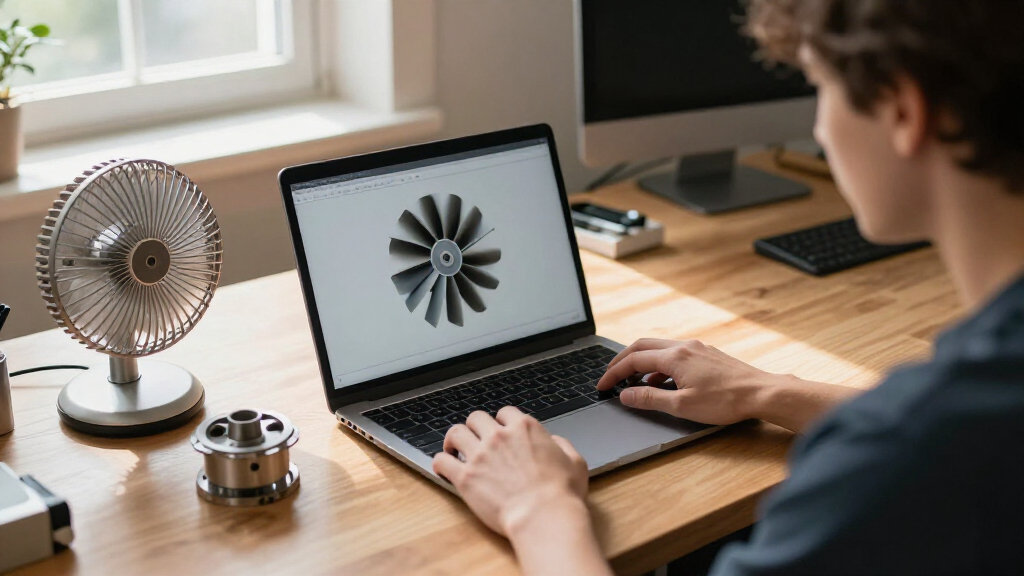
TURBINE — WERK 9 is an interactive web field guide built around an SVG rotor that moves in response to a visitor’s scroll. The project description presents the interaction as a way to connect page navigation with the mechanics of the place, but does not explain the implementation or provide performance details.
TURBINE — WERK 9 uses a scroll-driven SVG rotor to make movement through an interactive web field guide feel connected to the mechanics of the place it represents, according to the original project analysis on ThorstenMeyerAI.com. The design turns an ordinary browser action—scrolling—into a visual response, though the project description does not disclose how the rotor’s movement is implemented.
The project is framed as an interactive field guide, rather than a conventional brochure. Visitors explore the page by scrolling, while a rotor rendered as SVG vector paths moves in response. The described aim is to give that movement a relationship to the industrial setting, so that advancing through the page feels less like moving between static sections and more like engaging with a designed object.
ThorstenMeyerAI.com describes the experience as a combination of a browser, carefully constructed vector paths and scroll input. The page’s field-guide framing gives the exploration an organizing idea; its industrial atmosphere is part of the presentation, but the feature emphasizes the interaction itself. It does not specify the rotor’s number of parts, the amount it turns, or whether its movement follows the scroll continuously or in set stages.
The feature points readers to a fuller design teardown and a live version of the room. It says the teardown covers how the team shaped the rotor’s motion, organized the visual system and translated a physical-feeling space into a browser experience. Those details are introduced as subjects of the case study, rather than explained in the available project description.
Interactive field guide · Design feature
How The Rotor in “TURBINE — WERK 9” Moves With Your Scroll
A familiar browser gesture gets a mechanical echo: as visitors move through the field guide, an SVG rotor responds. The concept is clear; the implementation details remain undisclosed.
Scroll input → visible motion
Illustrative rotor; exact movement unspecified
01 / The idea
Scroll Becomes Part of the Machine
TURBINE — WERK 9 is presented as an interactive field guide rather than a conventional brochure. Visitors explore by scrolling, while a rotor drawn with SVG vector paths responds to their progress. The stated aim is to connect page navigation with the mechanics and industrial atmosphere of the place.
A familiar gesture
Scrolling advances the visitor through the page and gives navigation a visible consequence.
A vector rotor
The feature identifies an SVG rotor as the central moving element, without specifying its parts or range of rotation.
A sense of place
The design links movement through a browser experience to the mechanical character of its industrial setting.
02 / Interaction sequence
From Page Progress to Mechanical Image
The available account describes the relationship at a design level. It does not document the code or establish how precisely the rotor tracks scroll position.
Explore
The visitor enters a browser based field guide.
Scroll
Page navigation supplies the described interaction input.
Respond
The SVG rotor moves in response to scrolling.
Connect
Motion is intended to echo the place’s mechanical theme.
“What if a web page behaved less like a brochure and more like a machine you could walk around?”ThorstenMeyerAI.com
03 / What is known
The Teardown Holds More Detail
The project feature points readers to a full design teardown and a live version of the room. It says the case study covers motion design, the visual system, and how a physical feeling space was translated into a browser experience.
Described by the feature
An interactive field guide; an industrial atmosphere; an SVG rotor that responds to scroll input; and an intent to connect navigation with the place’s mechanics.
Not specified in the account
The code, tools, exact scroll to rotation mapping, number of rotor parts, behavior across devices, publication date, and any performance or user testing results.
04 / Reader questions
What the Project Feature Confirms
What is TURBINE — WERK 9?
An interactive web field guide with an industrial atmosphere. Its described central interaction is an SVG rotor that responds as visitors scroll.
How does the rotor move?
The feature says it responds to scroll input. It does not explain the code, animation method, or exact relationship between scroll distance and rotation.
Brochure or field guide?
The project is framed as a field guide, inviting exploration while linking page movement to its mechanical theme.
Where can readers learn more?
ThorstenMeyerAI.com points to a full design teardown and a live version of the room. The teardown is described as covering motion, visual design, and the browser experience.
Scroll Becomes Part of the Machine
The interaction gives scrolling a visible consequence: as visitors progress through the page, the rotor responds. That can make navigation feel connected to the subject of the experience, rather than serving only as a way to move between blocks of information. In this project, the stated goal is to link the browser experience to the mechanics of the place.
For designers and people interested in web interactions, the example highlights a restrained premise: a familiar input can help convey a setting when paired with a deliberate visual response. The project description also stresses that the experience aims to retain the clarity of a designed object while inviting exploration. Whether the interaction achieves that for visitors is not established by the description, which offers no user testing or accessibility information.
The wider relevance is practical rather than a claim of technical novelty. The project shows how a page can use vector graphics and scrolling to make its visual system feel responsive. Its value to readers lies in the design idea and the promised teardown, not in any reported benchmark, new web standard or evidence of broader adoption.
As an affiliate, we earn on qualifying purchases.
A Field Guide in the Browser
The project is presented as a response to a question: what might a web page feel like if it behaved less like a brochure and more like a machine visitors could walk around? TURBINE — WERK 9 answers with an industrial visual setting and a field-guide structure. The rotor is the central described interaction, linking page movement to a mechanical image.
ThorstenMeyerAI.com says the full case study discusses the motion design, the visual system and the translation of a physical-feeling space into a browser. The available feature does not identify individual team members, provide a project timeline or explain the setting beyond its industrial atmosphere. It also gives no technical documentation, so the interaction should be understood from the description as a design feature, not as a documented account of a particular coding method.
“What if a web page behaved less like a brochure and more like a machine you could walk around?”
— ThorstenMeyerAI.com
As an affiliate, we earn on qualifying purchases.
Implementation Details Still Missing
The project feature does not explain how scroll position controls the SVG, what tools or code are used, or how the rotor behaves across screen sizes and devices. It does not say whether movement is continuous, animated in steps, or adjusted for different user settings. The stated relationship between scrolling and rotor motion is clear; the technical method is not.
There is also no information about accessibility, load performance or user testing, and no evidence that the page has been evaluated against alternatives. The feature’s descriptions of a responsive experience and a physical-feeling space are design framing, not independently reported results. The publication date and whether the live version has changed since the feature was written are not specified.
web page scroll interaction devices
As an affiliate, we earn on qualifying purchases.
As an affiliate, we earn on qualifying purchases.
The Teardown Holds More Detail
ThorstenMeyerAI.com directs readers to the full design teardown and the live room. The case study is described as covering the choices behind the rotor’s motion, the visual system and the translation of the setting into a browser-based experience. Those materials may provide the technical and design details not included in the short feature.
Until those details are available, the confirmed account remains limited: the SVG rotor responds to scrolling within an interactive field guide. The project description does not announce a release schedule, new version or planned follow-up, so no further development can be confirmed.
Source: ThorstenMeyerAI.com
As an affiliate, we earn on qualifying purchases.
Key Questions
What is TURBINE — WERK 9?
It is an interactive web field guide with an industrial atmosphere. Its described central interaction is an SVG rotor that responds as visitors scroll through the page.
How does the rotor move?
The project feature says the rotor’s movement is driven by scroll input. It does not explain the code, animation method or exact relationship between scroll distance and rotation.
Is the site a brochure or a field guide?
It is framed as an interactive field guide, not a conventional brochure. The design invites visitors to explore while using the rotor to connect page navigation with the setting’s mechanical theme.
Where can readers find more about the design?
ThorstenMeyerAI.com points to a full design teardown and a live version of the room. The feature says the teardown covers the rotor’s motion, the visual system and how the experience was built for the browser.
Source: ThorstenMeyerAI.com
Halloween Picks
halloween
As an affiliate, we earn on qualifying purchases.