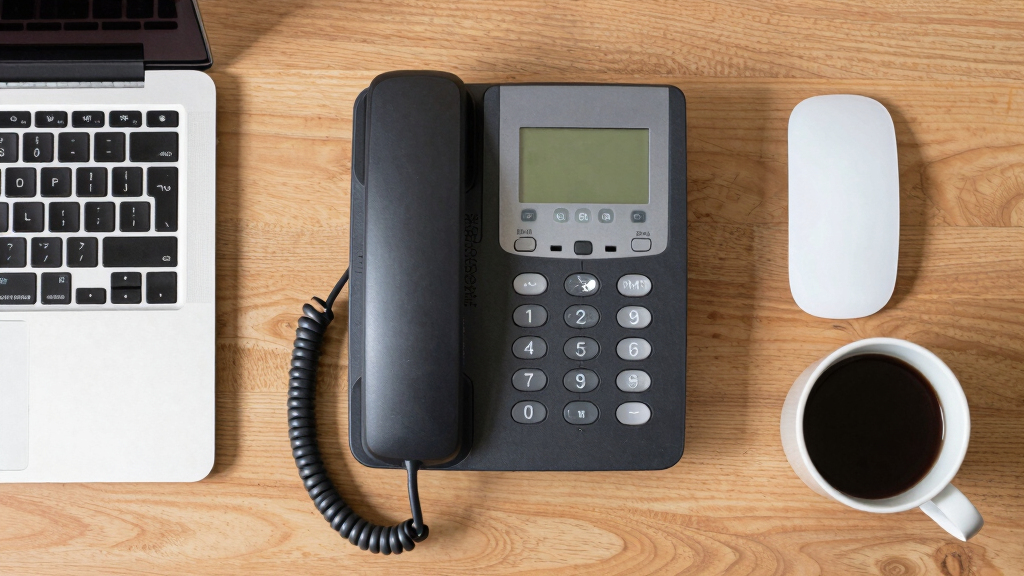

Choosing the best multi-line IP phone for support desks requires balancing call capacity, usability, and reliability. The Polycom VVX 250 stands out as the overall best for its balanced features and trusted brand. The Yealink T46U offers impressive screen size and VoIP capacity for larger teams, while the Grandstream GRP2616 provides an excellent mix of features and affordability. Support desk environments demand phones that can handle multiple lines with clarity and stability, but tradeoffs often include cost, ease of setup, and feature complexity. Continue reading for a detailed breakdown of each option to help you find the best fit for your support team.

Get business pricing on tech for your team
- Business-only prices and quantity discounts
- Tax-exempt purchasing
- Multiple users, one account, clear invoices
Key Takeaways
- The top picks balance between high line capacity and user-friendly interfaces suitable for busy support desks.
- Display size and clarity significantly impact ease of use and quick call management.
- PoE support is common but not universal; consider your network setup when choosing a model.
- Premium models tend to offer more features but at a higher cost, making value a key consideration for many teams.
- Most multi-line phones excel in reliability and call quality, but choosing the right capacity depends on team size and call volume.




| multi-line ip phone for support desk | Display | Ethernet Ports | Dimensions | HD Voice |
|---|---|---|---|---|
| Polycom VVX 250 Business Media | Color display | Dual Gigabit | — | Yes |
| Fanvil X5U V2 IP Phone with 3. | — | Dual Gigabit | 8 x 4 x 5 inches | Yes |
| Yealink T43U IP Phone | 3.7 inches | Gigabit | 8.12 x 8.86 x 6.89 inches | Yes |
| Yealink T46U IP Phone | 4.3-inch color TFT | Dual Gigabit | 8.39 x 9.61 x 7.28 inches | Yes |
| Yealink T48U IP Phone with Pow | 7-inch color touch screen | Dual Gigabit | 13 x 11 x 5 inches | Yes |
| Grandstream GRP2616 IP Phone | | 4.3-inch color LCD | 2 x Gigabit Ethernet with PoE | 13.8 x 10.4 x 3.5 inches | — |
| Grandstream GXP2170 IP Phone | | 4.3-inch color LCD (480×272) | — | 8.98 x 1.81 x 8.11 inches | — |
More Details on Our Top Picks
Polycom VVX 250 Business Media Phone
The Polycom VVX 250 stands out as the best overall choice for support desks due to its reliable HD voice quality, clear color display, and seamless integration with multiple call control platforms. Compared to the Yealink T48U, it offers a more straightforward and user-friendly interface without the complexity or expense of a large touchscreen, making it ideal for busy support environments. However, its limited conference capabilities and lack of wireless options mean it’s best suited for desk-bound agents who prioritize call clarity and network stability. This model’s dual Gigabit Ethernet ports ensure fast, reliable network connections—crucial during peak call times—although its basic conference features might fall short for teams requiring extensive collaboration tools.
Pros:- High-quality HD voice ensures crystal-clear communication
- Color display provides quick access to visual information
- Dual Gigabit Ethernet ports enhance network reliability
- Supports integration with over 60 call control platforms
Cons:- Limited to basic conference call capabilities
- No wireless or cordless functionality
- Requires a continuous power connection
Best for: Support desk teams needing a dependable, easy-to-use desk phone with high call quality and straightforward setup.
Not ideal for: Support agents looking for advanced touchscreen features or wireless connectivity options, as this model is more traditional and wired-only.
- Number of Lines:4
- Display:Color display
- HD Voice:Yes
- Ethernet Ports:Dual Gigabit
- Power Source:Corded Electric
- Conference Call Capability:Basic
- Multiline Operation:Single-Line Operation
- Warranty Duration:7 years
Our verdict“This phone is perfect for support desks that prioritize clarity and reliability over advanced multimedia features.”
Fanvil X5U V2 IP Phone with 3.5″ Color Display, HD Voice, Dual Gigabit Ports, PoE, 16 SIP Lines for Business
The Fanvil X5U V2 makes this list as the best choice for support teams managing large call volumes thanks to its support for up to 16 SIP lines, far surpassing other models like the Polycom VVX 250. Its 3.5-inch color display and HD voice quality ensure clarity, while dual Gigabit Ethernet ports with PoE simplify deployment without sacrificing network performance. Unlike the Yealink T43U, which is more feature-rich but less scalable, the X5U V2 focuses on volume handling and straightforward usability. A tradeoff is that it relies solely on corded power, and its basic design may not appeal to users seeking a more modern or feature-laden device, but it excels at handling multiple simultaneous calls efficiently.
Pros:- Supports up to 16 SIP lines for high-volume call environments
- HD voice quality ensures clear, intelligible calls
- Dual Gigabit Ethernet with PoE simplifies network setup
- Programmable keys boost workflow efficiency
Cons:- No wireless or cordless options
- Basic design may feel less premium
- Dependent on compatible VoIP services for full function
Best for: Support departments that need robust call handling capacity and reliable connectivity for high-volume workflows.
Not ideal for: Support staff requiring advanced integrations like Bluetooth or Wi-Fi, as it lacks wireless features and is primarily designed for wired networks.
- Number of SIP Lines:16
- Display Size:3.5 inches
- HD Voice:Yes
- Ethernet Ports:Dual Gigabit
- Power Source:PoE
- Conference Call Capability:Basic
- Multiline Operation:Multi-Line
- Dimensions:8 x 4 x 5 inches
Our verdict“Ideal for support teams who need to handle many calls smoothly without fuss over advanced multimedia features.”
Yealink T43U IP Phone, 12 VoIP Accounts, 3.7-inch Display, Dual USB, Gigabit Ethernet, PoE, Black
The Yealink T43U offers a versatile option for support teams needing multiple lines and flexible connectivity, supporting up to 12 VoIP accounts. Its 3.7-inch display enhances usability compared to basic models like the VVX 250, while dual USB ports facilitate recording or headset connections. Compared with the Yealink T46U, it provides fewer VoIP lines and a smaller display but remains a solid choice for teams that need multiple lines without the premium price of larger models. The absence of included power adapters and its larger footprint could be drawbacks for smaller desks, but overall, it balances feature set and affordability well for busy support agents.
Pros:- Supports 12 VoIP lines for multi-tasking
- Dual USB ports for flexible connectivity
- HD Voice ensures clear communication
- Supports wideband audio codecs
Cons:- Power adapter not included, may need separate purchase
- Bulky size for small desks
- Limited color options (Black only)
Best for: Support teams needing a multi-line, adaptable phone with good connectivity and moderate price point.
Not ideal for: Support staff requiring the highest number of SIP lines or a larger touch display, as this model covers fewer lines and has a smaller screen.
- VoIP Accounts:12
- Display:3.7 inches
- HD Voice:Yes
- USB Ports:Dual USB 2.0
- Ethernet Ports:Gigabit
- PoE:Yes
- Dimensions:8.12 x 8.86 x 6.89 inches
- Color:Black
Our verdict“A strong choice for support teams needing multiple lines and reliable features at an accessible price.”
Yealink T46U IP Phone, 16 VoIP Accounts, 4.3-Inch Color Display, Dual USB 2.0, Dual Gigabit Ethernet, PoE (Power Adapter Not Included)
The Yealink T46U is tailored for support staff who need a large, high-resolution touchscreen combined with extensive VoIP capabilities. Its 4.3-inch color TFT display offers a more intuitive interface than smaller screens, improving efficiency in busy support environments. Supporting up to 16 SIP accounts, it surpasses many competitors like the VVX 250, and dual USB ports enable recording or headset options. While the device’s large size and the need for additional adapters for Wi-Fi or Bluetooth might be drawbacks, its advanced call management features and high-quality audio make it a standout for professionals handling complex or high-volume support tasks.
Pros:- Large, high-res 4.3-inch color display enhances usability
- Supports up to 16 SIP accounts for complex workflows
- Dual USB ports for recording or headset connections
- Excellent audio quality with HD Voice
Cons:- Wi-Fi and Bluetooth adapters sold separately
- Expensive if additional modules are needed
- Requires external power adapter or PoE support
Best for: Support teams requiring an advanced, large-screen device with multiple connectivity options and high call capacity.
Not ideal for: Support agents with limited desk space or those seeking a more affordable, smaller device with fewer features.
- SIP Accounts:16
- Display:4.3-inch color TFT
- HD Voice:Yes
- USB Ports:Dual USB 2.0
- Ethernet Ports:Dual Gigabit
- PoE:Yes
- Dimensions:8.39 x 9.61 x 7.28 inches
- Color:Black
Our verdict“Best suited for busy support desks that benefit from a large touch interface and multiple lines handling complex calls.”
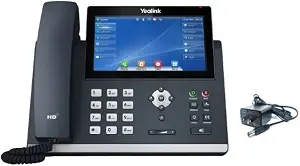
Yealink T48U IP Phone with Power Adapter
The Yealink T48U offers a premium experience with its large 7-inch color touch screen, supporting up to 16 SIP accounts. Its comprehensive connectivity options—including Wi-Fi, Bluetooth, and USB—make it highly adaptable for support desks that benefit from flexible setups. Unlike smaller screens like the VVX 250 or T43U, the T48U’s expansive display allows for quicker navigation and easier multitasking. However, the need for external adapters for Wi-Fi and Bluetooth adds to its cost, and its size and price point may be prohibitive for smaller support stations. Nonetheless, for high-demand environments demanding quick access and multi-modal communication, this model excels.
Pros:- Large, 7-inch touch screen simplifies navigation
- Supports up to 16 SIP accounts for extensive call handling
- Flexible connectivity via Wi-Fi, Bluetooth, and USB (adapters sold separately)
- High-definition audio quality
Cons:- Wi-Fi and Bluetooth require separate adapters
- Expensive when additional modules or adapters are needed
- External power supply required or use PoE
Best for: Support teams that require a large display, multiple connectivity options, and a high degree of flexibility in device integration.
Not ideal for: Support agents with limited desk space or those seeking a cost-effective, straightforward phone without wireless features.
- SIP Accounts:16
- Display:7-inch color touch screen
- HD Voice:Yes
- Connectivity:Wi-Fi, Bluetooth, USB (adapters sold separately)
- Ethernet Ports:Dual Gigabit
- Power Supply:5V/2A Power Adapter included
- Dimensions:13 x 11 x 5 inches
- Color:Black
Our verdict“Ideal for high-demand support environments needing quick access and multi-modal communication options in a single device.”
Grandstream GRP2616 IP Phone | 6 Lines, 6 SIP Accounts | 4.3-Inch Color Display | Wi-Fi 5 | Dual-Port Gigabit Ethernet with PoE
The Grandstream GRP2616 stands out for its support of up to 6 lines and SIP accounts, making it highly adaptable for support desks managing multiple queues or departments. Its 4.3-inch color display offers clear navigation, and the inclusion of Wi-Fi 5 and Bluetooth enhances device versatility beyond wired connections. Compared with the GXP2170, it provides a more modern interface and easier network management, though its larger size could be a drawback on cramped desks. The dual Gigabit Ethernet ports with PoE simplify network setup, reducing clutter and downtime. However, this model’s complexity and size might overwhelm support staff needing straightforward communication tools or those with limited space. This pick is ideal for support centers that require a flexible, feature-rich device capable of handling multiple lines with advanced management. It’s less suitable for smaller desks or users who prioritize simplicity over extensive features.Pros:- Supports up to 6 lines and SIP accounts for multi-department use
- High-quality HD audio with wide-band support for clear communication
- Built-in Wi-Fi 5 and Bluetooth for versatile connectivity
- Dual Gigabit Ethernet ports with PoE simplify network setup
Cons:- Large size may be cumbersome for small desks
- Requires PoE or external power source, adding setup complexity
- Feature set might be overly complex for basic support needs
Best for: IT support centers or large help desks needing multi-line support and flexible connectivity options
Not ideal for: Small support teams with limited space or staff who prefer simple, plug-and-play phones
- Number of Lines:6
- SIP Accounts:6
- Display:4.3-inch color LCD
- Wi-Fi:Dual-band 802.11 a/b/g/n/ac
- Bluetooth:Yes
- Ethernet Ports:2 x Gigabit Ethernet with PoE
- Dimensions:13.8 x 10.4 x 3.5 inches
- Weight:1 kg
Our verdict“This device is best suited for support environments that need extensive line management and flexible connectivity, despite its size and complexity.”
Grandstream GXP2170 IP Phone | 12 Lines, 6 SIP Accounts | 4.3-Inch Color Display | Dual Gigabit Ethernet with PoE
The GXP2170 excels in environments with intense call traffic, offering support for 12 lines and 6 SIP accounts, making it suitable for busy support desks or call centers. Its large 4.3-inch color display ensures quick access to multiple contacts and call statuses, outperforming models like the GRP2616 in high-volume scenarios. The support for up to four expansion modules provides extensive contact access, which is invaluable when managing large queues. Bluetooth and PoE support add to its convenience, though at over 1.4 kg, it can be hefty to handle physically. Setup complexity may challenge less technical staff, and the absence of a dedicated built-in speakerphone could be limiting for some users. This phone is ideal for support teams needing to handle numerous concurrent lines efficiently, but it might be too bulky or complex for smaller operations or less experienced users.Pros:- Supports up to 12 lines and 6 SIP accounts for busy environments
- Large, clear color display for quick navigation
- Supports multiple expansion modules for extensive contact access
- Includes Bluetooth and PoE for added convenience
Cons:- Heavier and bulkier at 1.43 kg, which may impact handling
- Setup can be complex, requiring some technical knowledge
- Lacks a built-in speakerphone, potentially limiting hands-free use
Best for: Support teams with high call volumes and extensive contact management needs
Not ideal for: Small support desks or users seeking a lightweight, simple phone
- Number of Lines:12
- SIP Accounts:6
- Display:4.3-inch color LCD (480×272)
- Network Ports:Dual Gigabit Ethernet
- PoE Support:Yes
- Bluetooth:Built-in
- Expansion Modules:Supports up to 4 GXP2200EXT
- Dimensions:8.98 x 1.81 x 8.11 inches
Our verdict“This phone is best suited for high-volume support centers that need to manage many lines and contacts efficiently, despite its size and setup complexity.”

How We Picked
These products were evaluated based on their call handling capacity, ease of use, build quality, and integration features. We prioritized phones that are specifically designed for support environments, meaning reliable performance under heavy usage and clear audio quality. Price-to-feature ratio was also considered, ensuring options are accessible for different budgets. Our ranking reflects a balance between high performance, usability, and value, helping support teams select phones that improve efficiency and reduce frustration.Factors to Consider When Choosing Best Multi-line Ip Phone For Support Desks
When selecting a multi-line IP phone for a support desk, it’s important to consider several factors that influence daily usability and long-term value. The right phone should handle your team’s call volume, provide clear audio, and integrate smoothly with your existing system. Beyond basic features, understanding the tradeoffs in display quality, connectivity options, and expandability can help you avoid costly mistakes and ensure your support staff stays productive.Call Capacity and Line Management
Support desks often require phones capable of managing multiple calls simultaneously. Look for models with a high number of SIP lines—at least 6 or more—so your team can handle multiple issues without switching devices. However, more lines can mean increased complexity; ensure your team can navigate the interface efficiently. Balancing capacity with ease of use is key to maintaining productivity during busy periods.
Display Size and User Interface
A larger, clearer display enhances quick call management, especially when handling multiple lines. Touchscreen interfaces or high-resolution screens allow support staff to view caller info and options at a glance, reducing errors and speeding up response times. Smaller screens may save costs but can hinder usability, especially in high-volume environments where rapid call handling is essential.
Network Connectivity and Power Options
PoE (Power over Ethernet) support is a common feature that simplifies setup by reducing cables and ensuring reliable power. If your network infrastructure supports PoE, opting for compatible phones can streamline installation and maintenance. However, if PoE isn’t available, check if the device includes a power adapter, as this adds to the overall setup considerations and cost.
VoIP Compatibility and Expandability
Ensure the phone supports the VoIP protocols used by your system, and verify its compatibility with your existing VoIP provider. Support desks often need to scale, so choosing a model with multiple SIP accounts and expansion options—like additional modules or USB ports—can future-proof your investment. Keep in mind that more features often come at a higher price, so prioritize the functionalities that directly improve support efficiency.
Build Quality and Reliability
Support desk phones endure heavy daily use, so durability and consistent audio quality are non-negotiable. Look for models from reputable brands with positive reviews on reliability. While cheaper models may seem attractive initially, they can lead to frequent replacements or technical issues, disrupting your support operations. Investing in a sturdy, high-quality device pays off through lower maintenance and better call clarity.
Frequently Asked Questions
How many lines should a support desk phone ideally have?
The ideal number of lines depends on your team size and call volume. Typically, support desks benefit from phones supporting at least 6 to 12 lines to handle multiple ongoing conversations simultaneously. Larger teams or high-traffic environments may require even more lines or multiple phones. Balancing capacity with ease of use helps prevent clutter and confusion during busy hours.
Is PoE necessary for support desk phones?
Power over Ethernet (PoE) simplifies installation by combining power and network connectivity into a single cable, reducing clutter and potential points of failure. For support desks with existing PoE infrastructure, choosing PoE-compatible phones is highly advantageous. If PoE isn’t available, ensure the device includes a power adapter, but be aware that this can complicate setup and increase costs slightly.
Should I prioritize display size over features?
Display size and clarity directly impact how quickly support staff can read caller information and navigate menus, which is vital during high-pressure situations. While additional features like touchscreen controls or high-resolution screens add convenience, a sufficiently large and clear display often provides the most tangible benefit for support environments. Striking a balance between size and feature set is key to maximizing efficiency.
Are premium models worth the extra cost for a support desk?
Premium models often include extended call capacity, larger displays, and more advanced features like USB ports or integrated Wi-Fi. For larger or more demanding support teams, these features can significantly improve productivity. However, for smaller teams or less complex setups, mid-range models frequently provide ample performance at a better price point. Evaluate your specific needs before investing in high-end options.
What should I consider for future-proofing my support desk phones?
Future-proofing involves selecting phones with expandable features, such as multiple SIP lines, USB ports, or compatibility with software upgrades. Choosing a model from a reputable brand with a track record of firmware updates can extend its useful life. Also, consider the scalability of your VoIP system, so adding more lines or features later doesn’t require replacing your entire setup.
Conclusion
If you seek the best overall performance and reliability, the Polycom VVX 250 remains a solid choice for most support desks. For teams prioritizing high call volume capacity without breaking the bank, the Grandstream GXP2170 offers excellent value. Support teams willing to invest in premium features will find the Yealink T46U to be a versatile and future-proof option. Beginners or smaller teams should consider models like the Fanvil X5U for straightforward setup and reliable operation. Ultimately, matching your team size, call volume, and budget will guide you to the best multi-line IP phone for your support desk needs.
As an affiliate, we earn on qualifying purchases.Halloween Picks
halloween