
TL;DR

Get business pricing on tech for your team
- Business-only prices and quantity discounts
- Tax-exempt purchasing
- Multiple users, one account, clear invoices
Building your own AI workstation used to save money, but component shortages and rising prices now make prebuilt options competitive. Your choice depends on control, support, and how fast you want to deploy.
Ever thought building your own AI rig was cheaper? That was true—until 2026. Now, with chip shortages, skyrocketing GPU prices, and supply chain chaos, prebuilt systems are often just as affordable, sometimes more so. So, the real question isn’t just about saving a few bucks—it’s about speed, support, and control.
If you’re eyeing a high-powered AI workstation, knowing whether to build or buy can save you thousands of dollars and countless headaches. Expect a clear breakdown of costs, performance, and what each option really offers in today’s market.
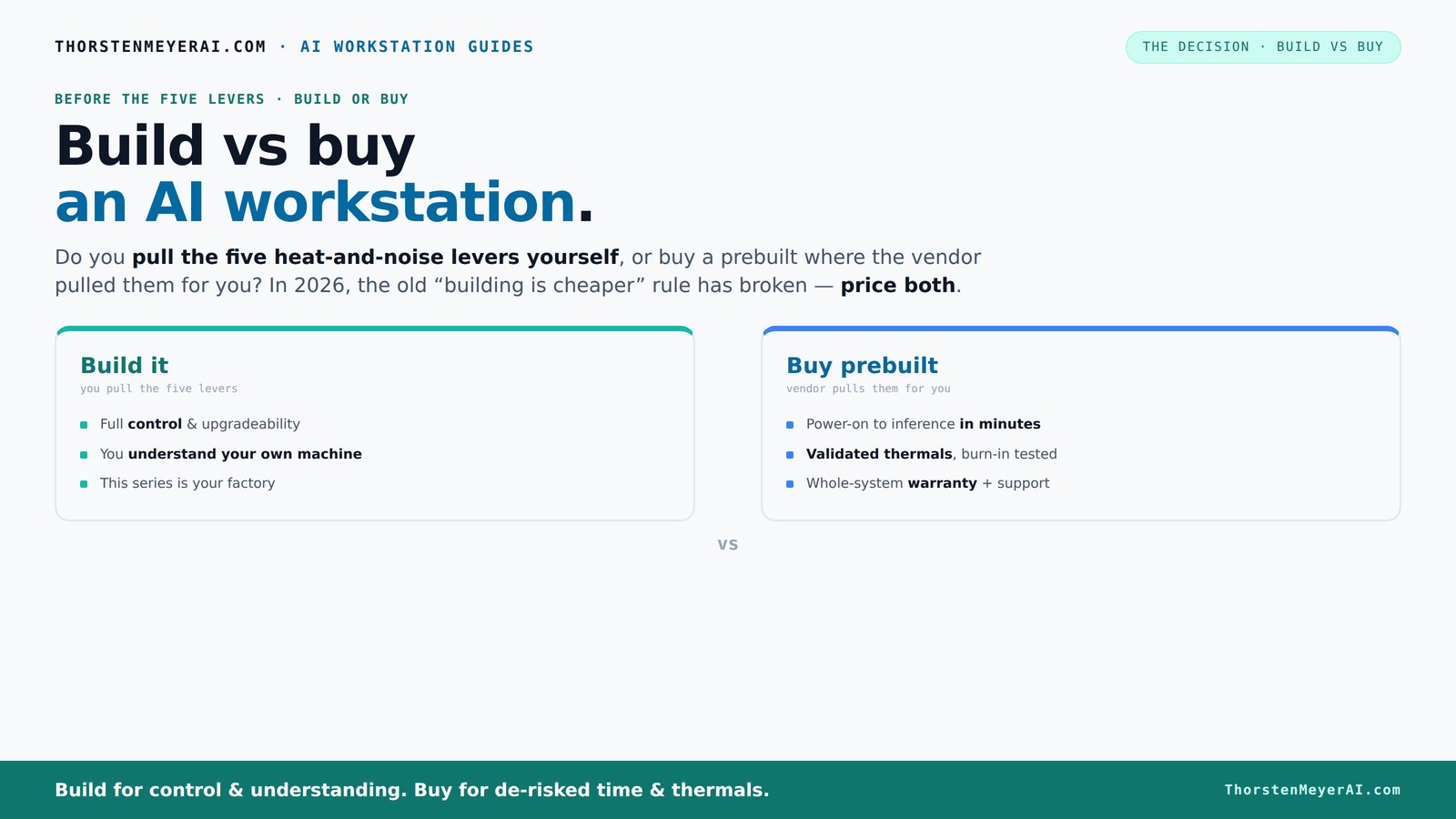
Build vs buy
an AI workstation.
The real question behind this whole series: do you pull the five heat-and-noise levers yourself, or buy a prebuilt where the vendor pulled them for you? And in 2026, the old “building is cheaper” rule has broken. Match your situation in Part 3.
Key Takeaways
- Component shortages and rising prices have made prebuilt AI workstations as cost-effective as custom builds in 2026.
- Prebuilts offer validated thermals, warranties, and quick deployment—ideal for fast-paced, mission-critical AI projects.
- Building your own rig grants maximum control over cooling, noise, and future upgrades, perfect for enthusiasts and specialized workloads.
- Evaluate your workflow: choose prebuilt for speed and support; build for control, customization, and learning.
- Cost isn’t just about parts—consider time, effort, risk, and future flexibility when deciding.
high performance AI workstation prebuilt
As an affiliate, we earn on qualifying purchases.
As an affiliate, we earn on qualifying purchases.
Why Building Your Own AI Workstation Is No Longer Cheaper in 2026
Building your AI workstation used to be a no-brainer for saving money. But in 2026, shortages and inflation have flipped that script. A typical DIY build, which once cost around $1,000, now easily pushes past $1,250, thanks to inflated GPU and RAM prices.
Meanwhile, prebuilt systems from trusted vendors like Lambda or Puget often come in at similar or even lower prices because they buy components in bulk before prices spiked. This shift means the traditional 'build is cheaper' rule no longer holds true—at least not without a detailed, real-time price comparison.
This change has significant implications for cost-conscious buyers. It suggests that the advantage of DIY isn't just about saving money—it's about control over specific components, customization, and learning. However, the current market conditions mean that, in many cases, prebuilt systems offer comparable or better value, especially when factoring in the time and effort needed for assembly and troubleshooting. The tradeoff becomes whether you prioritize cost savings or convenience and support.
As an affiliate, we earn on qualifying purchases.
The Real Cost of Building vs Buying: Break It Down
| Factor | Build | Buy |
|---|---|---|
| Initial cost | Depends on component prices; often higher due to shortages. You might pay a premium for specific parts, and unforeseen compatibility issues can add to costs. | Fixed price, often comparable or slightly lower due to bulk purchasing. Prebuilts sometimes include warranties and support, which can offset initial costs. |
| Time & effort | Hours of sourcing, assembling, and troubleshooting. This time investment can delay project start and introduce stress, especially if you're not familiar with hardware assembly. | Minutes to setup, plug-and-play. This rapid deployment allows you to begin work immediately, which is crucial for time-sensitive projects. |
| Support & warranty | Owner troubleshooting; DIY support. If something fails, you're on your own or need to seek external help, which can be time-consuming and uncertain. | Vendor support, warranty included. This reduces downtime and provides peace of mind, especially for critical workloads. |
| Upgradeability | Highly flexible; easy to swap parts or upgrade components as needed, making it more future-proof for evolving demands. | Can be limited; proprietary layouts or integrated components may restrict future upgrades, requiring additional investment or complete replacements. |
As an affiliate, we earn on qualifying purchases.
Pulling the Levers: Who Controls Thermal and Noise Tuning?
Managing heat and noise in an AI workstation is a game of five levers: undervolting GPUs, matching cooling systems, optimizing airflow, tuning fan curves, and positioning your rig. Learn more about quiet GPUs and cooling solutions.
When you buy a prebuilt, the vendor pulls these levers for you—validated, tested, and tuned for silence and thermal efficiency. Systems like those from BIZON or Lambda promise up to 30% lower noise and temperature, all factory-set and supported.
Build it yourself, and you control every lever. You choose a quiet GPU and a cooler, set airflow, and tune fans. This effort allows for a finely tuned machine that can be optimized for your specific environment and workload. The tradeoff is the time and expertise required—getting thermal and acoustic performance right can involve trial, error, and ongoing adjustments. For mission-critical tasks, this level of control can mean better stability and quieter operation, but it demands a deeper understanding of hardware tuning and airflow dynamics.
As an affiliate, we earn on qualifying purchases.
When Buying Prebuilt Makes Sense: Speed, Support, and Certainty
If you need to deploy fast, prebuilt AI workstations are your best bet. They come with the OS and AI tools like CUDA, TensorFlow, and Docker already installed, so you can start training or inference in minutes. Learn more about AI workstation options.
Support matters too. Vendors offer warranties, quick replacements, and expert help—crucial if you’re running long, expensive training jobs. For multi-GPU setups or high-end hardware, prebuilt systems are often validated for thermal stability and performance, reducing your risk of throttling or failure.
For example, a Lambda system designed for multi-GPU AI workloads undergoes 24–48 hours of burn-in testing, ensuring it won’t throttle during your critical training sessions. This validation process minimizes unpredictable hardware issues, allowing you to focus on your AI work without worrying about hardware stability or compatibility problems that might arise with a DIY build.
When Building Yourself Is Still the Better Move
If you love tinkering, want maximum control, or need a very specific hardware setup, building your own AI workstation still makes sense. It’s ideal for hobbyists, students, or small teams with tight budgets who enjoy the process and want tailored performance.
Plus, DIY allows future upgrades—swap in a more powerful GPU, add RAM, or switch to a custom cooling loop as your needs grow. This flexibility can be a significant advantage, especially if you anticipate evolving hardware requirements or want to experiment with different configurations. However, the tradeoff is the time, effort, and potential troubleshooting involved. You need to weigh whether the benefits of customization outweigh the inconvenience.
For instance, a researcher who builds their own rig can customize the cooling for a super-quiet operation, perfect for long, intensive training runs. This level of control can lead to better thermal performance and quieter operation tailored exactly to their environment, but it requires a willingness to invest time and learn about hardware tuning.
AI-Ready Hardware & Software: What You Need to Know
AI workloads benefit hugely from hardware tuned for AI—like GPUs optimized for deep learning, and ISV-accelerated software. Prebuilt systems often come with these features preconfigured, reducing setup time and maximizing performance.
According to Dell, AI PCs that leverage vendor-optimized hardware can lower power consumption by up to 41% for the same task, thanks to hardware-software synergy. This efficiency not only reduces operational costs but also minimizes thermal output, which can extend hardware lifespan and improve reliability. For teams aiming for sustainability and reduced energy bills, this optimization can be a decisive factor.
Building your own rig allows you to select these components yourself, providing the opportunity to tailor hardware for specific AI workloads. However, this requires careful verification of compatibility and software support, which can be time-consuming and complex. The advantage of preconfigured, validated systems is that they eliminate much of this guesswork, ensuring you get a system optimized out of the box for AI tasks. The tradeoff is less flexibility in component choice, but greater confidence in performance and stability.
Frequently Asked Questions
Is it cheaper to build or buy a prebuilt AI workstation?
In 2026, component shortages and inflated prices have made prebuilt systems often as affordable as building your own, especially when factoring in time and effort. Always compare real-time prices for your specific config.
Which option offers better performance for AI training and inference?
Both can deliver top-tier performance. Prebuilts are validated for thermal efficiency and software compatibility, ensuring reliable operation. DIY builds can potentially outperform if optimized correctly, but they require expertise and effort to achieve comparable results. The key is understanding your priorities: convenience and reliability versus maximum customization and performance tuning.
Do I need a prebuilt if I want AI-specific features like NPUs?
Prebuilt systems from vendors like Lambda often include AI accelerators and optimized hardware, making setup easier and more reliable. DIY options can include NPUs or other AI-specific hardware, but this demands more research, compatibility checks, and configuration work to ensure proper integration and performance.
How much upgradeability do prebuilt AI workstations offer?
Typically, they allow upgrades of RAM, storage, and sometimes GPUs. However, proprietary layouts or integrated components may limit future expansions. This can be a significant consideration if you plan to evolve your setup over time. Custom builds generally provide more flexibility, as you control the choice of components and their compatibility.
What hidden costs should I watch out for in a custom build?
Expect to spend extra on troubleshooting, time, and potential compatibility issues. Additional costs may include thermal management solutions, specialized cooling, and future upgrade parts that aren’t included initially. These hidden costs can add up, so it’s important to factor them into your overall budget and timeline.
Conclusion
Deciding between building or buying your AI workstation isn’t just about saving a few dollars anymore. It’s about what suits your workflow, your need for support, and your future plans. In a market where prebuilt systems now match or beat DIY on price, the real power lies in choosing what you value most—speed, control, or peace of mind.
Imagine a quiet, reliable machine humming along during your longest training run—that’s the real win. So, which path will you choose for your AI journey?
Fall Picks
fall essentials
As an affiliate, we earn on qualifying purchases.