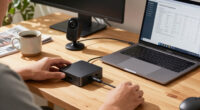
🔍 Read the full analysis: How To Pick From The 10 Best 4K Webcams For Your Work Setup on ThorstenMeyerAI.com

Get business pricing on tech for your team
- Business-only prices and quantity discounts
- Tax-exempt purchasing
- Multiple users, one account, clear invoices
TL;DR
A buying guide from ThorstenMeyerAI.com compares 10 4K webcams by image quality, lighting, autofocus, privacy and software support. Its recommendations are editorial assessments, not independent test results included in the supplied material; the right pick depends on your room, workflow and budget.
ThorstenMeyerAI.com has published a guide to 10 4K webcams for work setups, comparing models by image quality, low-light performance, autofocus, lighting and privacy features. The guide names the Logitech MX Brio Ultra HD its best overall choice and the NexiGo N680E Pro an option for people who need built-in lighting, but those are the source’s recommendations rather than independently verified test conclusions in the material provided.
The guide argues that 4K resolution alone does not determine image quality. It points buyers to sensor performance and lighting conditions, noting that a webcam may produce a noisy or muddy image in a dim room despite its resolution. For rooms with bright windows or harsh overhead light, the guide says high dynamic range may also matter.
It highlights phase-detection autofocus (PDAF) in the EMEET NOVA and S600, describing it as a way to get smoother focus when a presenter moves or holds up an object. The guide also notes that a built-in ring light on the NexiGo N680E Pro can reduce the need for a separate lamp, while adding bulk and potentially drawing more power from a USB connection.
Other tradeoffs include the OBSBOT Tiny 3’s AI tracking and spatial audio, which the guide says are most relevant to users who move around or need more capable audio capture, and the EMEET C60E’s dual-camera system, which it describes as offering flexible framing but potentially bringing software complexity or seams. These observations and rankings are attributed to the guide; the supplied source does not include test measurements, prices or detailed specifications for every model.
The 10 picks
- 1
 OBSBOT Tiny 3 AI-Powered 4K Webcam with Spatial Audio and AI TrackingView on Amazon →
 - 2
 Logitech MX Brio Ultra HD 4K Webcam, GraphiteView on Amazon →
 - 3
 Logitech Brio Ultra HD 4K Webcam with Microphones, BlackView on Amazon →
 - 4
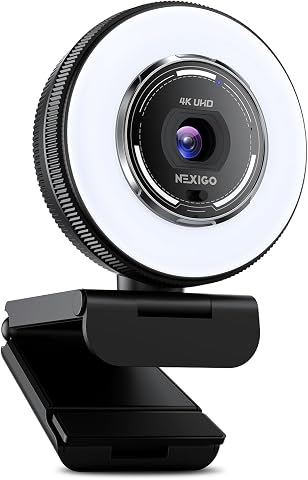 NexiGo N680E Pro 4K Webcam with Ring LightView on Amazon →
 - 5
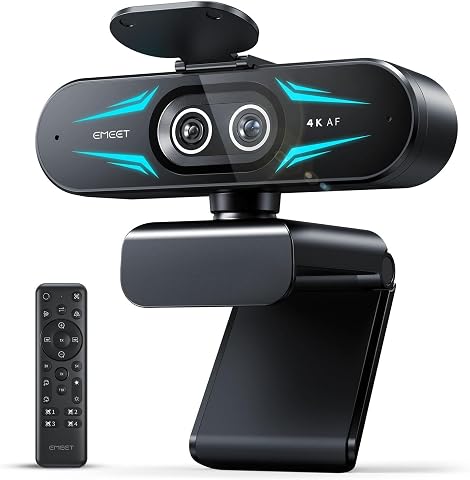 EMEET C60E Dual-Camera 4K Webcam with Wide-Angle and Telephoto LensesView on Amazon →
 - 6
 EMEET S600 4K Webcam with Sony Sensor and PDAF AutofocusView on Amazon →
 - 7
 EMEET NOVA 4K Webcam with PDAF Autofocus and Dual MicrophonesView on Amazon →
 - 8
 Acer A640 4K Webcam with AI Noise-Canceling MicrophoneView on Amazon →
 - 9
 Philips 4K USB Webcam with Microphone and Privacy ShutterView on Amazon →
 - 10
 AOC AC310 4K Webcam with Noise-Reducing Microphone and Privacy CoverView on Amazon →
Match Webcam Features to Your Workspace
The comparison matters because a webcam affects more than how sharp a video call looks. Room lighting, movement and privacy needs can make a less expensive or simpler model more suitable than a feature-heavy one. Buyers in a dim home office may value light sensitivity or an adjustable lamp; a presenter who moves may benefit more from responsive autofocus or tracking.
The guide’s central practical point is to avoid paying for functions that do not fit the work setup. Built-in lighting, AI tracking and dual lenses can add convenience, but can also mean extra size, cost or software demands. A physical lens shutter is another consideration for people handling sensitive work, though the guide’s broad security warning is not accompanied by evidence about specific incidents or individual products.
Products Worth Considering

Bose QuietComfort Ultra Wireless Noise-Cancelling Headphones with Spatial Audio, Black

Logitech MX Brio Ultra HD 4K Webcam, Graphite

Sonos Era 100 SL Compact, Microphone-Free Speaker – Black
As an affiliate, we earn on qualifying purchases.
What the Guide Compares
The source says its ranking considered clarity, color reproduction and low-light performance, as well as usability factors such as autofocus, microphone quality and privacy mechanisms. It also says software support informed its choices, on the grounds that controls for framing and color can affect day-to-day use.
The guide contrasts PDAF with contrast-based autofocus, describing the former as generally quicker and less prone to focus hunting. It also recommends checking software controls, firmware support and operating-system compatibility. The supplied material does not provide a full methodology, test conditions, side-by-side sample images or a complete, clearly itemized list of all 10 products, so readers cannot use it alone to verify the ranking across every model.
“The Logitech MX Brio Ultra HD stands out as the best overall pick for professionals needing reliable color accuracy and robust software support.”
— ThorstenMeyerAI.com guide
Limits of the Available Comparison
The supplied guide text does not identify a publication date, prices, complete 10-model lineup or standardized test results. It also does not show how each webcam performed under matching lighting, audio or connectivity conditions. The named rankings should be understood as the publisher’s assessments, not as independently confirmed outcomes.
Some guidance is expressed broadly: for example, the source warns that models without shutters pose a privacy risk, but does not identify all affected products or document specific security vulnerabilities. It also begins a frequently asked question about using 4K with a slow internet connection but provides no complete answer. Buyers should check current product specifications, compatibility and pricing before making a purchase.
Checks Before You Buy
The guide does not announce a follow-up review or testing schedule. For shoppers, the next step is to compare the shortlist against their actual setup: test how much light reaches the desk, decide whether they move during calls, and check whether the webcam has a physical shutter and the software controls they need.
Before buying, confirm the current price, USB and power requirements, supported operating systems, conferencing-app compatibility and return policy with the seller or manufacturer. A 4K camera may not stream at 4K on every service or connection, so verify the platform’s supported video settings rather than assuming the resolution will be available on every call.
Key Questions
Which webcam does the guide recommend overall?
The guide names the Logitech MX Brio Ultra HD as its best overall pick, citing color accuracy and software support. The supplied material does not include test data to independently verify that ranking.
Which listed model has a built-in light?
The NexiGo N680E Pro is described as having an integrated ring light. The guide says it may help users with poor lighting, while adding bulk and potentially increasing USB power demands.
Do I need a 4K webcam if my internet connection is slow?
Not necessarily. A webcam’s maximum resolution does not guarantee a 4K stream: internet capacity and the video-call platform’s settings can affect the quality sent to others. The supplied guide raises this question but does not provide a complete answer.
Is 4K resolution the main factor in image quality?
No. The guide says sensor performance and lighting also affect clarity, particularly in dim rooms or against bright windows. It recommends weighing the camera’s low-light behavior and dynamic range as well as its resolution.
What privacy feature should I look for?
The guide recommends a physical privacy shutter that blocks the lens, especially for people working with confidential information or in shared spaces. It does not document specific vulnerabilities in the models discussed.
Source: ThorstenMeyerAI.com