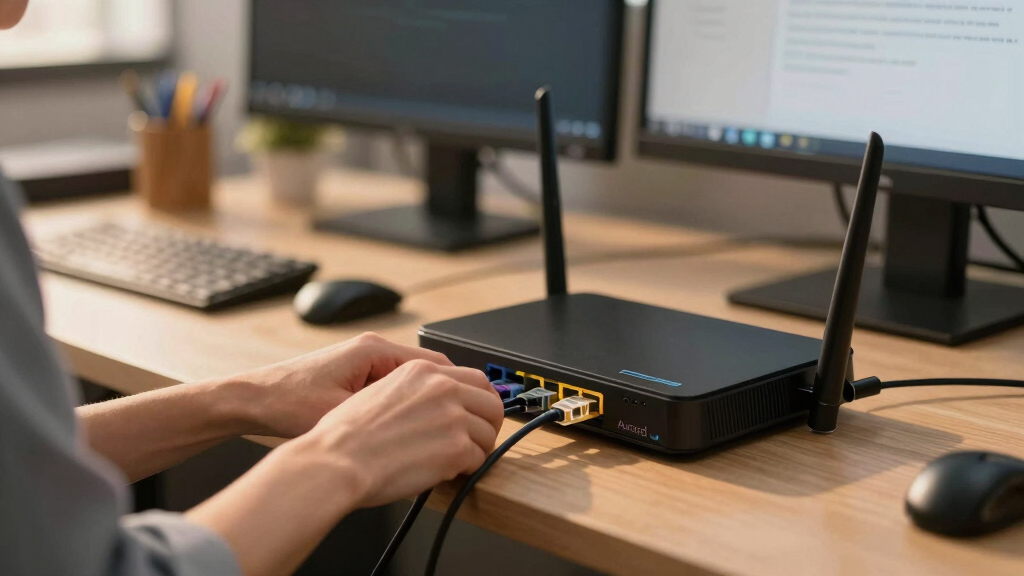

Choosing the best business router for a small office network involves balancing performance, security, and ease of management. The TP-Link ER7206 stands out as the best overall due to its robust multi-WAN support and advanced security features. For high-speed wireless, the GL.iNet GL-BE6500 (Flint 3e) offers cutting-edge WiFi 7 with long-range coverage, ideal for larger spaces. Meanwhile, the ASUS ExpertWiFi EBG15 provides enterprise-grade security and remote management, perfect for businesses with strict security needs. The main tradeoffs revolve around balancing cost versus capabilities, with premium options offering advanced features at a higher price. Continue reading to see how these choices compare and which fits your specific office setup best.
Key Takeaways
- Multi-WAN support is essential for small offices with multiple internet sources for redundancy and load balancing.
- Wireless standards like WiFi 6 and WiFi 7 significantly boost network capacity and future-proof your setup.
- Built-in security features such as firewalls and VPN support are critical for protecting business data.
- Ease of management varies; enterprise features often require more technical expertise but offer better control.
- Price range varies widely, with premium models offering advanced features, while budget options focus on core connectivity.


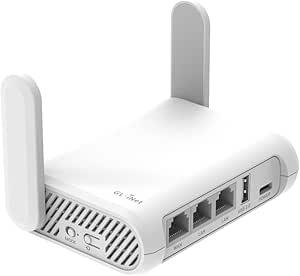


More Details on Our Top Picks
TP-Link ER7206 Multi-WAN Professional Wired Gigabit VPN Router Increased Network Capacity SPI Firewall Omada SDN Integrated Load Balance Lightning Protection
This router stands out for its robust multi-WAN capabilities, supporting up to four WAN ports, which makes it ideal for small offices with multiple internet connections. Its maximum associated client devices—150,000—and up to 700 clients ensure it can handle a busy environment better than many standard consumer routers. Compared with the GL.iNet GL-BE6500, which is faster and more flexible for home use, the ER7206 offers enterprise-grade security features, including advanced firewall policies and VPN support for up to 100 IPsec tunnels. The downside is its complexity; non-technical users may find its setup and management through Omada SDN overwhelming. This pick makes the most sense for small offices needing reliable, scalable, and secure multi-WAN management, especially if centralized control is a priority.
Pros:- Supports up to four WAN ports for optimal bandwidth management
- High capacity for clients—up to 700 devices—ideal for busy networks
- Integration with Omada SDN for centralized control and management
- Advanced security features including firewall policies and VPN support
Cons:- Steep learning curve for users unfamiliar with SDN or enterprise routers
- Higher cost and complexity compared to consumer-grade routers
Best for: IT managers or small business owners needing scalable, multi-WAN connectivity with centralized management.
Not ideal for: Small offices with limited technical expertise or those seeking a simple plug-and-play setup.
- Maximum associated client devices:150,000
- Maximum clients:700
- WAN ports:4
- Security features:Advanced firewall, VPN
- Management:Omada SDN
- Lightning protection:Yes
Bottom line: This router is best suited for small offices needing high capacity, multi-WAN handling, and centralized network control.
GL.iNet GL-BE6500 (Flint 3e) WiFi 7 Router, High-Speed WiFi Router for Wireless Internet w/VPN, 5 x 2.5G Ethernet Port for Fiber Optic Modem, Long Range Large Home, Business & Gaming Computer Routers
This model is ideal for small offices that prioritize high-speed Wi-Fi and straightforward VPN setup, supporting Wi-Fi 7 with speeds up to 6.5 Gbps, surpassing the TP-Link ER605 in wireless performance. Its five 2.5G Ethernet ports are perfect for fiber optic connections and local device connections, making it suitable for a tech-savvy team focused on fast, reliable wireless access. Compared to the Ubiquiti Cloud Gateway Ultra, which offers full-stack network management, the Flint 3e provides a more user-friendly interface via the GL.iNet app and supports VPNs like WireGuard and OpenVPN out of the box. However, it lacks the advanced enterprise security features of the ER7206 and may be overkill for very small or simple setups. This makes it a great choice for small offices emphasizing fast Wi-Fi and easy VPN integration without enterprise complexity.
Pros:- Supports Wi-Fi 7 with speeds up to 6.5 Gbps
- Five 2.5G Ethernet ports for fiber and local devices
- Built-in WireGuard and OpenVPN support for easy VPN management
- Long-range coverage suitable for larger office spaces
Cons:- Lacks advanced enterprise security features found in higher-end routers
- More complex setup than basic consumer routers
Best for: Small office environments needing fast Wi-Fi, multiple Ethernet ports, and simple VPN management.
Not ideal for: Very small teams or home users who do not need Wi-Fi 7 speeds or multiple gigabit Ethernet ports.
- Wi-Fi standard:Wi-Fi 7
- Wireless speed:up to 6.5 Gbps
- Ethernet ports:5 (including 2.5G ports)
- VPN support:WireGuard, OpenVPN
- Coverage:Long range
- Control method:App
Bottom line: This router is best for small offices seeking ultra-fast Wi-Fi and multiple wired connections with straightforward VPN support.
TP-Link ER605 V2 Wired Gigabit VPN Router, Up to 3 WAN Ethernet Ports + 1 USB WAN, SPI Firewall SMB Router, Omada SDN Integrated, Load Balance, Lightning Protection
The ER605 V2 offers a balanced mix of features suitable for small businesses, with support for up to three WAN Ethernet ports and a USB WAN for cellular backup, making it comparable to the TP-Link ER7206 but with a more streamlined setup. Its security suite includes SPI firewall, DoS defense, and VPN support for up to 20 IPsec, 16 OpenVPN, and other VPN types, suitable for SMBs needing secure remote access. Compared with the GL.iNet GL-AXT1800, which excels in wireless performance, the ER605 focuses on wired connectivity and load balancing. Its main tradeoff is less wireless flexibility and a slightly simpler management interface, which might limit advanced control. This router suits SMBs requiring reliable VPN, load balancing, and security without the complexity of enterprise-grade systems.
Pros:- Supports up to 3 WAN Ethernet ports and USB WAN
- Includes SPI firewall and load balancing features
- Supports multiple VPN protocols and security functions
- Integrates into Omada SDN for centralized management
Cons:- Limited wireless capabilities compared to Wi-Fi 6 or Wi-Fi 7 routers
- Simpler management interface may lack advanced customization
Best for: Small to medium businesses needing reliable VPN, load balancing, and wired connections.
Not ideal for: Home offices primarily relying on Wi-Fi network performance or needing extensive wireless features.
- WAN ports:3
- USB WAN support:Yes
- VPN support:20x IPsec, 16x OpenVPN
- Firewall:SPI, DoS defense
- Management:Omada SDN
- Lightning protection:Yes
Bottom line: Ideal for SMBs that prioritize wired connectivity, VPN security, and load balancing over advanced wireless features.
GL.iNet GL-AXT1800 (Slate AX) Portable Travel Router, Pocket Wi-Fi 6 Wireless Internet Router, Portable VPN Routers WiFi for Travel, Public Computer Routers, Business, Moblie/RV/Cruise/Plane
This portable router shines in scenarios where mobility and quick setup are critical, supporting Wi-Fi 6 with speeds up to 1800 Mbps, exceeding the TP-Link AX1800 in portability and open-source flexibility. Its support for OpenWrt 21.02 allows advanced customization, VPN setup, and NAS features, making it perfect for remote workers or small mobile offices. Unlike the Ubiquiti Cloud Gateway Ultra, which is geared towards full-stack management, this device offers plug-and-play simplicity with VPN, AdGuard, and file sharing support. Its main limitations are its smaller coverage area and lack of enterprise-grade security, which makes it less suitable for permanent office deployment. This router makes a compelling choice for those needing a secure, portable, and customizable network on the go.
Pros:- Supports Wi-Fi 6 with up to 1800 Mbps
- OpenWrt firmware for advanced customization
- Supports VPNs like WireGuard and OpenVPN out of the box
- Built-in NAS support for file sharing
Cons:- Limited coverage area for large offices
- Less enterprise security features than dedicated SMB routers
Best for: Remote workers or small mobile offices needing a portable, versatile Wi-Fi 6 router with VPN and file sharing.
Not ideal for: Large or fixed small office environments requiring extensive coverage or enterprise security.
- Wi-Fi standard:Wi-Fi 6
- Speed:up to 1800 Mbps
- Number of ports:3
- VPN support:OpenWrt, WireGuard, OpenVPN
- Coverage:Moderate
- Control method:OpenWrt
Bottom line: This router is best for mobile professionals needing a portable, highly customizable Wi-Fi 6 device with VPN and NAS features.
Ubiquiti Cloud Gateway Ultra (UCG-Ultra)
The Ubiquiti Cloud Gateway Ultra excels at full-stack network management, supporting over 30 Ubiquiti devices and 300+ clients, making it a prime choice for tech-forward small offices needing centralized control. With 1 Gbps routing and IDS/IPS features, it offers security and performance comparable to enterprise-grade routers like the TP-Link ER7206, but with a more streamlined, integrated management platform. Its multi-WAN load balancing and USB-C power make it versatile for various deployment scenarios. The main limitation is its complexity; users unfamiliar with Ubiquiti’s ecosystem may find initial setup challenging, and it is less suited to small offices that prefer simple device management. This device is tailored for small offices seeking comprehensive network management in a compact form.
Pros:- Supports 30+ Ubiquiti devices and 300+ clients
- Full-stack network management via UniFi platform
- 1 Gbps routing with IDS/IPS
- Multi-WAN load balancing
Cons:- Requires Ubiquiti ecosystem familiarity
- Less straightforward setup for non-technical users
Best for: Small offices with dedicated IT staff seeking integrated, centralized network management and high performance.
Not ideal for: Small teams or home users without Ubiquiti infrastructure or management needs.
- Device management:Full Ubiquiti UniFi
- Routing speed:1 Gbps
- Clients supported:300+
- Multi-WAN:Yes
- Security:IDS/IPS
- Power:USB-C
Bottom line: This gateway is ideal for small offices needing centralized management, IDS/IPS security, and high performance with multi-WAN support.
GL.iNet GL-SFT1200 (Opal) Portable WiFi Travel Router, Mini VPN Wireless Router for Fiber Optic Modem, Mobile Internet WiFi Repeater, Dual Band Openwrt Computer Routers, Home/Business/RV/Cruise
This compact router stands out for its portability combined with robust dual-band speeds up to 1200 Mbps, making it ideal for mobile small offices or remote work environments. Unlike larger, stationary routers, the GL.iNet Opal easily fits into a pocket or bag, perfect for frequent travelers or field workers. Its openwrt firmware supports VPNs like OpenVPN and WireGuard, providing security on public Wi-Fi, which is often a weak point for mobile setups. Compared to the TP-Link AX1800, it lacks Wi-Fi 6 but compensates with open-source flexibility and portability. The full gigabit ports and retractable antennas enhance wired and wireless coverage in small, varied environments. However, its speed and range are limited compared to larger, enterprise-grade routers, and it may struggle with high-density office environments. This pick makes the most sense for small businesses or remote teams needing secure, portable internet access without the bulk of traditional routers.
Pros:- Highly portable and lightweight at only 145g
- Supports open-source firmware for extensive VPN customization
- Full gigabit ports and retractable antennas for flexible wired/wireless coverage
- Pre-installed OpenVPN & WireGuard for secure internet access
Cons:- Limited Wi-Fi speed (up to 867 Mbps on 5GHz) compared to higher-end routers
- Lacks Wi-Fi 6 support, which limits future-proofing and maximum throughput
- Range may be insufficient in large office spaces or multiple rooms
Best for: Small remote teams or mobile professionals who need secure, high-speed Wi-Fi on the go.
Not ideal for: Large offices or high-density environments that require extensive coverage and higher throughput.
- Wireless Speed:300 Mbps (2.4GHz) + 867 Mbps (5GHz)
- Ports:2 Gigabit LAN + 1 Gigabit WAN
- Antenna:2 Retractable antennas
- Security:OpenVPN, WireGuard, Cloudflare encryption
- Firmware:OpenWrt
- Weight:145g
- Dimensions:4.65″L x 3.35″W x 1.18″H
- Wi-Fi Band:Dual-band Wi-Fi 5
Bottom line: This router is ideal for small, mobile offices or remote workers seeking secure, portable Wi-Fi with open-source flexibility.
TP-Link BE6500 Dual-Band WiFi 7 Router (BE400) – Dual 2.5Gbps Ports, USB 3.0, Covers up to 2,400 sq. ft., 90 Devices, Quad-Core CPU, HomeShield, Private IoT, Free Expert Support
Compared to the GL.iNet Opal, the TP-Link BE400 offers Wi-Fi 7 technology, delivering lightning-fast speeds up to 5764 Mbps on the 5GHz band, making it ideal for bandwidth-intensive small office tasks like large file transfers, HD video conferencing, and cloud collaboration. Its dual 2.5Gbps ports and USB 3.0 enable high-speed wired connections and device sharing, which the Opal lacks. The extensive coverage of up to 2,400 sq. ft. with strong signal focus via beamforming makes it suitable for small offices with multiple rooms or open layouts. Its quad-core CPU ensures stable multitasking even with numerous connected devices—up to 90—better suited to small teams with high connectivity needs. The main tradeoff is its larger size and higher cost compared to portable options. This router makes the most sense for small offices prioritizing speed, coverage, and device capacity over portability.
Pros:- Supports Wi-Fi 7 with speeds up to 5764 Mbps
- Dual 2.5Gbps Ethernet ports and USB 3.0 for fast wired device connections
- Covers up to 2,400 sq. ft. with strong beamforming
- Quad-core CPU maintains stability with many connected devices
Cons:- Larger footprint and less portable than travel routers
- Higher price point may be a barrier for budget-conscious users
- Requires more complex setup compared to plug-and-play options
Best for: Small office environments requiring ultra-fast Wi-Fi 7 speeds and reliable multi-device connectivity.
Not ideal for: Highly mobile professionals or remote workers needing a compact, portable device.
- Wireless Speed:Up to 5764 Mbps on 5GHz
- Ports:2 x 2.5Gbps Ethernet, 1 USB 3.0
- Coverage:Up to 2,400 sq. ft.
- CPU:Quad-core
- Supported Devices:Up to 90
- Security:HomeShield, WPA3
- Wi-Fi Band:Dual-Band Wi-Fi 7
- Size:10.6 x 6 x 1.9 inches
Bottom line: This router is best for small offices needing high-speed, reliable Wi-Fi 7 coverage and multiple device support.
TP-Link AX1800 WiFi 6 Router (Archer AX21 V5) – Dual Band Wireless Internet, Gigabit, Easy Mesh, Works with Alexa – A Certified for Humans Device, Free Expert Support
Compared with the GL.iNet Opal and TP-Link BE400, the Archer AX21 offers Wi-Fi 6 technology, providing solid performance with speeds up to 1200 Mbps on 5GHz, which is sufficient for most small office tasks like video calls, file sharing, and light streaming. Its dual-band support and EasyMesh compatibility allow for seamless expansion across multiple access points, making it easier to cover larger or obstacle-filled small offices. The setup process is straightforward via the TP-Link Tether app, suitable for users new to networking. While it doesn’t support Wi-Fi 7 speeds, it balances cost, ease of use, and performance effectively. Its coverage is adequate for typical small office layouts, but it may need additional units for larger spaces. The main drawback is that it lacks advanced enterprise features, and Wi-Fi 6 speeds may become limiting as bandwidth demands grow. This router makes sense for small businesses seeking reliable Wi-Fi 6 with simple expandability and support for smart home integrations.
Pros:- Affordable Wi-Fi 6 performance with speeds up to 1200 Mbps
- Supports EasyMesh for seamless multi-router setups
- Simple setup via mobile app, ideal for beginners
- Compatible with Alexa and smart home devices
Cons:- Limited to Wi-Fi 6, not supporting Wi-Fi 7 speeds
- Maximum coverage around 2400 sq. ft., may need additional units
- Lacks enterprise-level security and management features
Best for: Small office setups needing reliable Wi-Fi 6 with easy expansion and smart home integration.
Not ideal for: Offices needing ultra-high bandwidth or Wi-Fi 7 compatibility for future-proofing.
- Wireless Speed:Up to 1200 Mbps (5GHz)
- Ports:Gigabit Ethernet
- Coverage:Up to 2400 sq. ft.
- Wi-Fi Generation:Wi-Fi 6 (802.11ax)
- Security:WPA3, HomeShield
- Mesh Support:Yes
- Size:Approx 10.3 x 6.7 x 1.3 inches
- Supported Devices:Multiple, depending on bandwidth
Bottom line: This router is suitable for small offices seeking reliable, expandable Wi-Fi 6 performance at an accessible price.
GL.iNet GL-XE3000 (Puli AX) 5G Router with Dual SIM Card Slot, Wi-Fi 6 Cellular Routers, Built-in Battery, Multi-WAN, VPN, OpenWrt, Secure 5G Router for Office, Retail, Events, Business
Compared to the Wi-Fi 6 routers like the Archer AX21 or the Opal, the Puli AX excels in providing 5G cellular connectivity, making it ideal for remote, temporary, or mobile small office setups. Its dual SIM support and built-in 6400mAh battery enable high-speed internet with fallback options during outages, suitable for locations where wired infrastructure is unavailable or unreliable. Its VPN support and OpenWrt firmware offer robust security and customization, comparable to the Opal’s open-source VPN capabilities. Its long-range 5G speeds (up to 574 Mbps on 2.4GHz and 2402 Mbps on 5GHz) are ideal for outdoor events, construction sites, or mobile offices, unlike traditional routers that depend on wired connections. However, the device’s size and focus on cellular connectivity mean it has less coverage indoors and does not support Wi-Fi 7 or Wi-Fi 6E. It is best suited for highly mobile or remote small offices needing flexible, high-speed internet on the move.
Pros:- Supports 5G with speeds up to 574 Mbps, ideal for remote sites
- Dual SIM with automatic failover for uninterrupted connectivity
- Built-in 6400mAh battery supports up to 8 hours of operation
- OpenWrt firmware allows extensive customization and VPN integration
Cons:- Limited indoor Wi-Fi coverage compared to traditional routers
- Bulkier size suited for mobile use, not fixed installations
- No support for Wi-Fi 6 or Wi-Fi 7, limiting future-proofing
Best for: Remote or mobile small offices, retail outlets, or field teams needing reliable 5G connectivity with backup power.
Not ideal for: Traditional indoor office environments with existing wired infrastructure seeking Wi-Fi 6 or Wi-Fi 7.
- Wi-Fi Speeds:Up to 574 Mbps (2.4GHz), 2402 Mbps (5GHz)
- SIM Compatibility:Dual SIM slots
- Battery:6400mAh, up to 8 hours
- VPN:OpenVPN, WireGuard pre-installed
- Multi-WAN:Ethernet, Cellular, Tethering
- Size:Approx 9 x 6 x 2 inches
- Coverage:Long-range outdoor use
- Security:OpenWrt, WPA3
Bottom line: This device is best for mobile, remote, or temporary small offices requiring flexible 5G connectivity with power backup.
TP-Link Roam 6 AX1500 Portable Wi-Fi 6 Travel Router Dual-Band | Easy Public WiFi Sharing | Hotel/RV/Travel Approved | Phone WiFi Tether | USB C 3.0 | Multi-Mode | OpenVPN, WireGuard® | TL-WR1512X
This TP-Link model stands out for its impressive Wi-Fi 6 speeds up to 1,201 Mbps (5 GHz) and 300 Mbps (2.4 GHz), supporting up to 60 devices simultaneously. Compared to larger routers like the ASUS ExpertWiFi EBG15, it offers a more compact, travel-friendly design ideal for mobile setups and temporary workspaces. Its multi-mode functionality—router, access point, and client—provides versatile connectivity options, making it perfect for small offices that require flexible deployment in different environments. The inclusion of VPN support via OpenVPN and WireGuard® enhances security, though this comes at the expense of less extensive enterprise features found in dedicated business routers. Its USB-C power and external storage sharing add convenience, but its limited coverage area (around 1,500 sq ft) makes it less suitable for larger office spaces. Overall, this model is ideal for small teams needing reliable, portable Wi-Fi with security on the move, but it may fall short for fixed, high-demand office environments.
Pros:- Supports Wi-Fi 6 speeds up to 1,201 Mbps, supporting multiple devices seamlessly
- Compact, travel-sized design with multi-mode flexibility (router, AP, client)
- Built-in VPN support with OpenVPN and WireGuard® for secure remote access
- USB-C power input and external storage sharing for added convenience
Cons:- Limited coverage area around 1,500 sq ft, unsuitable for larger offices
- Basic security features compared to enterprise-grade routers like ASUS ExpertWiFi
- Lacks advanced management features found in more expensive, dedicated business routers
Best for: Small office teams that travel frequently or work remotely and need secure, portable Wi-Fi with VPN support.
Not ideal for: Large or fixed office setups requiring extensive coverage and more advanced enterprise security features.
- Wi-Fi Speeds:up to 1,201 Mbps (5 GHz), 300 Mbps (2.4 GHz)
- Device Support:up to 60 devices
- Ports:1 Gbps WAN, 1 Gbps LAN, USB 3.0
- Power:USB-C 3.0 port
- Coverage Area:around 1,500 sq ft
- VPN Support:OpenVPN, WireGuard®
- Size:4.6 x 3.5 x 1.3 inches
- Weight:0.42 pounds
Bottom line: This travel router makes the most sense for small, mobile offices needing reliable Wi-Fi with security features but not for fixed, high-capacity workspaces.
ASUS ExpertWiFi EBG15 Gigabit VPN Wired Router, up to 3 WAN ethernet Ports + 1 USB WAN, IPS Intrusion Prevention, Layer 7 Firewall, Commercial-Grade Network Security, Remote Management with App
Compared with more portable options like the TP-Link Roam 6, the ASUS ExpertWiFi EBG15 offers a more robust, fixed installation designed for small offices needing high security and reliability. Its three gigabit WAN ports with load balancing enable efficient handling of multiple internet connections, ideal for offices requiring redundancy and consistent uptime. The built-in IPS and Layer 7 firewall provide enterprise-grade security, surpassing the basic VPN features of travel routers, though this comes with a more complex setup process. The inclusion of remote management via a dedicated app allows for easy oversight, making it better suited for IT teams managing multiple devices. However, its size and power requirements make it less portable, limiting its usefulness for mobile or temporary setups. This router fits small offices with demanding security needs and multiple internet sources, but it’s overkill for solo remote workers or very small teams.
Pros:- Supports up to 3 WAN ports with load balancing for high uptime and redundancy
- Enterprise-grade security with IPS, Layer 7 firewall, and VPN features
- Easy remote management via dedicated app for centralized control
- VLAN support adds additional security segmentation
Cons:- Large, non-portable design unsuitable for mobile use
- More complex setup process requiring technical knowledge
- Higher price point reflecting advanced features, not budget-friendly for small teams
Best for: Small office environments requiring high security, multiple WAN connections, and remote management capabilities.
Not ideal for: Home-based or mobile users who need portability or simple plug-and-play setup without extensive security features.
- WAN Ports:Up to 3 gigabit Ethernet ports + 1 USB WAN
- Security Features:IPS, Layer 7 Firewall, VPN
- Management:Remote via ASUS app
- VLAN Support:Yes
- Throughput:Gigabit speed
- Setup:Browser or mobile app
Bottom line: This business router is best suited for small offices with high security demands and multiple internet lines, but not for small teams needing mobility or straightforward setup.
How We Picked
I evaluated these routers based on their performance in small office environments, focusing on network stability, speed, and security features. Usability and ease of setup were also key, especially for small teams with limited IT support. Build quality and reliability over time influenced the rankings, along with value for the price. Devices that offered scalable features or future-proof technology, like WiFi 6 and multi-WAN, were prioritized. The top picks strike a balance between advanced capabilities and user-friendly management, ensuring they meet the needs of small businesses without overwhelming complexity.Factors to Consider When Choosing Best Business Router For Small Office Network
When selecting the best business router for a small office, it’s important to consider several factors that impact performance, security, and ease of use. The right router should support your current network demands while offering room to grow. Understanding these key considerations helps avoid common pitfalls like underpowered hardware or insufficient security features, which can compromise productivity and data safety.Performance and Speed
For small offices, a router’s throughput capacity and wireless standards determine how smoothly multiple devices operate simultaneously. Look for WiFi 6 or WiFi 7 standards, which deliver higher speeds and better handling of multiple connections. Avoid models that max out at lower speeds if your team relies on bandwidth-intensive applications like video conferencing or cloud-based tools. Remember, a router with high theoretical speeds might not always translate to real-world performance, so checking reviews and testing scenarios is advisable.
Security Features
Business routers should include advanced security features such as firewalls, VPN support, and intrusion detection. These protect sensitive data and prevent unauthorized access. Consider models with built-in security subscriptions or firmware that is regularly updated. Neglecting security in favor of basic connectivity can expose your network to risks, especially with remote work and cloud services prevalent in small offices.
Ease of Management
Intuitive management interfaces and remote control capabilities save time and reduce setup frustration. For small teams without dedicated IT staff, features like simplified dashboards, app-based management, and automatic updates are valuable. On the other hand, enterprise-grade management systems offer more granular control but require technical expertise. Choose a router that aligns with your team’s skill level to avoid operational headaches.
Expandability and Ports
Assess the number and types of ports—Ethernet, USB, and WAN options—that match your office’s wired and wireless needs. Future expansion plans, such as adding more wired devices or integrating IoT sensors, should influence your choice. Overlooking port requirements can lead to bottlenecks or the need for additional networking hardware later, increasing costs and complexity.
Price and Value
While budget models cover the basics, they often lack features like multi-WAN or advanced security, which are crucial for business environments. Investing in a slightly higher-priced model can provide better reliability, security, and scalability. Consider your current needs and forecast future growth—sometimes paying more upfront saves money and headaches down the line. Be wary of very cheap options that might compromise on durability or security.
Frequently Asked Questions
How many devices can a small office router handle effectively?
The capacity varies by model, but most small office routers support between 20 to 100 devices depending on their hardware and wireless standards. For typical small offices with 10-30 employees and shared devices, a router supporting WiFi 6 and at least 50 devices is advisable. Overloading a router can cause drops, lag, and reduced productivity, so choosing a model with sufficient capacity for your expected network load is critical.
Is it better to get a router with multi-WAN support for a small office?
Yes, multi-WAN support provides redundancy and load balancing, which can keep your network running smoothly if one internet connection fails. For small offices that rely heavily on continuous connectivity, this feature reduces downtime and improves overall reliability. However, multi-WAN routers tend to be more expensive and complex to set up, so weigh these factors against your business’s uptime needs and technical resources.
Should I prioritize wireless speed or wired connections for my office?
Both matter, but wired connections generally offer more stability and faster speeds, especially for bandwidth-heavy tasks like file sharing or video conferencing. Wireless is essential for mobility and flexibility, but it can be subject to interference and signal degradation. A balanced approach is best—ensure your router has high-performance WiFi and enough Ethernet ports for critical wired devices, providing a reliable backbone for your network.
Do I need a business-class router with advanced security features?
For most small offices handling sensitive data, business-class routers with features like VPN, intrusion detection, and advanced firewalls are highly recommended. These features help protect against cyber threats and ensure compliance with data security standards. Cheaper consumer routers often lack these protections, making them less suitable for business use where security breaches could have serious consequences.
How future-proof is a WiFi 6 or WiFi 7 router for my small office?
WiFi 6 and WiFi 7 are designed to handle increasing device counts and higher bandwidth demands, making them more future-proof for growing offices. They provide better performance, lower latency, and improved efficiency compared to previous standards. Investing in these standards now can extend the lifespan of your network equipment, reducing the need for frequent upgrades as your business expands or your network demands increase.
Conclusion
For small offices just starting out or with basic needs, the TP-Link ER7206 offers a balanced mix of performance, security, and manageability, making it the best overall choice. Those seeking a budget-friendly option that still supports essential security features might prefer the TP-Link AX1800 WiFi 6 Router. For businesses with advanced security requirements or plans to scale, the ASUS ExpertWiFi EBG15 provides enterprise-grade features. If portability and flexibility are priorities, the GL.iNet GL-BE6500 (Flint 3e) or similar travel routers can be ideal. Ultimately, your choice depends on your specific network size, security needs, and future growth expectations, but this list covers the spectrum of what small offices require in 2026.