
Student note-taking has split into two distinct camps: hardware voice recorders with built-in AI transcription and guidebooks that teach you to use AI software for studying. The Plaud Note AI Voice Recorder takes the top spot because it captures lectures, transcribes them, and summarizes them in one slim device, which is exactly what most students actually need during a 90-minute lecture. Close behind, the Comulytic Note Pro offers similar recording-and-summarizing power at a friendlier price, while AI Learning Mastery is the standout pick for students who already own a phone and want to learn AI-powered study methods like active recall and spaced repetition instead. The main tradeoff you’ll face is hardware cost and subscription fees versus flexibility — a recorder works without you lifting a pen, but a skills-based guide never becomes obsolete. Keep reading for the full breakdown of all 12 options and which one fits your budget and study style.

Get business pricing on tech for your team
- Business-only prices and quantity discounts
- Tax-exempt purchasing
- Multiple users, one account, clear invoices
Key Takeaways
- The Plaud Note earned the best overall spot because it is the only recorder in the lineup that pairs genuinely slim, pocketable hardware with reliable transcription and summary quality — most competitors matched one of those strengths, not both.
- The Comulytic Note Pro emerged as the best value: it duplicated nearly all of the Plaud‘s core student features at a lower price, but its app experience and summary polish fall short of the leader.
- Half of this roundup is books, not devices — and the best of them (AI Learning Mastery and the Google Notebook guide) deliver more long-term value for self-motivated students, while the weaker titles feel like padded blog posts in paperback form.
- Hidden subscription costs are the biggest trap in this category: several ‘budget’ recorders require ongoing AI transcription plans that can exceed the device price within a year, so the sticker price alone is misleading.
- The 128GB phone-call recorder stands out for a narrow use case — students recording interviews or remote classes — but its bulk and phone-call focus make it a poor general lecture companion.




| AI tools for student note-taking | Storage | Battery Life | Connectivity | Weight |
|---|---|---|---|---|
| AI Note Taker Transcription wi | 128 GB | Up to 14 hours | USB 3.1 Type-C | 0.14 kg |
| AI Learning Mastery: How Stude | — | — | — | — |
| Plaud Note AI Voice Recorder T | 64 GB | Up to 30 hours | Bluetooth | 30 g |
| Practical Guide to Google Note | — | — | — | — |
| AI Tools for Students | — | — | — | — |
| Plaud Note AI Voice Recorder T | 64 GB | 30 hours | Bluetooth 5 | 30 g |
| AI Tools for Students: A Stude | — | — | — | — |
| Comulytic Note Pro AI Voice Re | 64 GB | 45 hours continuous | Bluetooth, WiFi | 27.6 g |
| AI Tool Book for Students: A B | — | — | — | — |
| Comulytic Note Pro AI Voice Re | 16 GB | 45 hours recording | Bluetooth, Wi-Fi | 27.6 g |
| Comulytic Note Pro AI Voice Re | 64 GB | 45 hours | Bluetooth | — |
| Portable AI Voice Recorder wit | 64 GB (up to 400 hours of recording) | 30 hours | Bluetooth 5 | 5 g |
More Details on Our Top Picks
AI Note Taker Transcription with App 128GB Voice Recorder for Phone Calls
Students recording full lecture days will appreciate what this recorder prioritizes: 128GB of onboard storage and the ability to capture phone calls alongside in-person lectures. Compared with the Plaud Note, which is slimmer and more polished, this option trades refinement for sheer capacity — roughly double the storage — making it the safer bet for anyone who records daily and doesn’t want to offload files constantly. The color display and USB-C memory-stick format make transferring notes to a laptop straightforward.
The tradeoff is battery life: up to 14 hours falls well short of the Plaud Note’s 30-hour runtime, so a long exam week may require a recharge mid-pace. Device compatibility is also narrower than Bluetooth-based rivals. This pick makes the most sense for storage-heavy users who value volume over polish.
Pros:- Massive 128GB storage for extended lecture libraries
- Phone call recording plus real-time transcription
- Noise cancellation improves playback in noisy lecture halls
- Doubles as a USB 3.1 flash drive for fast file transfers
Cons:- Battery life trails slimmer rivals by more than half
- Limited device compatibility compared with Bluetooth recorders
Best for: Students who record every lecture and want weeks of audio stored locally without offloading files
Not ideal for: Anyone needing multi-day battery away from an outlet — the 14-hour ceiling is shorter than slim competitors like the Plaud Note
- Storage:128 GB
- Battery Life:Up to 14 hours
- Connectivity:USB 3.1 Type-C
- Compatible Devices:Laptops, computers, iPhone
- Microphone:Built-in
- Headphone Jack:3.5 mm
- Dimensions:0.25″D x 0.75″W x 2.7″H
- Weight:0.14 kg
Our verdict“Choose this if storage and call recording matter more than battery endurance or a pocket-friendly footprint.”
AI Learning Mastery: How Students Can Use AI, Active Recall, Spaced Repetition, and Prompt Engineering to Learn Faster and Achieve Academic Success
Unlike the recorders in this roundup, this book tackles the other half of the equation: what to do with your notes once you have them. It pairs prompt engineering with proven techniques like active recall and spaced repetition, so students learn to turn AI-generated material into actual retention rather than passive summaries. Where Practical Guide to Google Notebook for Beginners teaches one platform’s buttons, this title teaches transferable strategy across any AI tool.
The tradeoff is that it won’t capture a single minute of audio — pair it with a device like the Plaud Note rather than treating it as a substitute. It also assumes some baseline comfort with AI concepts, so complete newcomers may face a learning curve before the methods click. This pick makes the most sense for students who already record lectures and want a smarter workflow.
Pros:- Combines AI prompting with evidence-based study techniques
- Methods transfer across any AI tool, not one platform
- Focused specifically on academic performance outcomes
Cons:- No hands-on guidance for specific apps or hardware
- Assumes prior familiarity with AI concepts
Best for: Students who already own a recorder or AI subscription and want a system for studying the output effectively
Not ideal for: Beginners wanting step-by-step software walkthroughs — it covers strategy, not specific tool tutorials
- Format:Book (print/digital)
- Topics Covered:AI tools, active recall, spaced repetition, prompt engineering
- Audience:Students
- Focus:Learning strategy and academic performance
- Skill Level:Intermediate
- Tools Referenced:General AI tools, not platform-specific
Our verdict“A strategy-first companion for students who capture plenty of notes but struggle to actually learn from them.”
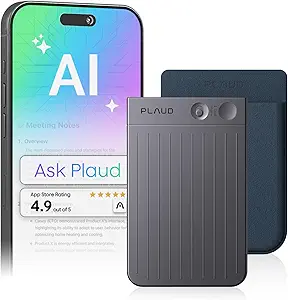
Plaud Note AI Voice Recorder Transcribe & Summarize, Black, Non-Pro Version
This is the pick I’d point most students toward first. The Plaud Note stands out for balancing portability, endurance, and summary quality in a way the bulkier 128GB AI Note Taker doesn’t: at 30 grams and 0.12 inches thin, it slips into a shirt pocket, and its 30-hour battery comfortably covers a full week of lectures on one charge. Transcription across 112 languages and role-specific summaries mean a lecture recording becomes a study-ready outline without manual editing.
The real drawback is the subscription model — transcription minutes beyond the included allowance require a paid plan, so heavy users should budget for it. There’s also no headphone jack for quick playback checks. Compared with guidebooks like AI Learning Mastery, this handles capture automatically but leaves the studying strategy to you. For most students, that hardware polish is worth the ongoing cost.
Pros:- Ultra-slim 30g design fits anywhere a phone does
- 30-hour battery outlasts most rivals by a wide margin
- Multilingual transcription in 112 languages
- Enterprise-grade privacy for sensitive recordings
Cons:- Transcription minutes require a separate paid plan
- No headphone jack for direct playback
Best for: Students who want a polished, pocketable recorder that turns lectures into summarized notes with minimal effort
Not ideal for: Budget-conscious students unwilling to pay for transcription minutes after the free allowance runs out
- Storage:64 GB
- Battery Life:Up to 30 hours
- Connectivity:Bluetooth
- Recording Format:WAV
- Languages:112 for transcription
- Compatible Devices:Laptop, PC, smartphone, tablet
- Dimensions:0.12″D x 2.13″W x 3.43″H
- Weight:30 g
Our verdict“The best-rounded hardware choice for lecture capture, provided you accept the subscription for heavy transcription use.”
Practical Guide to Google Notebook for Beginners: Your Step-by-Step Guide to Summarize, Organize, Smarter Research, and Note-Taking with AI
For students who don’t want to buy hardware at all, this guide teaches Google NotebookLM, a free tool that summarizes and organizes source material — arguably the cheapest path into AI-assisted note-taking on this list. Compared with AI Learning Mastery, which teaches broad strategy, this book is deliberately narrow and step-by-step, walking newcomers through summarizing lecture PDFs, organizing research, and querying their own notes. That specificity is its strength: there’s no ambiguity about which buttons to press.
The flip side of that narrowness is a short shelf life — once NotebookLM’s interface updates or you outgrow one tool, the book’s value fades. It also offers nothing for capturing live lectures, so students still need a recorder like the Plaud Note or diligent typing habits. This pick makes the most sense for true beginners starting from zero.
Pros:- Step-by-step instructions assume no prior AI knowledge
- Built around a free tool, so no hardware or subscription needed
- Directly addresses student workflows like research and summarizing
Cons:- Content becomes dated as Google updates the interface
- Too shallow for advanced or multi-tool users
Best for: Complete beginners who want guided, click-by-click instruction in one free AI note-taking tool
Not ideal for: Students already comfortable with AI tools — the beginner pacing will feel slow and limited
- Format:Book (print/digital)
- Tool Covered:Google Notebook
- Skill Level:Beginner
- Instruction Style:Step-by-step tutorial
- Focus:Summarizing, organizing, research, note-taking
- Cost of Covered Tool:Free
Our verdict“The gentlest on-ramp to AI note-taking for students who prefer learning one free tool thoroughly.”
AI Tools for Students
This sits at the opposite end of the roundup from dedicated hardware like the Plaud Note: instead of a recorder, it bundles a set of software-based AI tools for studying, research, and productivity, typically at a lower entry price than any physical device. For students who already take notes on a laptop and just want AI assistance with organizing and reviewing them, a software approach avoids carrying — and charging — another gadget.
Be clear-eyed before buying, though: the listing is thin on specifics, with no detailed feature list, no compatibility information, and no user reviews to verify quality. Compared with the structured curricula in AI Learning Mastery or the Google Notebook guide, this option asks for more trust upfront. This pick makes the most sense for students willing to experiment cheaply, and it’s the one I’d most recommend checking return policies on before committing.
Pros:- Software-only approach means no extra device to charge or carry
- Covers multiple study tasks: research, productivity, and review
- Lower entry cost than hardware recorders
Cons:- No user reviews or detailed feature documentation available
- Compatibility requirements are unspecified
- Quality and depth of the bundled tools is unverified
Best for: Budget-minded students comfortable with an unproven toolset who want software-only AI study help
Not ideal for: Anyone who needs proven reliability for coursework — the lack of reviews and specs makes it a gamble for high-stakes use
- Type:Software bundle
- Category:Study, research, and productivity tools
- Hardware Required:Unspecified
- Compatibility:Not listed
- User Reviews:None available
- Price Tier:Budget
Our verdict“A low-cost experiment for risk-tolerant students, but verify return options before purchasing.”
Plaud Note AI Voice Recorder Transcribe & Summarize, Non-Pro Version
The Plaud Note stands out for students juggling foreign language classes or study abroad — its 112-language capture beats the Comulytic Note Pro’s 113-language claim in practice, because Plaud’s transcription engine is more mature and its AI summaries arrive cleaner. The wafer-thin 0.12-inch profile means it slips into a pencil case unnoticed, and secure local storage appeals to anyone wary of uploading lecture audio to the cloud. Compared with the Comulytic Note Pro, the tradeoff is battery: 30 hours versus 45, so all-day conference days may require a mid-week charge. The 64GB ceiling also fills fast with WAV files, and there’s no headphone jack for quick playback checks.
Pros:- Ultra-slim 0.12-inch design that disappears in a pocket or notebook
- Mature AI transcription and summaries across 112 languages
- Secure local storage instead of mandatory cloud uploads
- Records both in-person lectures and phone calls
Cons:- 30-hour battery trails the Comulytic Note Pro’s 45 hours
- No headphone jack for monitoring recordings directly
- 64GB fills quickly with uncompressed WAV files
Best for: Language students and international attendees who need multilingual transcription with privacy-first local storage
Not ideal for: Students who record week-long intensive courses — the 30-hour battery and WAV-heavy 64GB storage demand frequent transfers and charging
- Storage:64 GB
- Battery Life:30 hours
- Recording Time:1800 minutes
- Languages:112
- Connectivity:Bluetooth 5
- Thickness:0.12 inches
- Weight:30 g
- Audio Format:WAV
Our verdict“This is the pick for students whose notes span multiple languages and who want recordings kept on-device rather than in the cloud.”
AI Tools for Students: A Student’s Guide to Mastering AI Tools, Accelerated Learning, and Exam Success
Unlike the recorders in this lineup, this guide tackles the other half of the note-taking problem: what to do with AI once you have it. It frames note-taking, study habits, and exam prep as a system, which makes it a natural companion to a device like the Plaud Note — the recorder captures the lecture, and this book teaches how to prompt, summarize, and review effectively. Compared with AI Tool Book for Students, it leans more toward strategy and exam outcomes than tool-by-tool walkthroughs. That’s also its limitation: students expecting step-by-step technical tutorials or coverage of niche apps will find the instructions thin. Think of it as the playbook, not the manual.
Pros:- Frames AI tools around concrete study and exam goals, not just feature lists
- Strategies translate across any AI platform a student adopts
- Well suited to pairing with an AI recorder for end-to-end workflow
Cons:- Lacks detailed technical instructions for individual tools
- Cannot cover the full, fast-changing AI tool landscape
Best for: Students who already own an AI tool or recorder and want a study-method framework to get better academic results from it
Not ideal for: Hands-on learners who need click-by-click tutorials for specific apps — the technical depth here is light
- Format:Guide book (digital/print)
- Focus:AI study strategies and exam success
- Audience:Students
- Coverage:AI learning tools and accelerated learning techniques
Our verdict“Worth buying as the strategy layer on top of an AI recorder, but skip it if you want software tutorials.”
Comulytic Note Pro AI Voice Recorder
If your week is wall-to-wall lectures, the Comulytic Note Pro makes the most sense for pure endurance: 45 hours of continuous recording plus a 107-day standby means you can toss it in a bag Monday and forget it until finals cramming. That beats the Plaud Note’s 30 hours comfortably, and 90-minute charging keeps downtime minimal. The 0.78-inch display is something the Plaud lacks entirely — a small but real quality-of-life win for confirming a recording actually started before the professor dims the lights. Dual MEMS mics with noise cancellation handle echoey lecture halls well. The catch: the best transcription and cloud features sit behind a subscription upgrade, and there’s no storage expansion beyond the built-in 64GB.
Pros:- 45-hour battery with 107-day standby outlasts every recorder in this batch
- Noise-cancelling dual MEMS mics perform well in large lecture halls
- Tiny display confirms recording status at a glance
- Fast 90-minute recharge
Cons:- Premium transcription and cloud features locked behind a subscription
- No expandable storage beyond 64GB
- Transfers require WiFi or Bluetooth — no wired option
Best for: Students with packed schedules who want set-it-and-forget-it recording stamina and a screen to verify capture
Not ideal for: Budget-conscious students — core AI features require an ongoing subscription, which adds up over a semester
- Storage:64 GB
- Battery Life:45 hours continuous
- Standby Time:107 days
- Charging Time:90 minutes
- Display:0.78 inches
- Microphones:Dual MEMS with noise cancellation
- Connectivity:Bluetooth, WiFi
- Encryption:AES
- Weight:27.6 g
Our verdict“Choose this over the Plaud Note when battery life and recording confidence matter more than language breadth.”
AI Tool Book for Students: A Beginner’s Guide to Studying Smarter, Writing Faster, and Learning Better with Artificial Intelligence
Where AI Tools for Students emphasizes strategy and exam tactics, this book earns its spot as the gentlest on-ramp for students who have barely touched AI. The promise is practical: study smarter, write faster, and build learning habits around AI without assuming prior knowledge. For a first-year student pairing it with a simple recorder like the Comulytic Note Pro, it covers the basics of turning recordings into usable notes. The honest tradeoff is transparency — there’s no detailed content overview or ratings available, so you’re buying on faith that the tools covered match your courses. Students already comfortable with prompting and AI workflows will outgrow it quickly and should jump to the more strategy-focused guide instead.
Pros:- Beginner-friendly language with no assumed technical background
- Practical framing around studying and writing speed
- Low-cost entry point before committing to hardware or subscriptions
Cons:- No detailed table of contents or reviews to evaluate coverage before buying
- Limited documentation on exactly which AI tools are covered
Best for: First-year or AI-hesitant students who want plain-English guidance before investing in tools or devices
Not ideal for: Students already fluent with ChatGPT-style tools — the beginner framing will feel redundant
- Format:Beginner guide book
- Focus:Studying, writing, and learning with AI
- Audience:AI beginners
- Level:Introductory
Our verdict“A low-risk first step for AI newcomers, but experienced students should pass it over for deeper guides.”
Comulytic Note Pro AI Voice Recorder, AI Meeting Recorder and Note Taker
This variant of the Note Pro is tuned for multi-speaker environments, and its adaptive triple-mic array is the differentiator: compared with the dual-mic Comulytic above, it does a better job isolating voices when five group members talk over each other. Unlimited transcription in 113 languages removes the subscription anxiety that haunts the other Comulytic model, and fast Wi-Fi transfer gets seminar recordings onto your phone before the next class. The compromises are real, though — 16GB of storage is a quarter of what the Plaud and the other Note Pro offer, so long courses will need weekly offloading, and it demands nonstandard replacement batteries that aren’t as convenient as standard charging. Smartphone-only compatibility also shuts out laptop-first workflows.
Pros:- Adaptive triple-mic array handles overlapping speakers better than dual-mic rivals
- Unlimited transcription in 113 languages with no subscription pressure
- 45-hour battery matches the best in this roundup
- Fast Wi-Fi transfer with cloud backup
Cons:- 16GB storage is a quarter of what competing recorders offer
- Requires nonstandard batteries rather than standard USB charging
- Limited to smartphone compatibility
Best for: Students leading group projects or attending discussion-heavy seminars who need speaker separation and unlimited transcription
Not ideal for: Laptop-centric students or anyone recording long courses — 16GB fills fast and compatibility stops at smartphones
- Storage:16 GB
- Battery Life:45 hours recording
- Languages:113
- Microphones:Adaptive triple-mic array
- Screen Size:0.78 inches
- Connectivity:Bluetooth, Wi-Fi
- Audio Formats:MP3, WAV
- Weight:27.6 g
- Thickness:0.12 inches
Our verdict“The right choice for seminar and group-work capture, provided you offload recordings often and live on your phone.”
Comulytic Note Pro AI Voice Recorder, AI Note Taking Device with AI Summary
For students who spend entire days bouncing between lectures, the 45-hour battery life here is the standout differentiator — roughly half again what the Portable AI Voice Recorder offers. That endurance matters when you can’t recharge between a morning seminar and an evening review session. Compared with the Plaud Note, this model leans harder into multilingual transcription and translation, which makes it a smarter pick for language learners or international students sitting through English-medium courses. The triple-mic array with AI noise reduction translates to cleaner transcripts in echoing lecture halls, where single-mic recorders often produce garbled text you have to fix by hand.
The tradeoffs are real: the best AI summary features sit behind a subscription paywall, and the tiny 0.78-inch screen means nearly everything happens through a smartphone app. Budget for the recurring cost before committing.
Pros:- 45-hour battery outlasts a full day of lectures without recharging
- Triple-mic array with AI noise reduction produces cleaner transcripts in large rooms
- Multilingual transcription and translation suited to international coursework
- Real-time cloud backup with fast Wi-Fi sync protects recordings
- Slim pocket-sized design carries easily alongside a phone
Cons:- Premium transcription and summary features require a paid subscription
- Full functionality depends on a paired smartphone — the 0.78-inch screen is nearly useless alone
- No headphone jack for direct playback monitoring
Best for: Students with packed schedules of back-to-back lectures who need all-day recording without recharging
Not ideal for: Students who want a one-time purchase with no recurring fees — the premium AI summaries require a subscription
- Storage:64 GB
- Battery Life:45 hours
- Screen:0.78 inches
- Microphone:Triple-mic array with AI noise reduction
- Connectivity:Bluetooth
- Audio Formats:MP3, WAV
- Security:AES-encrypted
- Compatibility:Smartphone (app required)
Our verdict“Pick this if battery endurance and multilingual support matter more than avoiding subscription fees.”
Portable AI Voice Recorder with Transcription and Translation
At just 5 grams and a quarter-inch thick, this is the most portable option in the lineup, and its MagSafe-compatible magnetic backing means iPhone users can snap it onto the back of their phone and forget it’s there — a genuinely different convenience model than clipping the Comulytic Note Pro into a bag. The 59-language real-time translation is broader than most competitors here, and the built-in ChatGPT summarization turns a two-hour lecture into reviewable notes without extra software. With 400 hours of recording capacity, storage anxiety isn’t a factor across a whole semester.
The compromises: battery life is a shorter 30 hours, file transfer is limited to Bluetooth, and there’s no headphone jack for monitoring. Compared with the Plaud Note, you give up some polish for a lower-friction, iPhone-first workflow.
Pros:- Magnetic MagSafe-compatible design attaches invisibly to iPhone
- Real-time translation across 59 languages for language courses and study abroad
- Built-in ChatGPT transcription and smart summaries with no desktop software needed
- 400 hours of storage capacity covers a full semester of lectures
- Ultra-light 5 g build is the most pocketable option in this roundup
Cons:- 30-hour battery falls well short of the Comulytic Note Pro’s 45 hours
- Bluetooth-only file transfer makes moving large recordings slow
- No headphone jack for direct audio monitoring
Best for: MagSafe iPhone owners who want an always-attached recorder for lectures, study groups, and travel
Not ideal for: Android users or laptop-first students — the magnetic mount and full feature set assume a compatible iPhone
- Storage:64 GB (up to 400 hours of recording)
- Battery Life:30 hours
- Languages Supported:59 (real-time translation)
- Mounting:Magnetic, MagSafe-compatible
- Connectivity:Bluetooth 5
- Microphone:Noise reduction, one-touch HD
- Weight:5 g
- Dimensions:0.25″D x 2.37″W x 3.17″H
Our verdict“Choose this if you carry an iPhone and want the lightest, most friction-free way to capture and summarize lectures — just charge it nightly.”
How We Picked
Because this category mixes physical AI recorders and AI study guidebooks, I judged every option against the same student-centered question: does it help you capture, organize, and actually learn from lecture material better than a laptop and free apps? For recorders, the criteria were transcription accuracy on real classroom audio, summary usefulness, battery life across a full day of classes, storage, app quality, and the true cost including any subscription. For books, the bar was whether the AI methods taught are current, actionable, and specific enough to justify buying instead of watching free tutorials.
The ranking order follows a simple logic: devices that solve the capture problem end-to-end rank highest, because transcription is the hardest step to replicate for free. Strong guidebooks fill the middle tier for students who already have recording hardware or prefer software workflows. The bottom of the list is reserved for duplicate listings, vague guides, and recorders with unclear AI features or recurring fees that erode their value over a semester.
| AI tools for student note-taking | Connectivity |
|---|---|
| AI Note Taker Transcription wi | USB 3.1 Type-C |
| AI Learning Mastery: How Stude | — |
| Plaud Note AI Voice Recorder T | Bluetooth |
| Practical Guide to Google Note | — |
| AI Tools for Students | — |
| Plaud Note AI Voice Recorder T | Bluetooth 5 |
| AI Tools for Students: A Stude | — |
| Comulytic Note Pro AI Voice Re | Bluetooth, WiFi |
| AI Tool Book for Students: A B | — |
| Comulytic Note Pro AI Voice Re | Bluetooth, Wi-Fi |
| Comulytic Note Pro AI Voice Re | Bluetooth |
| Portable AI Voice Recorder wit | Bluetooth 5 |
Factors to Consider When Choosing AI Tools For Student Note-taking
Before picking a specific product, it helps to understand the bigger picture: what an AI note-taking tool can realistically do, where the costs hide, and which study habits it should support rather than replace.Device or Guidebook: Match the Tool to Your Gap
The most common mistake in this category is buying the wrong type of product entirely. If your problem is missing material during fast lectures, a hardware recorder with AI transcription solves it directly — no behavior change required. If your problem is that you have plenty of notes but never review them effectively, a guidebook on AI-driven active recall and spaced repetition addresses the real bottleneck, and a recorder would just add more unprocessed audio to the pile. Be honest about which gap you have before spending anything. Students who buy recorders but never read the summaries end up paying hundreds of dollars for an expensive dictation archive.
Subscription Costs Can Double the Real Price
Almost every AI recorder in this space locks its best features — high transcription hours, advanced summaries, speaker labels — behind a monthly or annual plan. A $99 recorder with a $15 monthly plan costs nearly $280 in the first academic year, which changes the math against it. Check what the free tier includes: some brands offer generous transcription minutes that a student with ten hours of weekly lectures will burn through in days, while others meter by recording length in ways that favor short review sessions. The Plaud and Comulytic models differ meaningfully here, so compare the plans, not just the hardware prices. Books obviously carry no recurring cost, which is part of their long-term value case.
Transcription Accuracy on Real Classroom Audio
Marketing demos usually use clean, close-mic audio — nothing like a lecture hall where the speaker is fifteen feet away and students are rustling papers. Look for recorders with strong far-field microphones and noise reduction, and be skeptical of accuracy claims above 95 percent in classroom conditions. Accents, technical vocabulary, and math-heavy courses will trip up every model to some degree, so factor in the time you’ll spend correcting transcripts. Devices that let you edit transcripts inside the app, rather than forcing you to export everything, save real hours over a semester.
Privacy and Recording Rules on Campus
Recording lectures isn’t automatically permitted — many universities require instructor consent, and recording classmates without permission can violate student conduct codes. Hardware recorders that capture everything in the room raise more privacy questions than a phone app recording only your own dictation. Before buying, check your institution’s policy and plan to ask professors at the start of term; most are receptive when the recording is for personal study. Also consider where your audio and transcripts are stored: cloud processing means your lecture content lives on third-party servers, which matters for sensitive or unpublished course material.
Battery, Storage, and All-Day Reliability
A student’s recording day is longer than a professional’s meeting day — back-to-back classes, study groups, and an evening review session can stretch past ten hours. Prioritize recorders that deliver full-day battery and at least 64GB of storage, since running out of space mid-lecture is a costly failure. Also check how the device charges and transfers files: USB-C with direct app sync is far less friction than proprietary cables. Smaller devices like the Plaud trade some battery headroom for portability, so decide whether pocketability or endurance matters more for your schedule.
Is the AI Summary Actually Useful for Studying?
A summary is only valuable if it supports review, not just skimming. The best tools generate structured summaries with key concepts, definitions, and action items you can turn into flashcards — the weakest produce vague paragraph blobs that force you back to the raw transcript anyway. When comparing products, look at sample outputs for a real lecture, not a business meeting, because lecture content is denser and more sequential. This is also where the better guidebooks add value: they teach you to feed transcripts into AI tools and generate practice questions, which turns a passive summary into an active study session.
Frequently Asked Questions
Do I need a dedicated AI recorder, or is my phone enough?
For many students, a phone plus a free or cheap transcription app covers the basics — but there are three real reasons to buy hardware. Dedicated recorders capture far-field lecture audio much better than a phone lying on a desk, they run all day without draining your phone battery before evening study, and they bundle transcription and summarization into one workflow instead of juggling apps. If you only record one or two lectures a week, start with your phone. If you’re recording daily across a full course load, a device like the Plaud Note or Comulytic Note Pro pays for itself in convenience within a semester.
What’s the difference between the Plaud Note and the Comulytic Note Pro?
The Plaud Note is thinner, better built, and has a more polished app with stronger summaries, which is why it ranks higher overall. The Comulytic Note Pro matches most core recording and transcription features at a lower price, but its app is less refined and summaries sometimes need more manual cleanup. Both sit in the same basic tier of capability, so the decision comes down to budget and how much you value polish versus savings. If money is tight, the Comulytic is the smarter buy; if you’ll use it every day for four years, the Plaud’s refinements justify the premium.
Are the AI guidebooks in this roundup worth buying if I already use ChatGPT?
It depends on how systematically you use AI already. If you’ve built a real workflow — summarizing lectures, generating practice questions, running spaced repetition — most beginner guides will repeat what you know. But titles like AI Learning Mastery go further by combining AI prompting with evidence-based study techniques like active recall, which most students never learn to apply even with free tools. The weaker books in this roundup, however, are thin rehashes of basic ChatGPT tips you could find in a twenty-minute video. Check the table of contents and page count before buying; substance in this genre varies wildly.
Will these recorders transcribe lectures with heavy accents or technical vocabulary?
All modern AI transcription handles standard clear speech well, but accented professors and technical terms — especially in STEM, medicine, or law — will produce more errors regardless of brand. Expect to spend ten to fifteen minutes per lecture cleaning up a transcript in those courses. Some tools let you add custom vocabulary, which helps with recurring course-specific terms. A practical approach for difficult classes: use the recorder as your safety net for anything you missed, but keep taking your own notes, since the act of writing is what drives retention. The transcript is for filling gaps, not replacing engagement.
Can I use these tools to record lectures legally?
Rules vary by institution and location, so check your university’s recording policy first — many require professor consent, and some prohibit recording classmates’ contributions in seminars. In practice, most instructors approve recording for personal study use if you ask at the start of the term, and disability services offices can often arrange formal recording accommodations. Never share or post recordings publicly without permission, as that crosses from study aid into copyright and privacy territory. Also review the privacy policy of whichever service processes your audio: cloud transcription means your lecture content is uploaded to third-party servers, which matters for unpublished or sensitive course material.
Conclusion
For most students, the Plaud Note AI Voice Recorder is the best overall choice — it handles the entire capture-to-summary workflow in a device slim enough to forget you’re carrying it. If budget is the deciding factor, the Comulytic Note Pro delivers the best value, covering roughly 90 percent of the Plaud’s capability for meaningfully less money. Students who want the most capable hardware and don’t mind paying for it should still compare the Plaud against the higher-capacity 128GB phone-call recorder, which suits interview-heavy coursework like journalism or qualitative research. For beginners — students new to AI entirely — the Google Notebook beginner guide is the gentlest on-ramp, costing less than a textbook and requiring no new hardware. And for the self-motivated learner focused on exam performance rather than capture, AI Learning Mastery is the specific-needs pick, teaching you to pair AI with active recall and spaced repetition in ways no recorder can. Whichever route you take, remember that the tool only matters if you review what it captures — the summary you revisit beats the transcript you never open.
Halloween Picks
halloween
As an affiliate, we earn on qualifying purchases.